¶ Workflow Trigger: Product Access Removed
The Product Access Removed Workflow Trigger allows you to build a workflow that will trigger whenever a contact’s access to your membership products has been removed. The contact who received access to your applicable membership products will be added to the workflow when access has been removed. This article will give an overview of how to build a workflow using the Product Access Removed Workflow Trigger.
Note that this article will assume that you have already built Membership Products. For an overview of how to create Membership Products, see our article “How to Create and Edit Categories in Memberships.”
¶ Key Benefits of the Product Access: Removed Trigger
- Real-Time Customer Notifications: Automatically notify customers about access changes, ensuring clear communication and professionalism.
- Streamlined Operations: Automate administrative tasks like updating __ComanyName records and managing access permissions, saving time and minimizing errors.
- Improved Customer Retention: Offer clear next steps, such as subscription renewal or support contact, to help customers regain access and improve retention.
- Better Team Coordination: Notify internal teams, such as support or sales, enabling timely follow-ups and retention actions.
- Tailored Responses: Use filters to target specific products, ensuring workflows are customized to address different business requirements.
¶ Navigation
¶ Step 1: Accessing the Workflow Builder
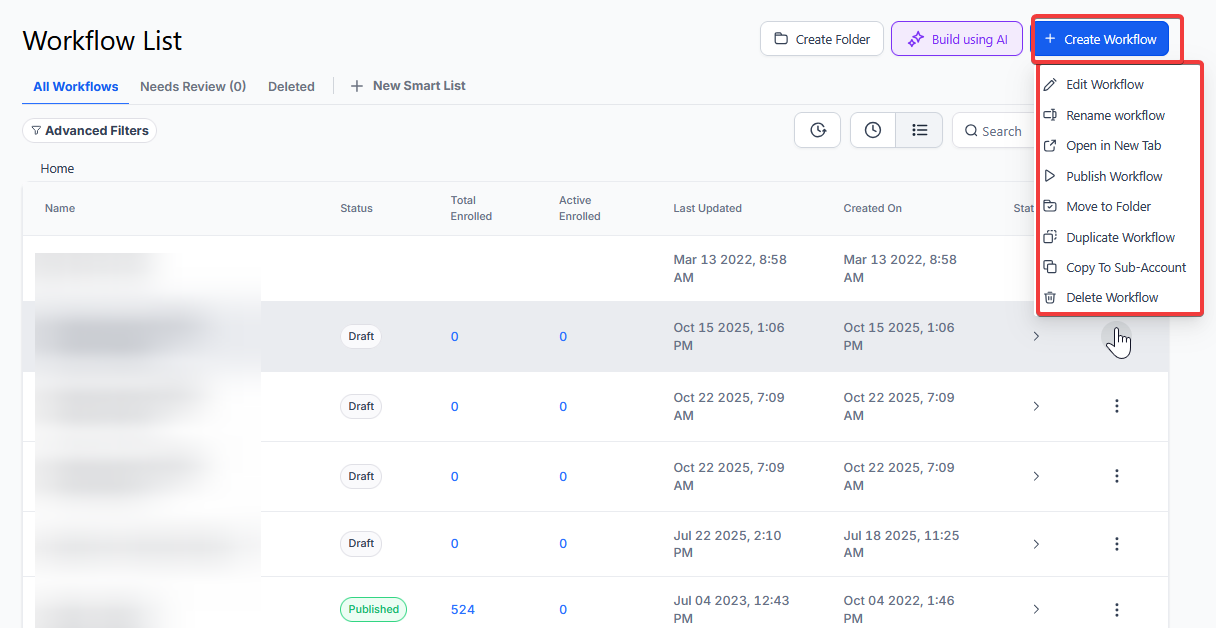
- Navigate to Automation on the left > Workflows on the top and create a new workflow or edit an existing one
¶ Step 2: Creating and Editing the Trigger
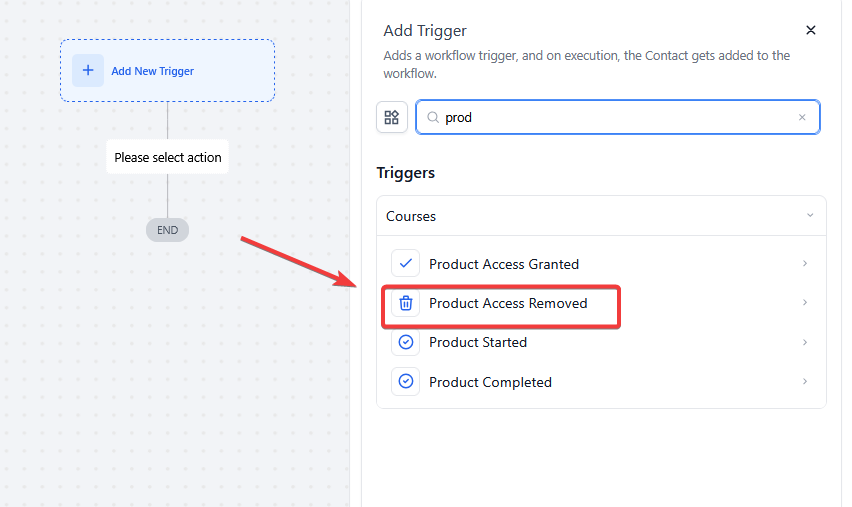
- Click “Add New Trigger”

- Select Product Access Removed in the Courses section of the Workflow Triggers Menu or use the search feature. Once selected, the Trigger setup menu will appear
- (Optional) You can change the workflow builder display name of this trigger using the textbox below Workflow Trigger Name. Note that this will only affect the display name within the workflow builder and has no other impact on the content or functionality of this Workflow Trigger.
- Press + Add filters to expand the Filters section of the Trigger setup menu
- If you do not add any filters to this section, then any time a contact has access removed from any Membership Product, they will be added to this workflow
- The Select Product filter parameter will only allow this workflow to be triggered when a contact has access removed from a selected product
- You can filter by Custom Fields which you would set up elsewhere in your account. Filtering by these fields will only allow contacts who meet your Custom Value parameters to be added to this workflow

- Press Save Trigger in the bottom right corner of the Trigger setup menu

¶ Step 3: Set up applicable Workflow Action(s). We have multiple articles available to explain the setup of each Workflow Action. Feel free to review our articles on these for more information on setting these up.
Pro Tip: You can use any Workflow Actions to be triggered by the Product Access Removed trigger or you can leave this workflow without any actions.
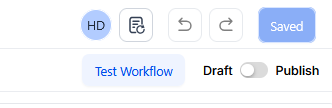
¶ Step 4: Press Save in the top right corner of your browser to save the workflow
- If your Workflow is ready to be enabled, make sure the toggle switch under Save is set to Publish
- Be sure to test your Workflow to ensure it is set up correctly using the Test Workflow button next to the Publish toggle switch.
- For an in-depth overview of Workflow Testing see our article, “Using the Testing Features in Workflows”
Now your workflow is set up and ready to go with the Product Access Removed Workflow Trigger.
¶ Use Cases for the Product Access Removed Trigger
¶ Customer Notification for Expired Subscriptions
Scenario: A customer’s subscription to an online course expires, and they need to be informed.
Trigger Setup:
- Trigger: Product Access Removed
- Filter: Select Product: “Advanced Marketing Course”
Outcome: The workflow sends an email notifying the customer about the expiration and provides instructions for renewing their subscription.
¶ Internal Team Alerts for Membership Revocations
Scenario: A customer’s access to a premium membership is revoked, and the support team needs to follow up.
Trigger Setup:
- Trigger: Product Access Removed
- Filter: Select Product: “Premium Membership”
Outcome: The workflow alerts the support team, updates LeadMagicX, and creates a follow-up task for the sales team to retain the customer.
¶ LeadMagicX Updates for Accurate Tracking
Scenario: Access to a digital product is removed, and the customer’s profile needs to be updated for tracking purposes.
Trigger Setup:
- Trigger: Product Access Removed
- Filter: Select Product: “E-Book Access”
Outcome: The workflow updates LeadMagicX to reflect the removal and tags the customer for future re-engagement campaigns.
¶ Upsell Opportunities After Access Removal
Scenario: A customer’s access to a basic product is revoked, and they are encouraged to upgrade to a premium offering.
Trigger Setup:
- Trigger: Product Access Removed
- Filter: Select Product: “Basic Plan”
Outcome: The workflow sends an email highlighting the benefits of upgrading to a premium plan, including a discount code as an incentive.
¶ FAQ’s
Question: What types of Workflow Actions can be used with the Product Access Removed trigger?**
**Answer: Any Workflow Actions can be used with the Product Access Removed trigger, such as sending an email, updating contact information, or adding a tag. You can choose actions that align with your specific needs for handling access removal.
Question: How do I enable the workflow after setting it up?**
**Answer: To enable the workflow, ensure the toggle switch under Save is set to Publish. This activates the workflow, allowing it to run when the trigger conditions are met.
Question: Why is it important to test the workflow after setting it up?**
**Answer: Testing the workflow ensures that it functions correctly and triggers as expected when access is removed. The Test Workflow button helps you identify any issues, allowing you to correct them before the workflow goes live.
Question: What should I do if my workflow doesn’t work as expected during testing?**
**Answer: If the workflow doesn’t perform as expected during testing, review the setup of your trigger, filters, and actions. Ensure all settings are correctly configured and adjust as necessary before retesting.
Question: Can I edit the Product Access Removed trigger after it has been set up?**
**Answer: Yes, you can edit the Product Access Removed trigger at any time by going back into the workflow and modifying the trigger settings, filters, or display name.
Question: What should I name my workflow when adding the Product Access Removed trigger?**
**Answer: Naming your workflow descriptively, such as “Courses Access Removal Follow-Up” or “Product Access Revoked,” helps keep your workflows organized and easy to identify.
Question: Where can I find more information on setting up Workflow Actions?**
**Answer: For more information on setting up Workflow Actions, refer to related articles that provide detailed instructions on various actions and their configurations. These resources will help you optimize your workflow setup.
Question: What are common use cases for this trigger?**
**Answer:
-
Notifying customers of expired subscriptions
-
Alerting internal teams about membership revocations
-
Updating LeadMagicX records for accurate tracking
Question: If I delete a Membership Product entirely from my account, will this workflow trigger for all students?**
**Answer: No. Deleting a product from the system is a back-end administrative action and does not typically trigger “Access Removed” workflows for individual contacts. This trigger is designed for changes at the Contact Record level.