¶ How To Use Multiple Triggering Events in Workflows
Understanding Triggers in Workflows :
- A trigger is an event or action that initiates a workflow. You can set up one or multiple triggers depending on your specific requirements.
- Triggers can be anything from a survey submission to an appointment being scheduled.
¶ Step 1: Set up the Workflow Triggers
Navigate to the Workflow Builder :
- Navigate to Automation > Workflows to start creating or editing your workflows.
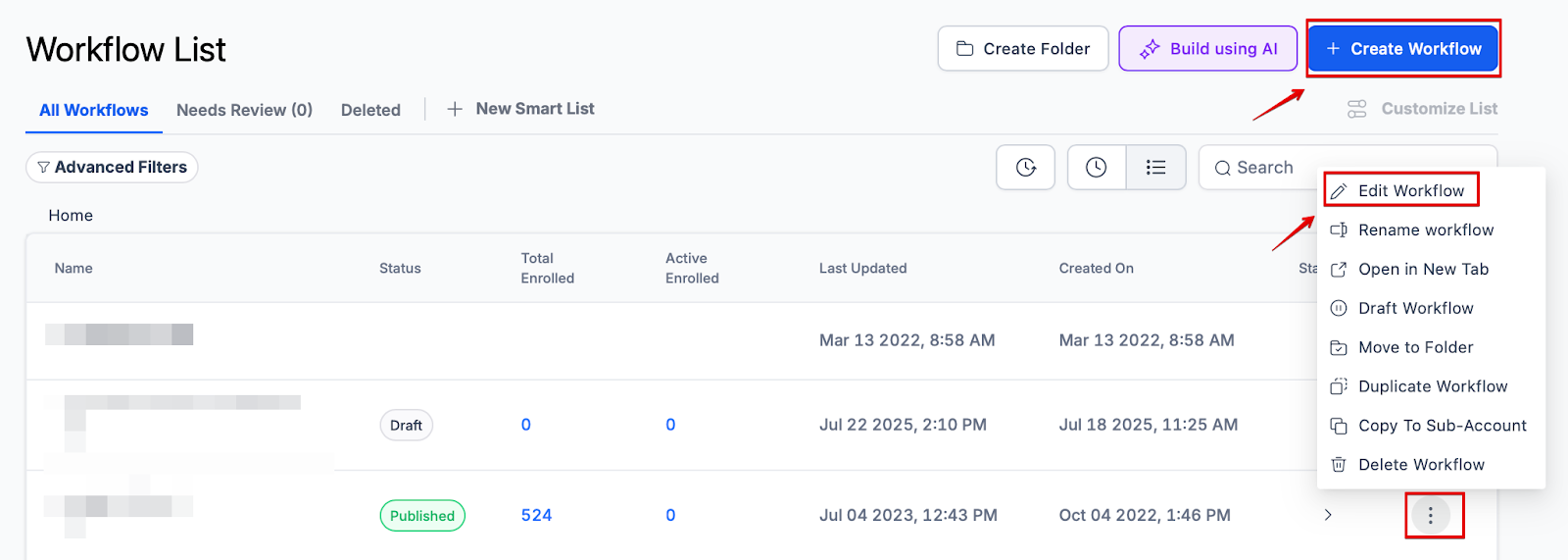
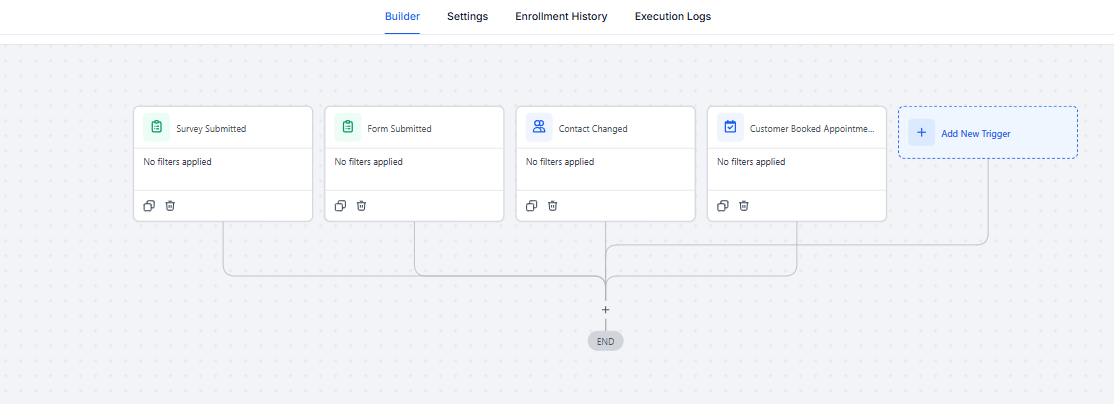
Set Up Workflow Triggers :
- Add triggers to your workflow. For example, you might add triggers for:
- Any survey submission
- Any contact tag being added
- Any form submission
- Any appointment booking
- If left generic (without filters), these triggers will initiate actions for any relevant event that occurs.
Customize Triggers with Filters :
- To refine your workflow, customize the filters for each trigger:
- Survey Submission : Specify which survey should trigger the workflow.
- Contact Tag : Select the specific tag that should activate the workflow.
- Form Submission : Choose the particular form that should start the workflow.
- Appointment : Determine which calendar or type of appointment should trigger the workflow.
¶ Step 2: Set up the Workflow Actions
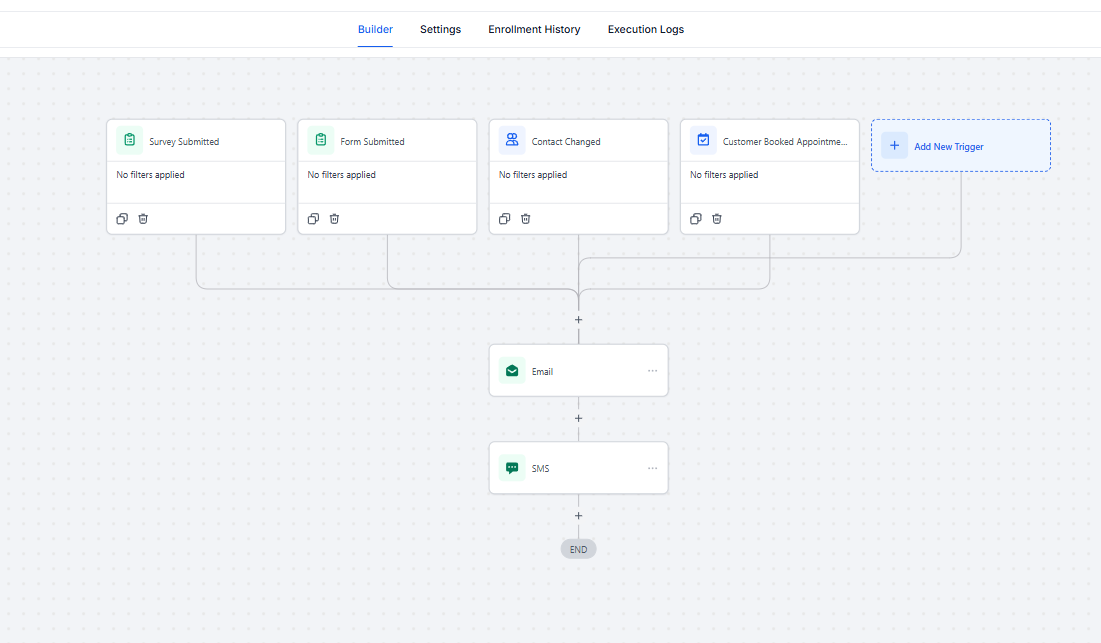
- Add whichever action(s) you’d like into the Workflow
- Save and Publish the Workflow, and it will run for the multiple triggers you’ve set up.
¶ ****
¶ FAQs**
**
**
Question: What is a workflow trigger?
**Answer: A workflow trigger is an event or action that initiates a workflow process. Triggers are designed to automatically start a series of actions based on specific conditions or events, such as a survey submission, form submission, or appointment booking.
Question: How do I access the Workflow Builder?**
**Answer: To access the Workflow Builder, navigate to the Automation section from your dashboard. This is where you can create or edit workflows and set up your triggers.
Question: What types of triggers can I set up in a workflow?
Answer: You can set up various triggers, including:
- Survey submissions
- Contact tag additions
- Form submissions
- Appointment bookings
Question: Can I use multiple triggers in a single workflow?**
**Answer: Yes, you can use multiple triggers in a single workflow. This allows you to create more complex workflows that respond to different types of events.
Question: How do I customize triggers with filters?**
**Answer: To customize triggers, you need to set specific criteria for each trigger:
- Survey Submission: Specify the particular survey that should initiate the workflow.
- Contact Tag: Choose the specific tag that should activate the workflow.
- Form Submission: Select the exact form that should start the workflow.
- Appointment: Define which calendar or type of appointment should trigger the workflow.
Question: What happens if I leave triggers generic?**
**Answer: If you leave triggers generic (without filters), the workflow will activate for any relevant event that occurs. This means the workflow will run whenever any survey is submitted, any contact tag is added, any form is submitted, or any appointment is booked.
Question: How do I set up actions for my workflow?**
**Answer: After setting up your triggers, you can add actions to your workflow. These actions define what should happen when a trigger event occurs. Actions can include sending emails, updating records, or any other task you want to automate.
Question: Do triggers work with test data?
Answer: Yes, you can test workflows using test contacts or form submissions. Be sure your filters (if any) match your test data for the workflow to activate properly.**
Question: What is the final step required to make my workflow active after setting up triggers and actions?**
Answer** * To make the workflow run, you must Save and Publish it. Once published, it will execute based on the multiple triggers you have established.
Question: If I delete a trigger, will the contacts currently in the workflow be removed?
Answer: No. Deleting a trigger only prevents new contacts from entering the workflow. Anyone who has already started the process will continue through the remaining actions until they reach the end.
Question: What happens if a lead meets the criteria for two different triggers in the same workflow at once?
Answer: The workflow is designed to run for the multiple triggers you’ve set up. Each unique trigger event acts as an entry point to start the automated sequence you have defined.