¶ Workflow Trigger: Form Submitted
Workflow Trigger: Form Submitted
The Form Submitted Workflow Trigger activates a workflow whenever a form is submitted. This trigger allows you to automatically add contacts who submit forms to the workflow, enabling various follow-up actions based on their submission.
NOTE: This article will assume that you have customized forms already set up in your account. For an overview of how to create customized forms, see our article, “How To Customize a Form Or Survey”.
¶ Steps to add the trigger to your workflow
¶ Step 1: Start a new workflow or edit an existing one
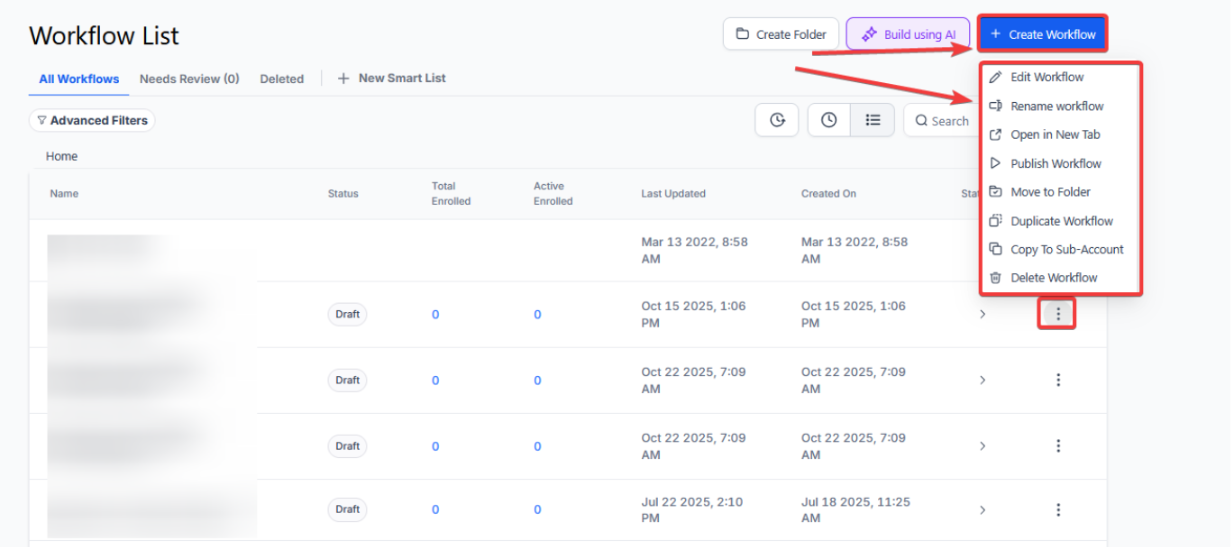
¶ Step 2: Creating and Editing the Trigger
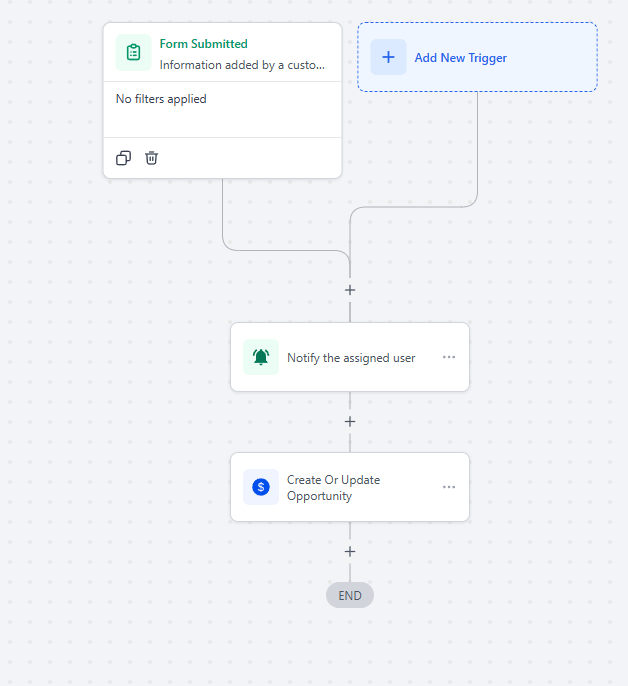
- Click on “Add New Trigger”
- Select Form Submitted in the Contact Actions section of the Workflow Triggers Menu or use the search feature. Once selected, the Trigger setup menu will appear.

Note: You can change the display name of this trigger within the workflow builder under the Workflow Trigger Name textbox. This won’t change any content or functionality related to this trigger or workflow other than the display name of the trigger which is only displayed within the workflow builder

- Press + Add filter to bring up the Filters section. We highly recommend filtering by the name of the form they will be optin in.
- The Form is parameter allows you to only allow submissions of specified forms to trigger this workflow.
- You can select multiple forms in the same filter.
- The Form is parameter allows you to only allow submissions of specified forms to trigger this workflow.


Note: If you choose to leave the Filters section blank, then this workflow will be triggered by all Form Submissions from any contacts anywhere in your account.
- Press Save Trigger in the bottom right corner of the Trigger setup menu

¶ Step 3: Set up applicable Workflow Action(s). We have multiple articles available to explain the setup of each of the Workflow Actions. Feel free to review our articles on these for more information on setting these up.
¶ Step 4: Press Save in the top right corner of your browser to save the workflow
- If your Workflow is ready to be enabled, make sure the toggle switch under Save is set to Publish
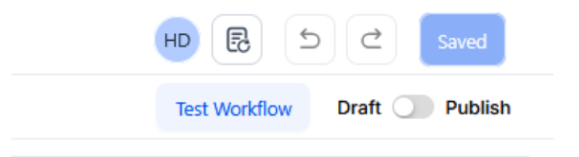
- Be sure to test your Workflow to make sure it is set up correctly using the Test Workflow button next to the Publish toggle switch.
- For an in-depth overview of Workflow Testing see our article, “Using the Testing Features in Workflows”
Use Cases
Customer Information Collection
Scenario: A business wants to automate the collection and management of customer information through an online form.
Trigger Setup:
- Trigger: Form Submitted
- Filter: Form is “Customer Information Form”
Outcome: The submitted data is automatically entered into __ComanyName, a notification is sent to the sales team, and a follow-up task is created.
Lead Qualification Workflow
Scenario: A marketing team collects leads via form submissions and wants to automatically qualify them.
Trigger Setup:
- Trigger: Form Submitted
- Filter: Form is “Lead Capture Form”
Outcome: The workflow assigns a lead score, updates __ComanyName with lead details, and notifies the sales team for further action.
Event Registration Management
Scenario: An event organizer registers attendees through a form and needs to automate the communication process.
Trigger Setup:
- Trigger: Form Submitted
- Filter: Form is “Event Registration Form”
Outcome: An email confirmation is sent to the registrant, and their details are added to the attendee list in __ComanyName.
Customer Feedback Collection
Scenario: A business collects customer feedback using an online form and wants to analyze the responses.
Trigger Setup:
- Trigger: Form Submitted
- Filter: Form is “Customer Feedback Form”
Outcome: The workflow sends a thank-you email to the customer and adds their responses to a feedback database for analysis.
Appointment Booking Notifications
Scenario: A healthcare provider collects appointment bookings via a form and wants to notify the relevant team.
Trigger Setup:
- Trigger: Form Submitted
- Filter: Form is “Appointment Booking Form”
Outcome: The workflow notifies the scheduling team, updates the appointment calendar, and sends a confirmation email to the patient.
¶ FAQs
Question: What is the Customer Replied Workflow Trigger?**
**Answer: The Customer Replied Workflow Trigger activates a workflow when a message is received from a contact. This feature automates responses or actions based on the customer’s reply, enabling more personalized and timely interactions.
Question: How do I start setting up a workflow with the Customer Replied trigger?**
**Answer:
- Start by creating a new workflow or editing an existing one.
- Click on “Add New Workflow Trigger.”
- Select “Customer Replied” from the Contact Actions section or use the search feature to find it in the Workflow Triggers Menu.
Question: Can I rename the Customer Replied trigger?**
**Answer: Yes, you can rename the trigger. Enter a new name in the Workflow Trigger Name text box if you want to make the trigger easier to identify within the workflow builder. This step is optional.
Question: What customization options are available under the Filters section?**
**Answer:
- Contains Phrase: Triggers the workflow if the customer’s reply includes the specified phrase. This filter is not case-sensitive.
- Exact Match Phrase: Triggers the workflow only if the customer’s reply matches the exact phrase specified. This filter is also not case-sensitive.
- Doesn’t Have Tag: Excludes contacts with the selected tag from being added to the workflow.
- Has Tag: Includes only contacts with the selected tag in the workflow.
- Intent Type: Uses AI to detect if the customer’s reply is positive or negative and triggers the workflow based on this detection.
- Replied to Workflow: Adds contacts to the workflow if they reply within a separate workflow.
- Reply Channel: Triggers the workflow only if the reply is received through a specified channel (e.g., Chat Widget, Email, Facebook Messenger, GMB Messaging, Instagram DM, SMS).
Question: What should I do after configuring the Customer Replied trigger?**
**Answer: Set up the applicable Workflow Actions that will be triggered by this event. You can choose from various Workflow Actions based on your needs. Consult our articles on Workflow Actions for detailed setup instructions. If you don’t need any actions, you can leave the workflow as is.
Question: How do I save and publish my workflow?**
**Answer:
- Click the “Save” button located in the top right corner of your browser to save your changes.
- Ensure the toggle switch under “Save” is set to “Publish” to enable the workflow.
Question: What happens if I don’t add any filters to my Form Submitted trigger?**
**Answer: If you leave the Filters section blank, the workflow will be triggered by every form submission from any contact across your entire account. To avoid this, it is highly recommended to use the “Form is” filter to specify exactly which form should activate the workflow.
Question: What is the difference between the “Optin” and “Sale” submission types on a two-step order form?
Answer: The Optin filter triggers when the first step of the form is filled out, while the Sale filter only triggers after the second step is submitted and payment is made.