¶ Workflow Trigger: Contact Changed
¶ Workflow Trigger: Contact Changed
The “Contact Changed” Workflow Trigger provides a way to automate actions when changes are made to a Contact Record.
Within the Workflow builder, the “Contact Changed” workflow trigger allows you to automate actions when a contact record is modified. You can trigger events in a Workflow when a contact record is changed based on the following items:
- Tags being added
- Tags being removed
- DND being activated or removed
- Contact being assigned to a user, or reassigned to a user
- The custom field being populated
- Custom field changing to something specific
- Contact’s address information is updated
¶ Follow these simple steps to use this Workflow Trigger:
¶ Step 1: Navigate to the Automations tab and open Workflows
- In the Workflow, click to add a Trigger.
- Choose “Contact Changed” as the Workflow Trigger.
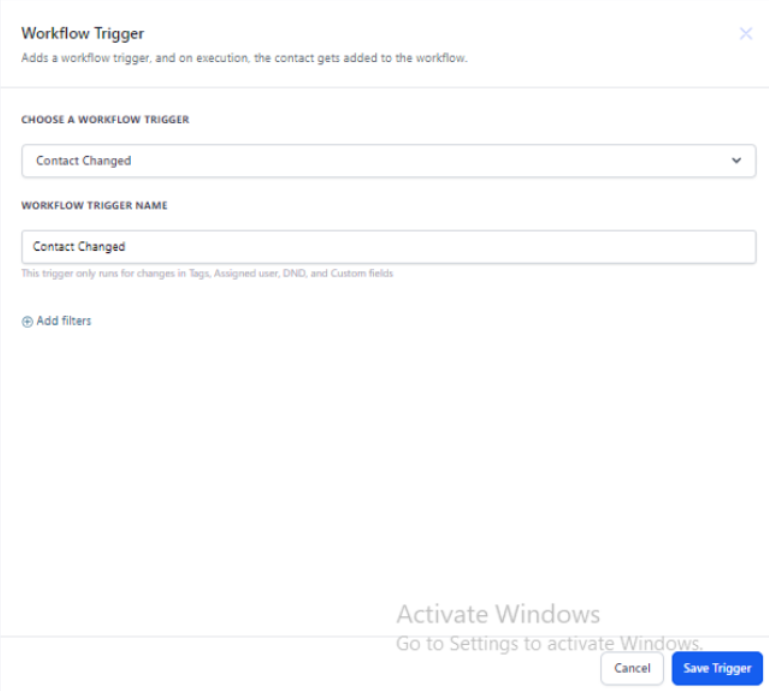
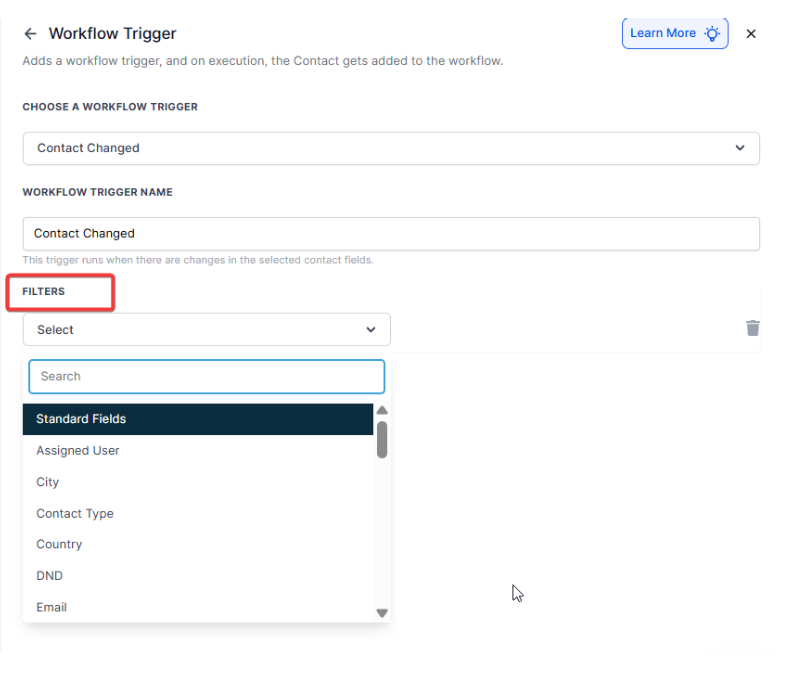
From here, you can filter specifically what change in the contact record you want to set off this workflow by using the ‘filter’ function.
3. Select a filter from the dropdown menu.
4. Save Trigger to add to the Workflow.
5. Add your Actions to the Workflow.
¶ FAQs
Question: What types of changes can trigger a workflow with the “Contact Changed” trigger?**
Answer:** The “Contact Changed” trigger can activate workflows based on changes such as:
- Tags being added or removed
- DND status being set or removed
- Assignment or reassignment of a contact to a user
- Updates to custom fields, including specific values being entered
Question:Can I use multiple filters with the “Contact Changed” trigger?
Answer: Yes, you can apply multiple filters to refine when the workflow should trigger. For example, you might set filters for both tag additions and custom field updates to trigger different actions.
Question:How do I ensure that the workflow only triggers for specific contacts?
Answer: By using filters, you can specify which changes to contact records will trigger the workflow. This allows you to control which contacts will activate the workflow based on their updates.
Question:What should I do if the workflow is not triggering as expected?
Answer: First, check the filters to ensure they are correctly set up to match the intended contact changes. Verify that the workflow is published and active. You may also test the workflow with sample data to diagnose any issues.
Question:Can I edit the “Contact Changed” trigger once it is added to a workflow?
Answer: Yes, you can edit the trigger settings by going back into the Workflow builder, selecting the trigger, and adjusting the filters or other settings as needed.
Question:Does the trigger work for all contacts in my system?
Answer: By default, the trigger applies to all contacts. Filters can be used to narrow it down to specific segments, tags, or criteria to control which contacts will activate the workflow.
Question: Will this trigger work if a contact is updated via a bulk import?**
Answer:** Yes. If you perform a bulk import and choose to “Allow Triggers” during the import process, any contact record that is modified will activate the “Contact Changed” workflow. Use this carefully to avoid accidentally sending hundreds of emails at once!
Question: If I change three things on a contact record at once, does the workflow run three times?**
**Answer: It depends on your filters. If you have three separate “Contact Changed” triggers for each of those items, it may. However, if you are using one trigger with multiple filters, it typically evaluates the change as a single event.