¶ Marking Calls as Completed
Marking Calls as Completed
In this article, you will learn how to create a Call Completed Trigger to ‘Mark Calls’ to your leads as completed when answered. This process will ensure that you can set up LeadMagicX to mark calls correctly that go to voicemail, instead of marking them as completed. Please follow along to learn how to accomplish this!
How does this trigger work?
¶ Part 1: Set up your Phone Number
- Navigate to Settings
- Click on Phone Numbers
- Go to your desired phone line and set the ‘Call timeout’ to 20 Seconds. This will take out most instances of a ‘voicemail box’ being processed as an ‘answered call.’

Note : The Call Connect feature enhances accuracy in call reporting by requiring the receiver to press a key to connect the call. This ensures that voicemail boxes are not mistakenly counted as answered calls. If you enable this feature, be sure to update your whisper message to instruct the receiver to press a key to complete the connection.
¶ Step Two: Set up your Workflow
- Navigate to the Automations tab > Workflows
- Create a New, Blank Workflow
- Create a name for the workflow. (Example: Call Status: Completed)
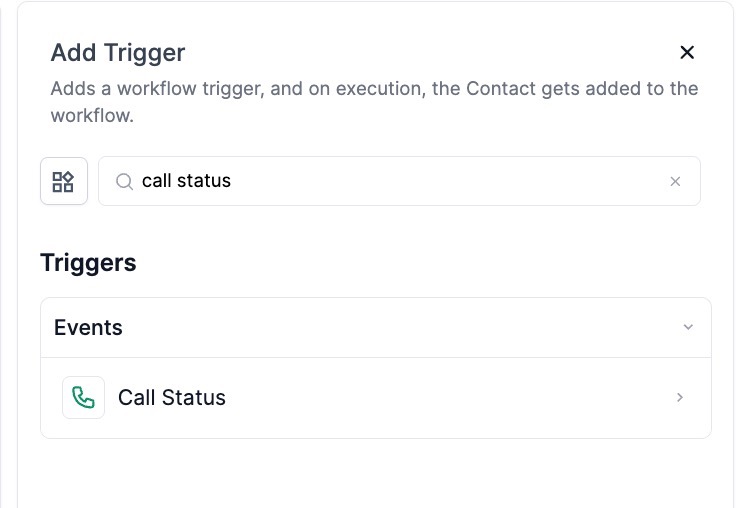
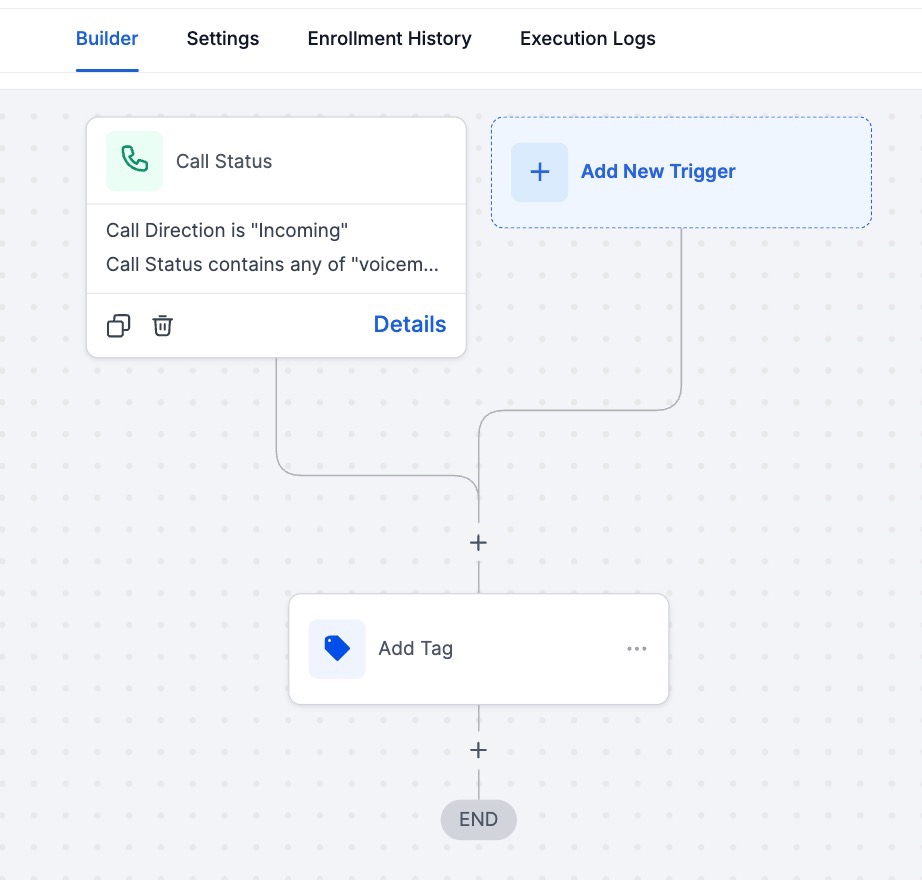
- Add a “Call Status” trigger and add a filter for the call status desired.

- Make use of an “Add Tag” action and mark the contact with the tag that represents each call status of your choice. (Example: completed)
- Publish the workflow and save it.
- Repeat this process for every call status you want to mark leads for or make use of the “If/Else” action to create branches based on workflow triggers and add multiple triggers for each status instead.
¶ FAQs
Question: What is the purpose of the Call Completed Trigger?**
**Answer: The Call Completed Trigger is designed to automatically mark calls to leads as completed when they are answered. This ensures accurate tracking of call statuses and helps distinguish between actual answered calls and voicemail boxes.
Question: How do I set up the phone number for accurate call reporting?**
****Answer: **
- Navigate to Settings: Go to the settings section of your account.
- Click on Phone Numbers: Select the phone numbers option.
- Set Call Timeout: Adjust the ‘Call timeout’ setting to 20 seconds. This helps to avoid misclassifying voicemail boxes as answered calls.
Question: What is the Call Connect feature, and how does it improve accuracy?**
****Answer: **The Call Connect feature requires the receiver to press a key to connect the call, which helps in accurately distinguishing between answered calls and voicemail boxes. If you enable this feature, ensure that your whisper message instructs the receiver to press a key to connect the call.
Question: How do I set up the workflow for marking calls as completed?**
****Answer: **
- Navigate to Automations: Go to the Automations tab and select Workflows.
- Create a New Workflow: Choose to create a new, blank workflow.
- Name Your Workflow: Give your workflow a descriptive name (e.g., Call Status: Completed).
- Add a Trigger: Add a “Call Status” trigger and configure it with the desired call status filter (e.g., answered).
- Add an Action: Use the “Add Tag” action to mark the contact with a tag representing the call status (e.g., completed).
- Publish and Save: Publish your workflow and save it.
Question: Can I create workflows for multiple call statuses?**
**Answer: Yes, you can create separate workflows for each call status or use the “If/Else” action within a single workflow to handle different call statuses. This allows for more flexible and comprehensive call tracking.
Question: How do I use the “If/Else” action in workflows?**
**Answer: The “If/Else” action lets you create branches within a workflow based on different conditions. You can set up branches to handle different call statuses and apply corresponding tags or actions based on the call status.
Question: What should I do if I want to mark calls that go to voicemail differently?**
**Answer: Ensure that your call timeout is set appropriately to avoid misclassifying voicemail boxes as answered calls. You can also create a separate workflow or condition to handle and tag calls that go to voicemail.
Question: How do I test if my Call Completed Trigger is working correctly?**
****Answer: **
- Perform Test Calls: Make test calls to verify that they are correctly marked as completed or as voicemail based on your setup.
- Review Workflow Logs: Check the logs and reports to ensure that calls are being processed and tagged as expected.
Question: What should I do if my Call Completed Trigger isn’t working as expected?**
****Answer: **
- Verify Settings: Double-check your phone number settings, call timeout, and Call Connect feature.
- Review Workflow Configuration: Ensure that the workflow triggers and actions are correctly set up.
- Consult Documentation: Refer to additional documentation or contact support for troubleshooting.
Question: What should I do if the trigger isn’t working?**
**Answer: Check your phone number settings, call timeout, and Call Connect feature. Review the workflow configuration to ensure triggers and actions are set correctly. If issues persist, consult the documentation or contact support.
Question: What should I include in my whisper message if I enable the Call Connect feature?
Answer: If you enable Call Connect, you must update your whisper message to explicitly instruct the receiver to press a key. This ensures the receiver knows they need to take an action to successfully complete the connection and prevent the call from being dropped or misclassified.
Question: Why is 20 seconds the recommended “Call Timeout” setting?
Answer: Setting the timeout to 20 seconds is a strategic “sweet spot.” It is generally short enough to prevent most carrier voicemail boxes from picking up and being processed as an “answered call,” yet long enough to give your leads sufficient time to answer the phone.
Question: How can I manage multiple call statuses within a single workflow instead of creating a separate workflow for each one?**
**Answer: Instead of creating multiple workflows, you can use the “If/Else” action to create distinct branches. This allows you to add multiple triggers for each status (e.g., Busy, No Answer, Completed) and direct the contact down the appropriate path to receive the corresponding tag within one unified workflow.