Workflow Action: Modify Contact Engagement Score
This feature enables users to directly influence a contact’s Engagement Score, providing a flexible approach to engagement management. This article will walk you through the steps of utilizing this workflow action.
1. Access Workflow Builder: Begin by accessing the workflow builder within your LeadMagicX platform.
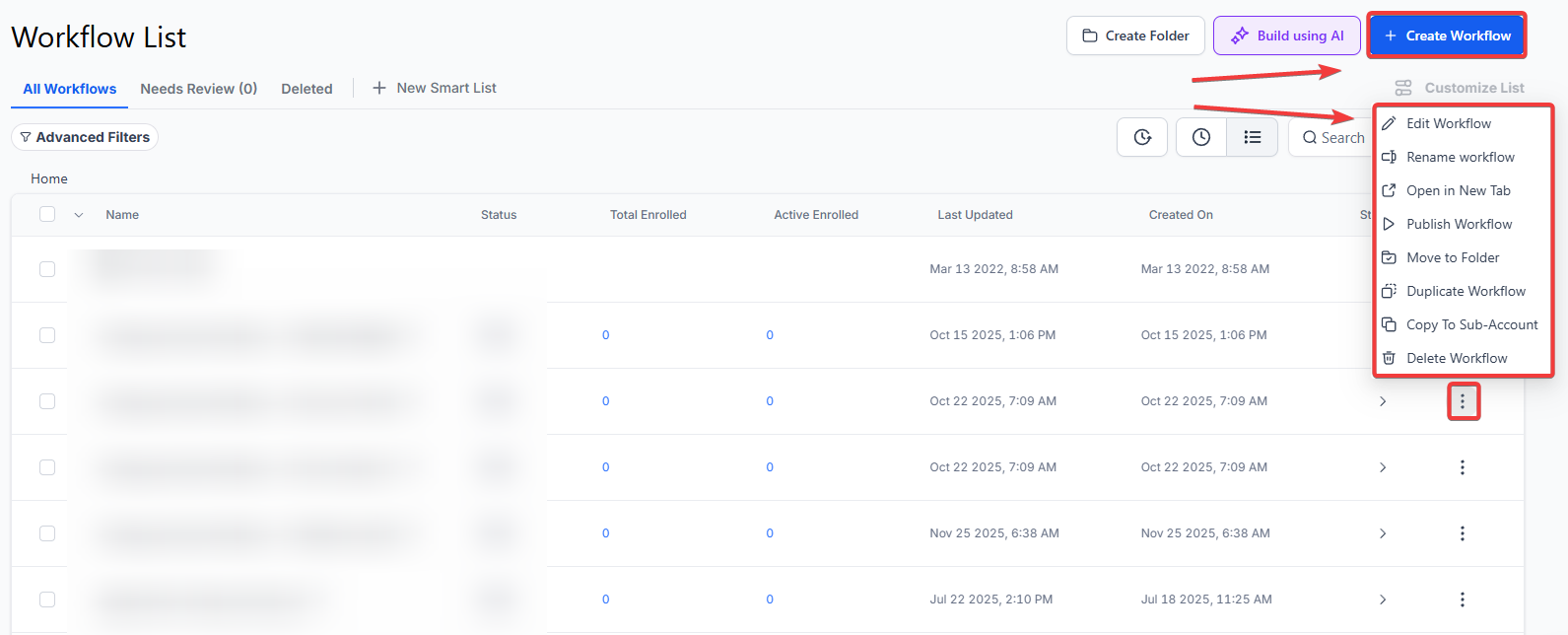
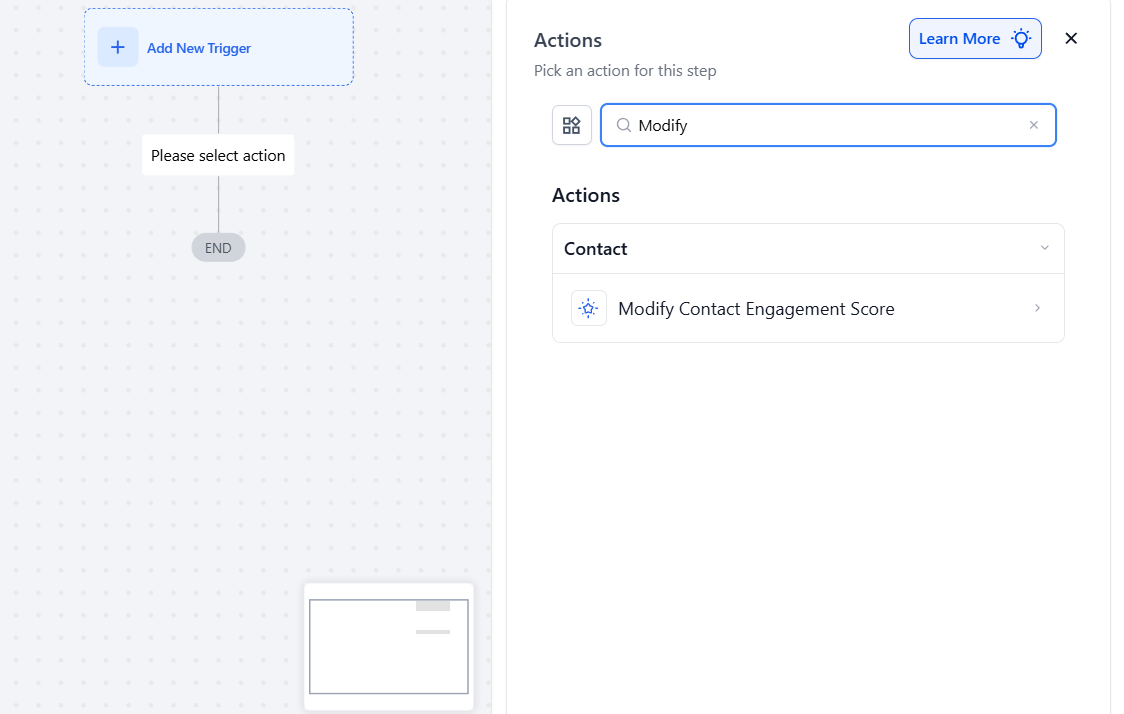
2. Select Modify Contact Engagement Score Action: Within the workflow builder interface, locate the action options and select “Modify Contact Engagement Score.”
3. Define Adjustment Type: Choose whether to add or subtract points from the contact’s existing Engagement Score. This adjustment type will determine how the contact’s score is modified based on the workflow trigger.
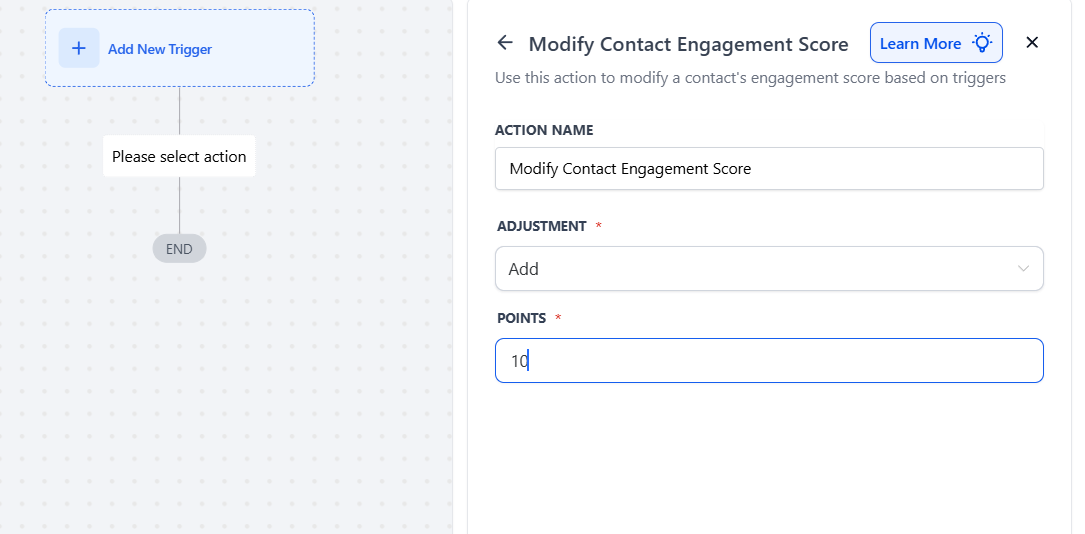
4. Specify Point Value: Enter the specific point value to be added or subtracted from the contact’s Engagement Score. This value should reflect the desired impact on the contact’s engagement level.
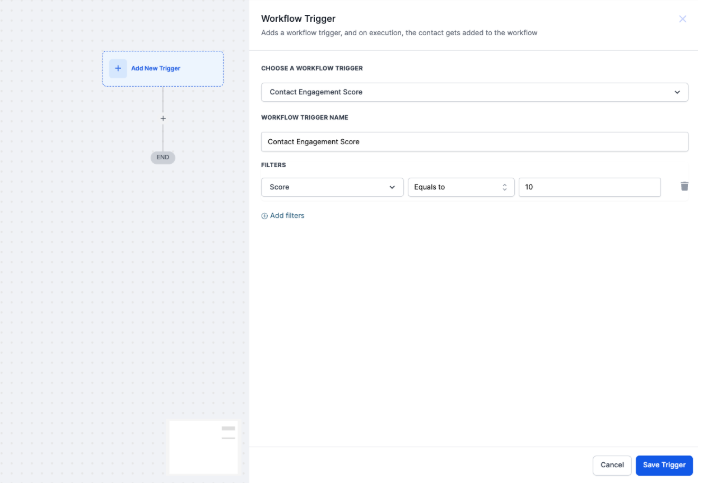
5. Configure Trigger Conditions: Define the conditions under which the Modify Contact Engagement Score action will be triggered. These conditions may include specific engagement thresholds, time-based triggers, or other relevant parameters.
NOTE: Please view our article on ‘Workflow trigger: Contact Engagement Score’ to set up this trigger.****_
_
6. Test Workflow: Before deploying the workflow action at scale, conduct thorough testing to ensure it functions as intended. Test various scenarios to validate the accuracy and effectiveness of the Modify Contact Engagement Score action.
NOTE: For an in-depth overview of Workflow Testing see our article, “Using the Testing Features in Workflows”
7. Monitor Performance: Once the workflow action is deployed, monitor its performance closely. Track changes in Engagement Scores and assess the impact of the modification on overall engagement levels.
Example
Scenario: Email Engagement Tracking
Objective: A digital marketing agency aims to adjust engagement scores for contacts based on their email interactions to better target future campaigns.
Workflow Steps:
Outcome:**
**When a contact opens an email and clicks on a trigger link, their engagement score automatically increases, reflecting their interest in the agency’s content. This allows the agency to segment contacts more effectively, prioritizing those with higher engagement scores for future campaigns like exclusive offers or personalized content. As a result, the agency enhances its targeting strategies, leading to improved conversion rates and overall customer engagement.
Answer: The Modify Contact Engagement Score workflow action allows you to adjust a contact’s Engagement Score directly within a workflow. You can either add or subtract points from the contact’s existing score based on specific conditions or triggers. This action helps you manage and influence engagement levels, enabling more personalized and targeted interactions.
Answer:
Answer:
Answer: Yes, the Modify Contact Engagement Score action can be used alongside other actions and triggers within a workflow. For example, you can trigger score adjustments based on specific conditions and then use additional actions to send follow-up messages or update contact records.
Answer:
Answer:
Question: Can I set up multiple Modify Contact Engagement Score actions within a single workflow?
Answer: Yes, you can set up multiple instances of the Modify Contact Engagement Score action within a single workflow. Each instance can be configured with different adjustment types, point values, and trigger conditions based on your specific needs.
Question: Will the contact be notified when their score changes?**
**Answer: No, the Engagement Score is an internal metric used for your team’s marketing and sales strategy. Contacts never see their own score, allowing you to manage your lead prioritization privately.
Question: Can I subtract points from a contact’s Engagement Score using this workflow action?**
**Answer: Yes. When configuring the “Modify Contact Engagement Score” action, you have the flexibility to define the adjustment type as either adding or subtracting points. This allows you to decrease a score if a contact’s behavior warrants a reduction in their engagement level.