¶ Troubleshooting Guide for Upsell Products in Funnels
This troubleshooting guide helps you resolve common issues that may arise when setting up upsell products in your funnels. From product configuration and button actions to payment processing errors, it provides clear, step-by-step solutions to ensure your upsell flows function correctly and deliver a seamless purchasing experience for your customers.
FAQs: Troubleshooting Upsell Products in Funnels
Questions: Why is my upsell product not appearing in the funnel after I create it?**
**Answer: If your upsell product isn’t showing up in the funnel, it could be due to the product not being correctly linked to the funnel or not being saved properly.
How to Fix:
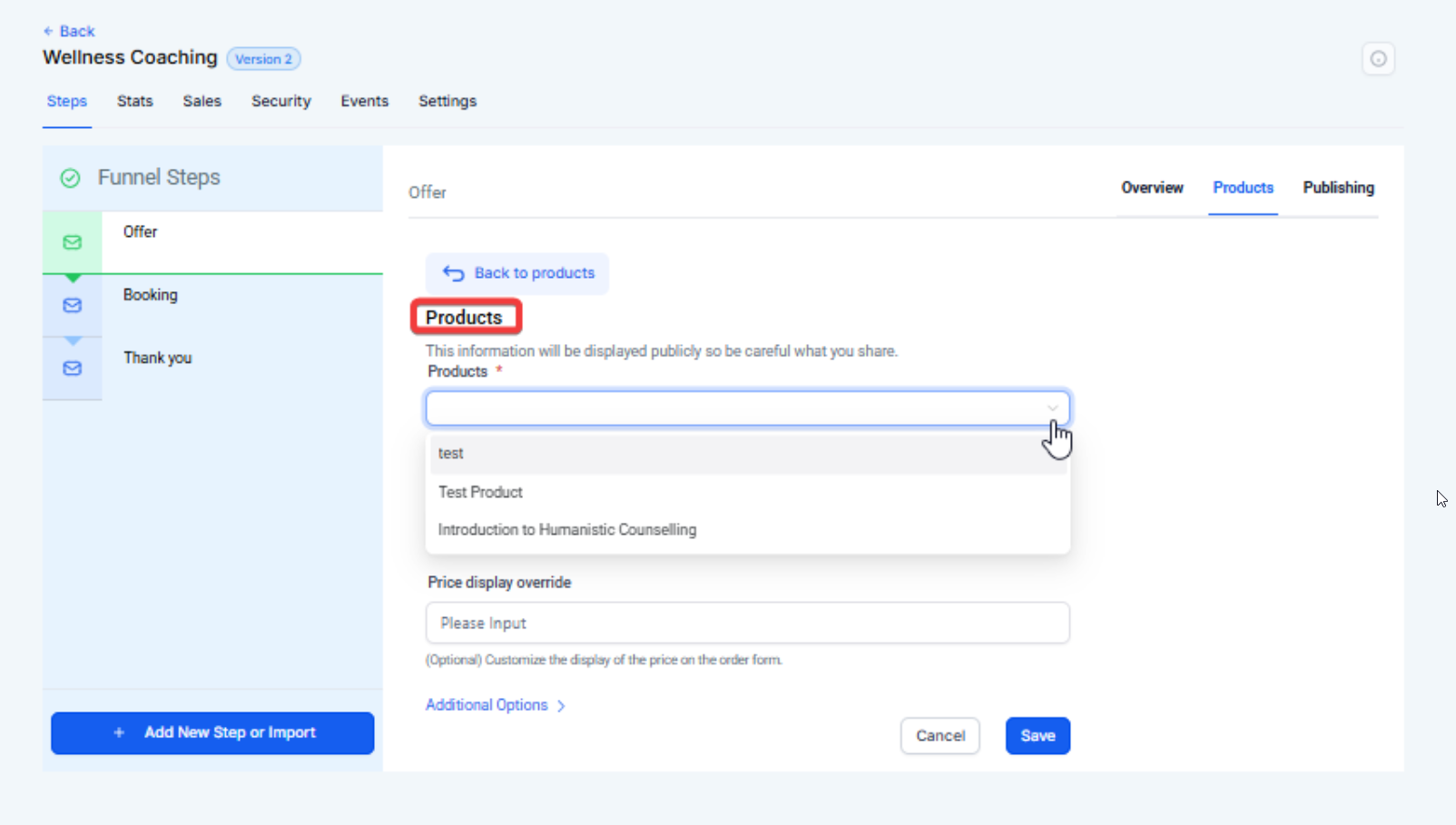
- After creating the product, ensure that you have added the product to the funnel at the appropriate upsell step.
Steps to Fix:
- Go to your funnel settings.
- Navigate to the funnel step where the upsell product should appear.
- Click Add Product and select the created upsell product.
Save the changes to the funnel.
Questions: Why is the upsell button not triggering the payment for my product?**
**Answer: This issue could arise if the button settings aren’t configured correctly to trigger the upsell product payment.
How to Fix:
- Ensure that the button action is set to One-Click Upsell/Downsell in the button settings.
Steps to Fix:
- Go to the upsell page and edit the button you’ve added for the upsell.
- In the button settings, look for the Button Actions section.
Select One-Click Upsell/Downsell Product from the available actions.

- Choose the correct upsell product and configure the post-purchase action (e.g., redirect to another page).
- Save the button settings.
Questions: Why is my upsell product not reflecting the correct price when the customer clicks the button?**
**Answer: If the product price is not showing correctly, it might be due to an issue with the price override or the product pricing settings not being properly updated.
How to Fix:
- Double-check the price settings for your upsell product and ensure that any price override is set correctly.
Steps to Resolve:
- Go to the Products section and find the upsell product.
- Verify that the price is set correctly (e.g., $7 per month or $27 one-time).
- Ensure that no conflicting price settings exist in the upsell funnel step.
Revisit the upsell funnel step , select the correct price, and save the changes.

Questions: Why is the customer not being redirected after purchasing the upsell?**
**Answer: If the customer isn’t being redirected after completing the upsell purchase, the post-purchase redirection might not be set correctly in the button settings.
How to Fix:
- Ensure the button is configured with a redirect action after the upsell is completed.
Steps to Resolve:
- Edit the upsell button in the funnel.
- In the Button Actions , check if the post-purchase redirection is enabled.
- Set the redirection to the next page or confirmation page after the purchase is completed.
Save your changes to the button settings.

Question: Why isn’t the upsell product automatically charging the customer’s credit card?**
**Answer: The issue may arise if the payment action for the upsell product is not properly linked to the customer’s credit card details.
How to Fix:
- Ensure the payment settings are correctly configured in the product settings for automatic charging.
Steps to Resolve:
1. Go to the Payments tab >integrations.

2. Check the payment method for the product (ensure credit card payment is selected).
3. Verify that the One-Click Upsell action is correctly set for automatic processing.
4. Save the settings and test the upsell again.
Question: My upsell button is not functioning as expected. What could be the problem?**
**Answer: The upsell button may not be functioning correctly if the link for the button is not set up properly or the button’s action is not linked to the correct product.
How to Fix:
- Check that the button link is configured to the correct upsell product and the button action is set to the correct payment processing option.
Steps to Resolve:
- Go to your funnel and edit the upsell page.
- Click on the upsell button and check the button action settings.
- Ensure the button is set to One-Click Upsell/Downsell and that the correct product is selected.
- Save and test the button again.
Question: How do I set up a down-sell product in my funnel?**
**Answer: Setting up a downsell product follows the same process as an upsell, with an additional option to offer a discounted alternative if the customer declines the initial upsell.
How to Set Up:
- Create a down-sell product and link it to the down-sell button in your funnel.
Steps to Set Up:
- Create the down-sell product in the Products section.
- Go to the down-sell page in your funnel and edit the down-sell button.
In the Button Actions , select One-Click Downsell Product.

- Choose the down-sell product from the product list.
- Save the settings and test the funnel.
Question: Why is my upsell product not showing the correct quantity or availability?**
**Answer: If the upsell product shows incorrect availability or quantity, it may be due to an issue with the inventory or product settings.
How to Fix:
- Verify that the inventory settings for the upsell product are configured correctly, especially if the product is quantity-limited.
Steps to Resolve:
1. Go to the Payments tab > Products> Inventory section.
2. Open the upsell product and check if inventory management is enabled.
3. Ensure that the quantity available is correct and adjust as needed.

4. Save the changes and test the upsell again.
Question: Why is my upsell product not appearing in the funnel after I create it?**
**Answer: The product may not be correctly linked to the funnel or saved properly. Ensure the upsell product is added to the correct funnel step and save changes.
Question: Will the upsell product be added to the customer’s original order, or is it processed separately?**
**Answer: If a customer chooses to purchase an upsell product, it will create a separate order rather than being bundled into the initial checkout transaction.
Question: Can I offer a different product if a customer declines my initial upsell?
Answer: Yes, this is handled through a “Downsell” step. If a customer clicks a “No” link or declines the first offer, you can redirect them to a downsell page featuring a different or lower-priced product.