¶ How To Schedule Content with the Recurring Scheduling Post Feature
How To Schedule Content with the Recurring Scheduling Post Feature
By utilizing a recurring schedule, your content gains the opportunity to connect with a wider audience over time, boosting both reach and engagement. Repeatedly sharing valuable content allows for effective retargeting, ensuring that your message reaches those who may have missed it initially.
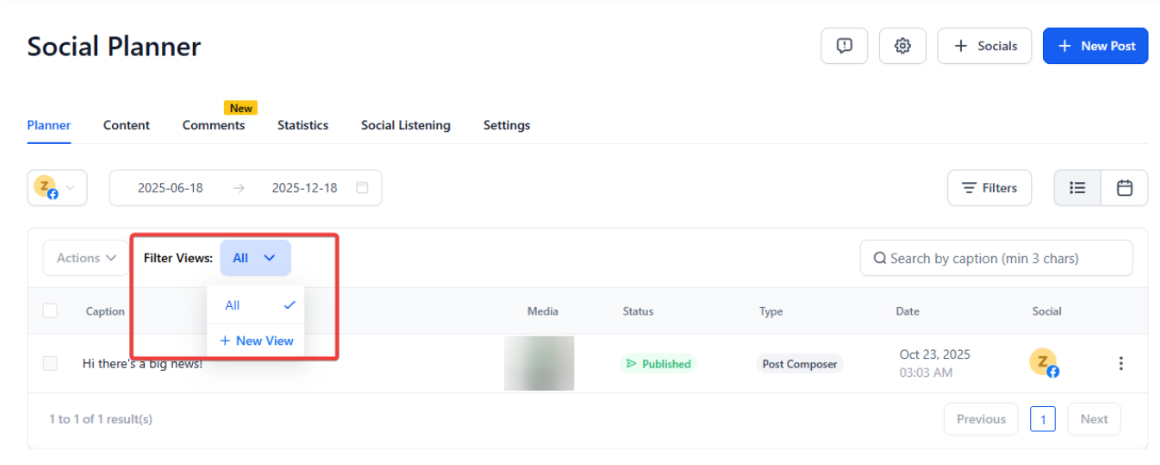
Note: To use the search and smart filter view in the social planner, simply apply filters to narrow down your content, create custom views for recurring or scheduled items, and use the search function to quickly find specific entries.
¶ How does the Recurring Scheduling of Posts work?
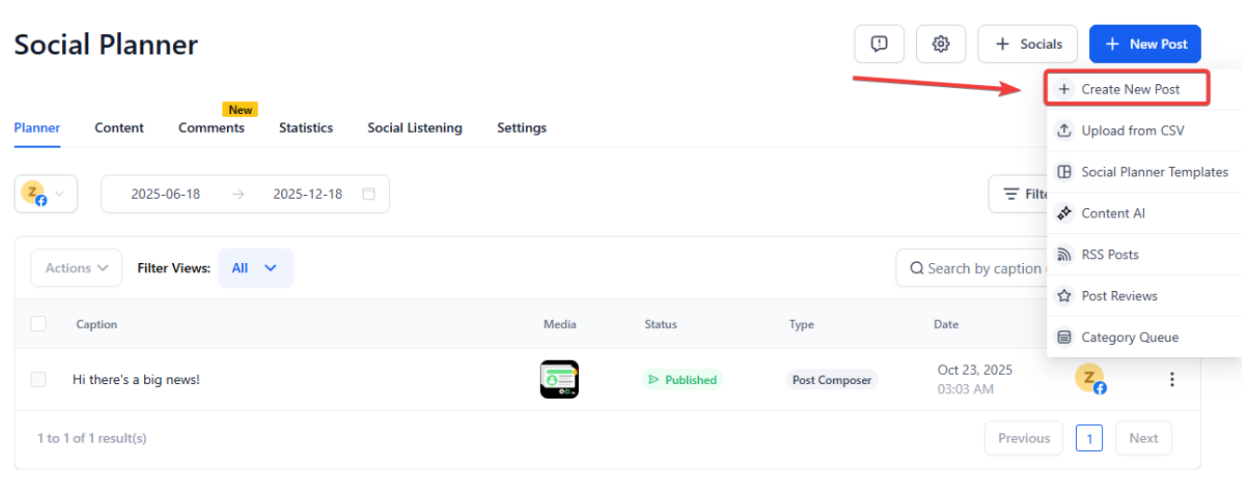
Navigate to Marketing > Social Planner > New Post
Create your content for Social posts, potentially using AI to write the copy, combined with media of your choosing.
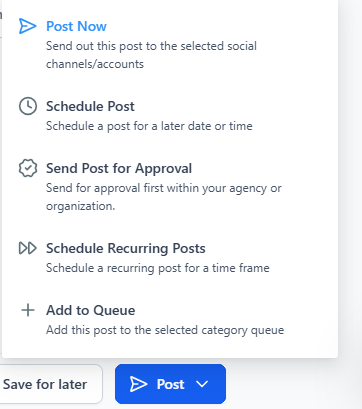
Post that, select the post option and select the Schedule Recurring Post option
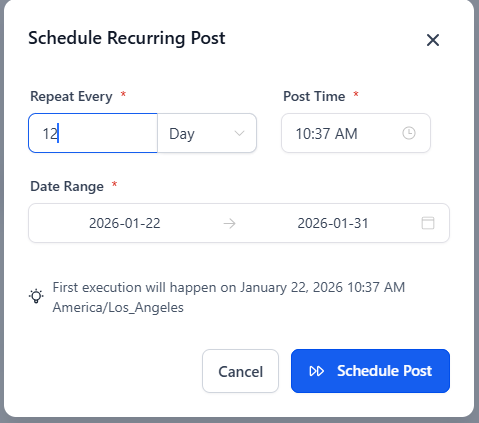
- Schedule the post for days, weeks, months, and years.
- If a week is selected, scheduling for days is necessary
- Select the time it needs to go out.
¶ Calendar View for Recurring Posts in the Social Planner
The Calendar View in the Social Planner allows users to see recurring posts in the queue. This update provides a comprehensive view of all your scheduled social media content.
- Access the Social Planner: Navigate to the Marketing section and select the Social Planner.
- Create a New Post: Click the option to create a new post. Add your desired content and media.
- Set Recurring Options: In the post options, select the recurring option. Your recurring posts will now be visible on the calendar.
- In Calendar view, users can drag and drop an individual recurring post to reschedule it.


¶ Benefits
- Comprehensive Scheduling: See all recurring posts in one place, ensuring you have a complete overview of your social media strategy.
- Enhanced Planning: Easily manage and adjust your recurring posts directly from the calendar view.
Note: The Social Planner feature can schedule recurring posts for days, weeks, months, and years.
¶ FAQ’s
Question: How do I schedule recurring posts?**
**Answer: To schedule recurring posts, navigate to Marketing > Social Planner > New Post. Create your content and select the “Schedule Recurring Post” option. Choose the frequency (days, weeks, months, or years) and the time for each post.
Question: Can I see all my recurring posts in one place?**
**Answer: Yes, you can view all your recurring posts in the Calendar View of the Social Planner. This gives you a comprehensive overview of your scheduled content.
Question: What is the purpose of the Calendar View in Social Planner?**
**Answer: The Calendar View allows you to manage and track your recurring posts, providing a clear visual representation of your scheduled content.
Question: Can I edit or adjust recurring posts after scheduling them?**
**Answer: Yes, you can easily manage and adjust your recurring posts directly from the calendar view in the Social Planner.
Question: What frequencies can I set for recurring posts?**
**Answer: You can schedule recurring posts for days, weeks, months, or years. If scheduling weekly, you’ll also need to select the specific days for posting.
Question: Is there a limit to how far in the future I can schedule recurring posts?**
**Answer: No, recurring posts can be scheduled for days, weeks, months, or even years , giving you flexibility to plan long-term social media strategies.
Question: Why should I schedule the same post to recur instead of just posting it once?
Answer: Recurring posts allow for effective retargeting. By sharing valuable content multiple times, you ensure your message reaches audience members who may have missed it the first time, ultimately boosting your overall reach and engagement.