¶ How to Connect to Your Facebook Group for Use in the Social Planner
How to Connect to Your Facebook Group for Use in the Social Planner
The Social Planner tool allows you to connect multiple social media accounts and manage them in one area. By connecting Facebook Groups, you can use the Social Planner to schedule, create, and push out posts to your Facebook Groups, along with Facebook Pages, Instagram, and Google My Business.
Note:
1. Ensure you have an Admin role for the Facebook group. Check out Facebook’s “Group Management for Admins” if you need further assistance.
2. Add “Lead Connector” as an authorized app for the Facebook Group. Check out Facebook’s article “How do I add an app to a Facebook group I admin?”
¶ **Step One: Gaining Admin Access to the Facebook Group **
Request Admin Role:
- Ask an existing admin of the group to add your page as an admin.
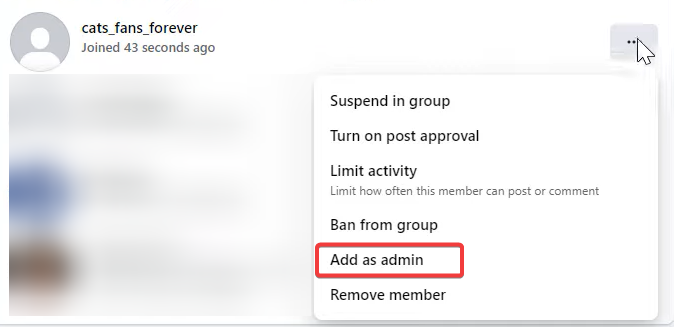
- If you are the group’s admin on your personal Facebook account, you can send the “Add as admin” request to your page.
- You can do that by going to the member’s page, locating the page you’ve added to the group, and selecting “add as admin.”
Accept Admin Invitation:
- Once the invite has been sent, switch to your page and accept the invitation to become an admin.

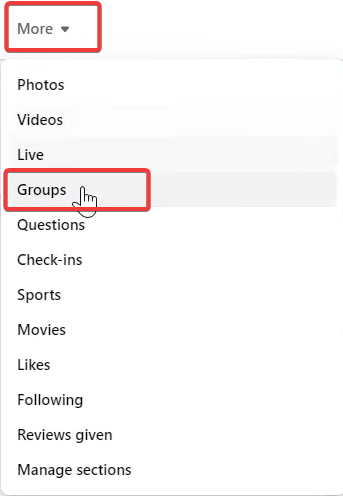
- Click “More” and then select “Groups.” The group should now appear on your Facebook page. This will enable you to post in groups as the facebook page.

¶ Step 2: Add the App to your Facebook Group
- From your Facebook Feed, click on Groups in the left-hand menu.
- Select your group. (If you do not see Groups, click “See more.”)
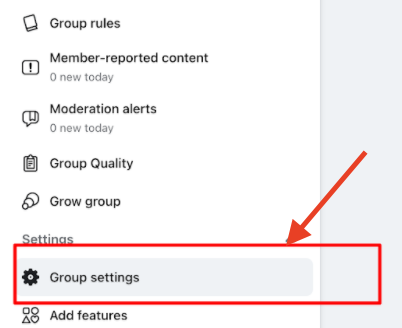
- Click “Group Settings”.
- Scroll down and click the pencil icon.
- Click “Add Apps”.
- Select or Search for LeadConnector and add the App.
- NOTE: Facebook’s API changes allow you to add pages/groups from multiple profiles, but you cannot connect personal Facebook profiles.
¶ Step 3: Add The Facebook Group to your Social Planner
- Go to LeadMagicX > Marketing > Social Planner > Settings.
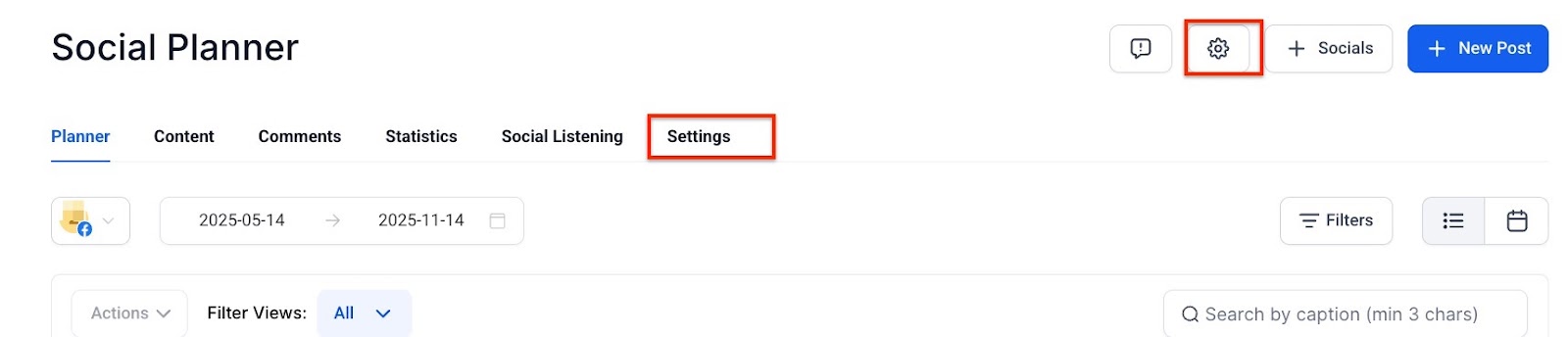
- Click “Connect a new Facebook Group Page and Group.”
- If connecting any profile for the first time, you will have to enable permissions for LeadConnector.
- Click Continue
- Select the group(s) you wish to connect. You’ll see a list of all the groups connected to your profile. Select the one(s) you wish to connect to the Social Planner.
You can manage all of your accounts from the Settings icon anytime. Add, change, or remove connected pages and groups anytime.
¶ FAQ
Question: What can I do with the Social Planner tool?**
**Answer: The Social Planner tool allows you to connect and manage multiple social media accounts, including Facebook Groups, Facebook Pages, Instagram, and Google My Business, in one area.
Question: What do I need to set up before connecting a Facebook Group to the Social Planner?**
**Answer: You need to ensure that you have an Admin role for the Facebook Group and add “Lead Connector” as an authorized app for the group.
Question: How do I add an app to my Facebook Group?**
**Answer: Go to your Facebook Feed, click “Groups” in the left-hand menu, select your group, click “Group Settings,” scroll down, click the pencil icon, and then click “Add Apps.” Search for and add “LeadConnector” as the app.
Question: Can I connect personal Facebook profiles to the Social Planner?**
**Answer: No, you cannot connect personal Facebook profiles. Facebook’s API only allows you to connect pages and groups from multiple profiles.
Q: Can I manage my connected accounts after setup?**
**Answer: Yes, you can manage all your connected accounts from the Settings icon. You can add, change, or remove connected pages and groups anytime.
Question: Do I need to reconnect groups if Facebook updates its API?**
**Answer: Occasionally, Facebook API changes may require reauthorizing permissions. You can manage connections anytime from the Settings tab in Social Planner.
Question: Can I connect multiple groups from the same Facebook account?**
**Answer: Yes, you can connect multiple groups and pages from a single profile, provided you are an admin for each group.
Question: What happens if a post fails to be published to my Group?
Answer: If a post fails, go to the “Planner” view and click on the failed post. It will show you a specific error message from Facebook. The most common error is an “Expired Token,” which is fixed by simply re-linking the account in settings
Question: Can I schedule posts to Google My Business and Facebook Groups at the same time?
Answer: Yes. The Social Planner allows you to manage and push out posts to Facebook Groups, Pages, Instagram, and Google My Business all from the same area.