¶ Managing AI Agents for Review Responses
Managing AI Agents for Review Responses
In today’s world, online reviews play a crucial role in shaping a business’s reputation. However, keeping up with the sheer number of reviews can be overwhelming. That’s where AI agents step in, offering an efficient way to automate responses while still maintaining a personal touch. These smart systems can be tailored to respond in a way that matches the brand’s tone and style, making sure every interaction feels consistent and genuine, no matter how many reviews come in.
This guide will walk you through the process of setting up and managing AI Agents for review responses, optimizing their use to maintain your brand voice, and enhancing customer engagement.
¶ Key Features of Reviews AI Agents
- Personalized AI Responses : Create AI personalities that respond in a tone and style that matches your business’s voice.
- Automatic Sentiment Detection : The AI understands the sentiment of reviews and responds accordingly, whether they are positive, neutral, or negative.
- Multi-Language Support : Language detection ensures responses are appropriately tailored to the reviewer’s language.
- Easy Setup and Management : Create agents quickly, manage them with ease, and even test their responses before going live.
- Customizable Behavior : Adjust the AI’s tone, style, and response strategies to meet your specific needs.
¶ How to Set Up and Manage Reviews AI Agents
¶ Step 1: Access the Reviews AI Settings
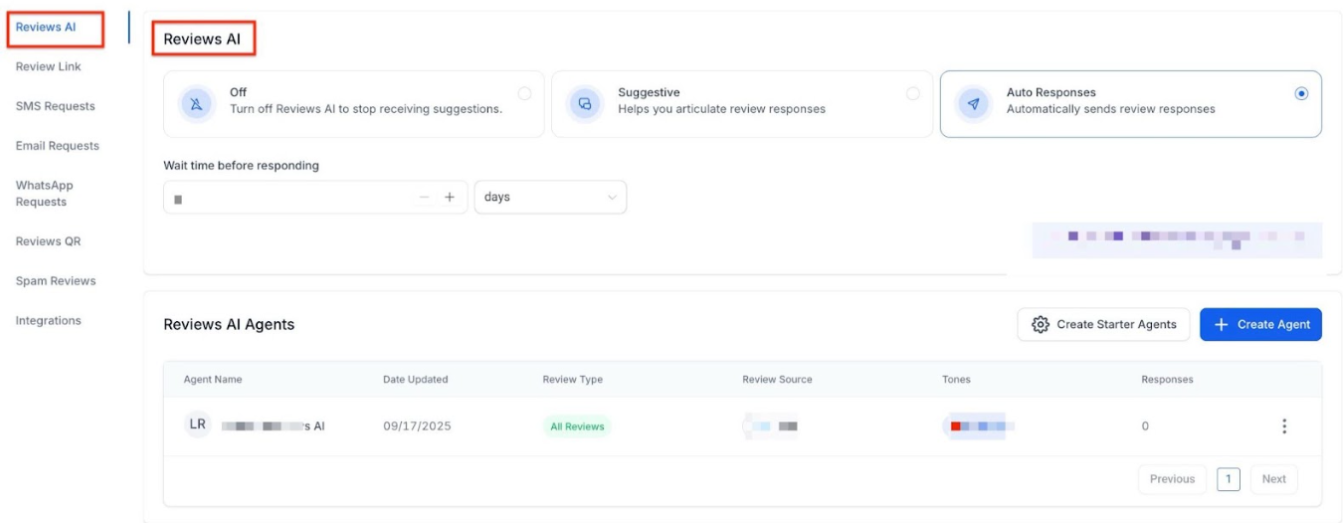
To begin, navigate to the Reputation Management area in your account. From there, click on Settings and click the Reviews AI tab. This is where you can create and manage all your AI agents
Step 2: Create or Select an AI Agent
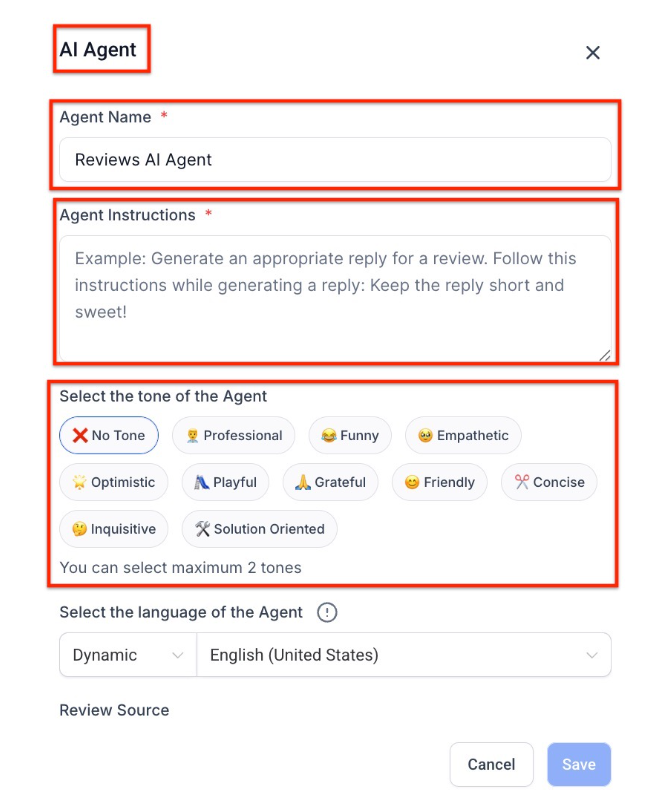
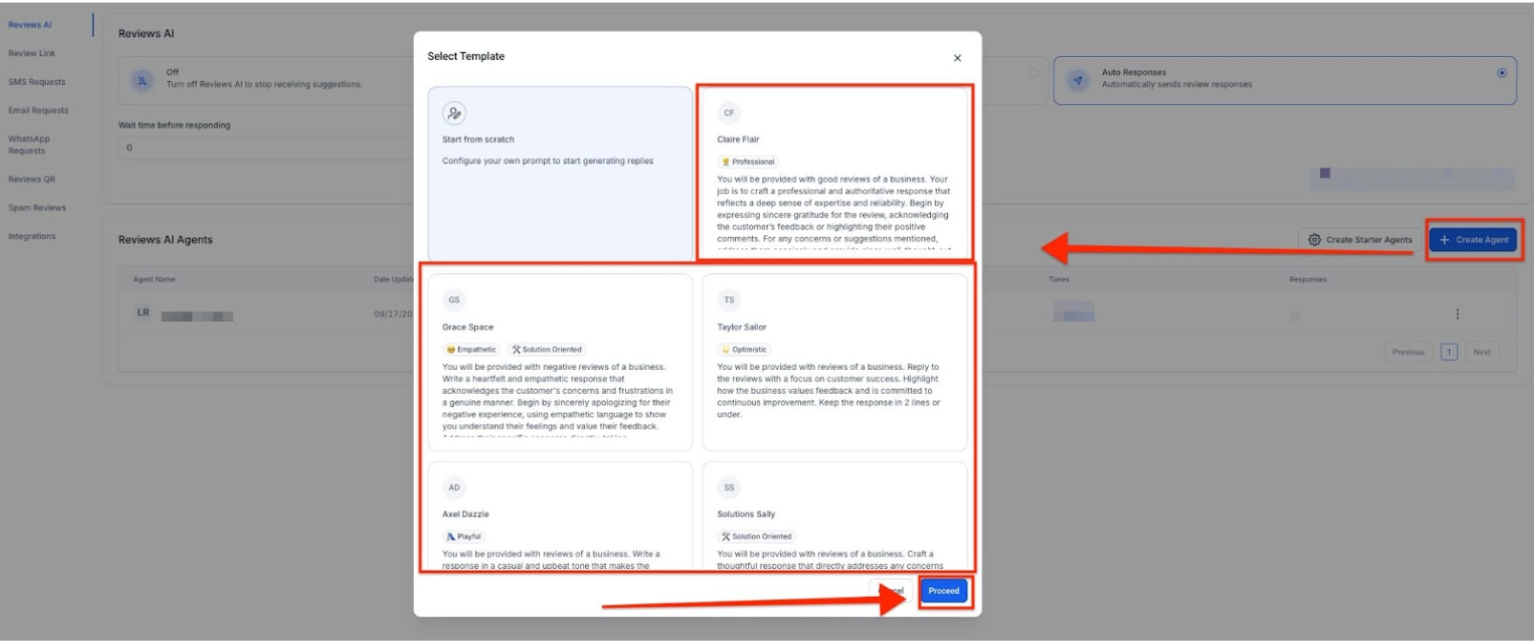
Click on the “Create Agent” button. Here, you can either design a new agent from scratch or select from ready-made templates. Customization options include:
- Agent Name : Give your agent a friendly name for easy identification and tracking.
- Tone : Choose the tone of voice that suits your brand (e.g., friendly, professional, empathetic).
Prompt (Agent Instructions) : Provide a concise prompt (Agent Instructions) to guide the AI in crafting its responses.
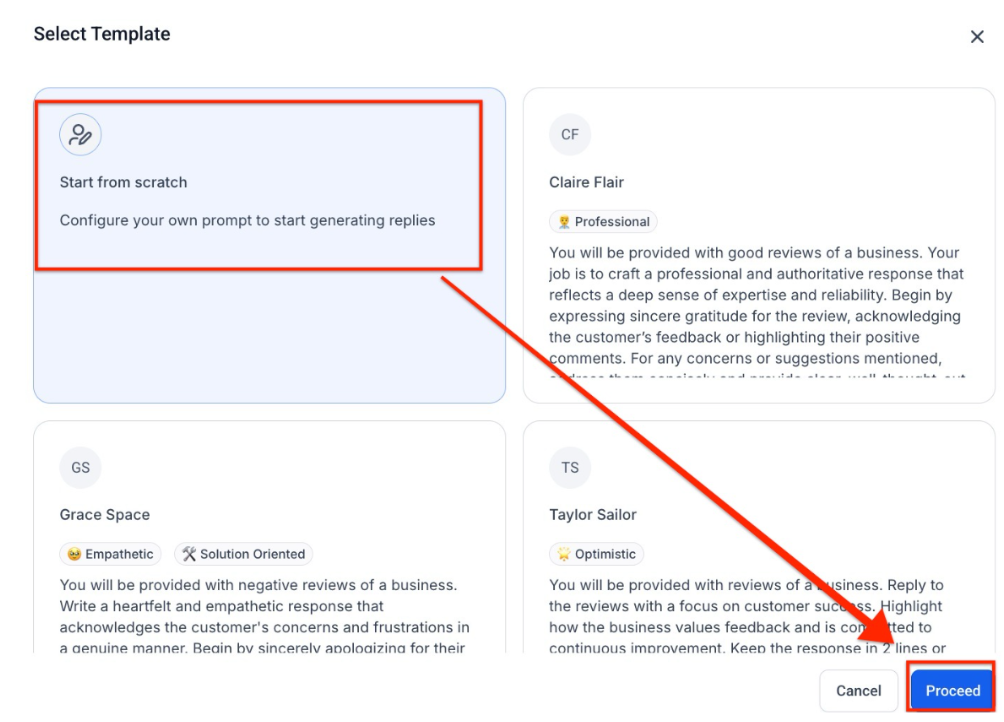
If you’re in a hurry, you can select “Create Starter Agents” to quickly deploy pre-built personalities without going through the customization process.
Step 3: Set Assignment Rules for AI Agents
Once your agent is ready, assign it to respond based on the sentiment of reviews. You can set rules to differentiate responses for positive, neutral, and negative reviews.
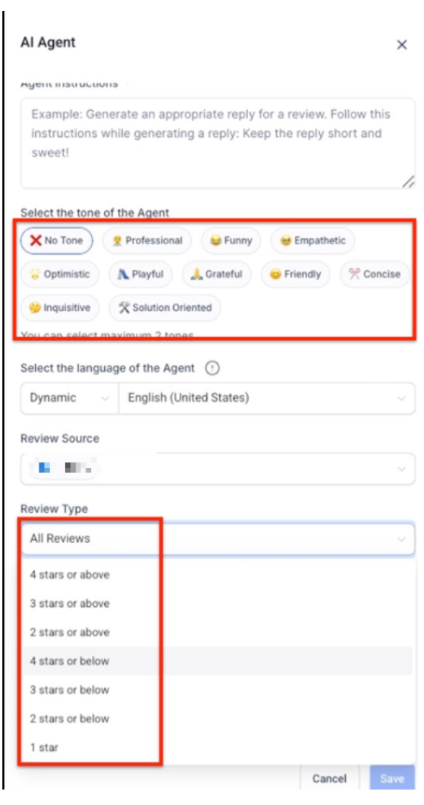
Step 4: Configure Language Detection
The AI automatically detects the language used in a review, ensuring accurate responses. However, if the language cannot be detected, you can set a fallback language to ensure the AI still responds appropriately.
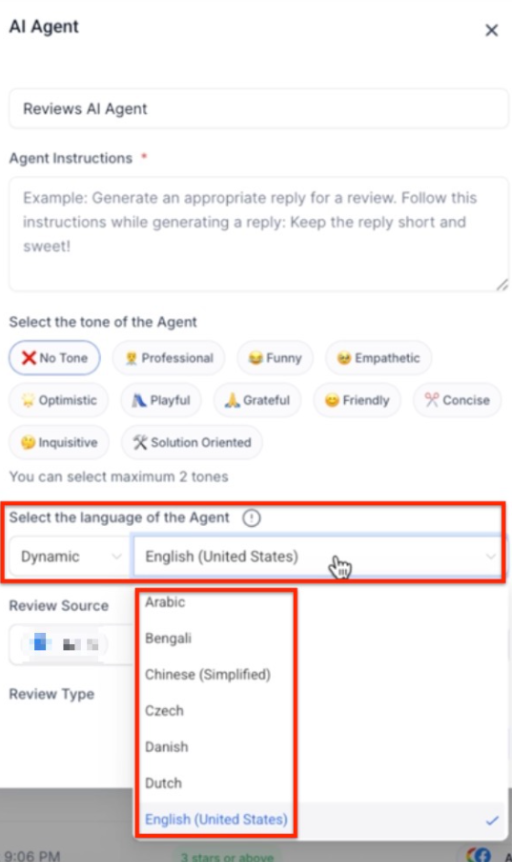
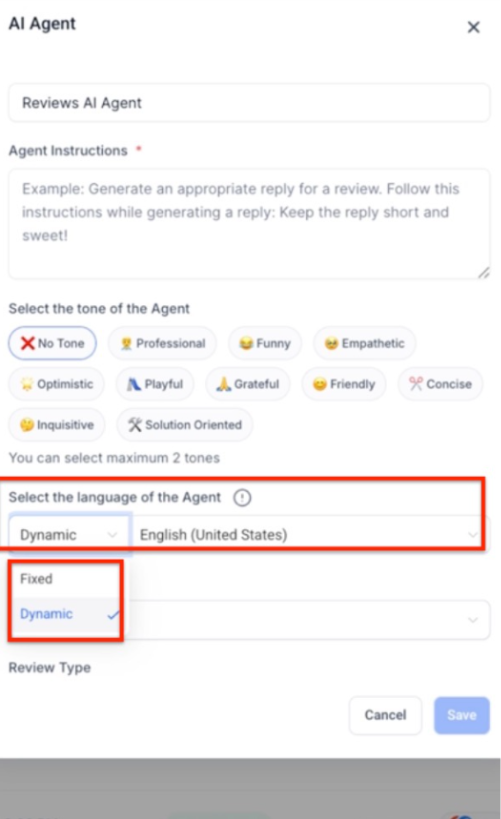
Step 5: Select Google Business Pages (Optional)
If you’re managing responses for multiple brands or locations, you can assign specific AI agents to different Google Business Pages. This feature helps keep responses organized and tailored to each brand or location.
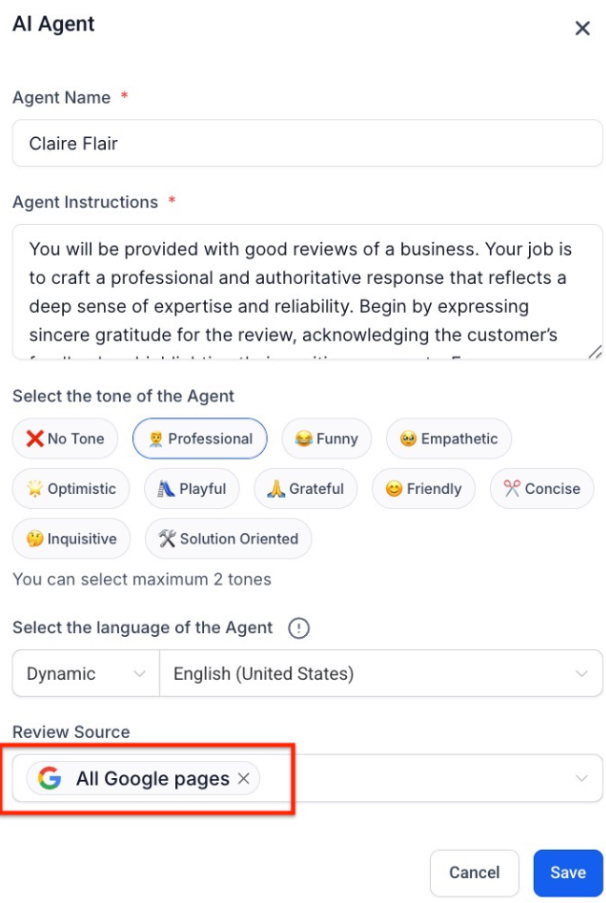
Step 6: Manage and Test AI Agents
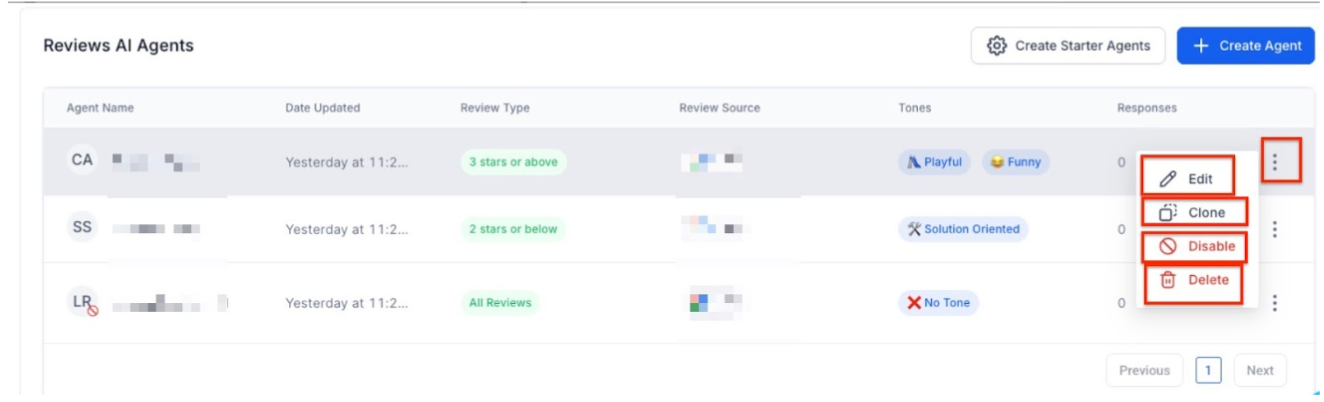
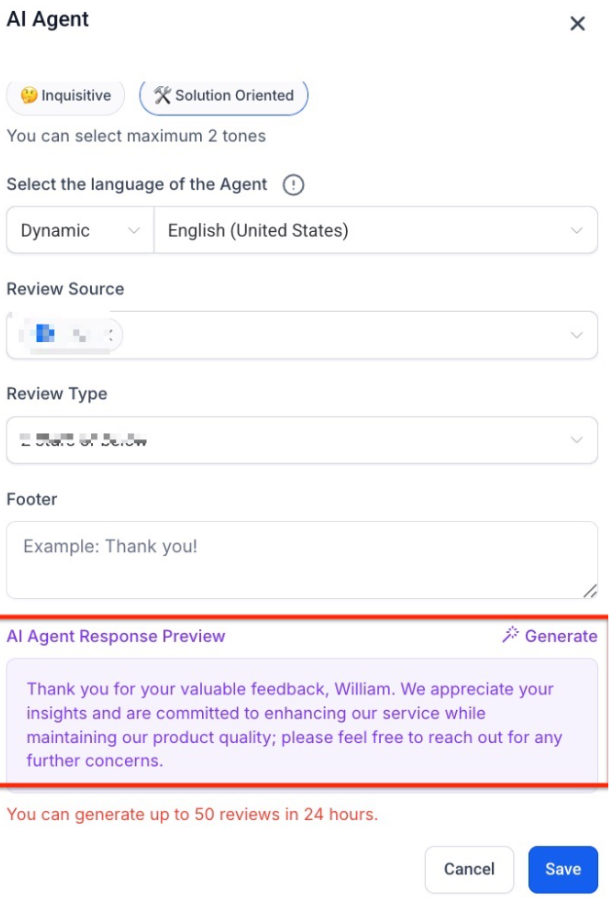
You can edit, clone, or delete AI agents at any time. It’s also important to preview the AI-generated responses before they go live. Within the Reputation Management view, you’ll be able to easily see which agent crafted each review reply, making it easy to track and manage responses.
Best Practices for Using Reviews AI Agents
To get the most out of your AI Agents, consider the following best practices:
- Match Your Brand’s Voice : Set a tone and style that aligns with your brand’s identity. Whether your business is professional, friendly, or empathetic, consistency is key.
- Handle Different Sentiments Separately : Tailor responses for positive, neutral, and negative reviews. This ensures that your replies are relevant and appropriate for the sentiment expressed.
- Be Clear and Concise in Instructions : Provide simple and specific instructions for your AI agents, ensuring they understand the nuances of your brand voice.
- Personalize Responses : Whenever possible, personalize responses by including business names or locations to make interactions feel more genuine.
- Preview Responses Regularly : Ensure that the tone and content of AI-generated responses align with your expectations. Regular previews help maintain quality control.
¶ Note on AI Behavior and Brand Consistency
One of the biggest advantages of using AI for review responses is the consistency it brings to your customer interactions. However, it’s important to regularly monitor and tweak the AI’s behavior to ensure it remains aligned with your brand’s evolving needs. For example, if your company undergoes a rebranding, adjusting your AI agents’ tone and style will help ensure that their responses stay relevant.
Pro Tips for Using Reviews AI Agents
- Regularly Update Prompts : To keep the responses fresh and relevant, regularly update your agent’s prompt to reflect changes in your brand’s messaging or customer expectations.
- Track Agent Performance : Monitor how well each AI agent is performing by reviewing metrics such as engagement rates or response quality. This helps you make informed adjustments for better outcomes.
- Use Templates for Efficiency : If you’re managing multiple agents, consider using pre-built templates to save time on setup without compromising on personalization.
¶ FAQ Section
Question: Can I use multiple AI Agents for different brands or locations?**
**Answer: Yes, you can assign specific AI agents to different Google Business Pages, making it easier to manage reviews for multiple brands or locations.
Question: What happens if the AI cannot detect the language of a review?**
**Answer: You can set a fallback language that will be used if the AI fails to detect the language of a review.
Question: How can I ensure my AI Agent’s responses match my brand’s voice?**
**Answer: Customize your AI agent’s tone and style to reflect your brand’s personality. Be sure to set clear and specific instructions to guide the agent’s responses.
Question: Can I test the AI Agent’s responses before they are published?**
**Answer: Yes, you can preview AI-generated responses before publishing them, ensuring they meet your expectations for tone and content.
Question: Can I adjust the sentiment detection settings?**
**Answer: While the AI automatically detects the sentiment of a review, you can customize the response rules for positive, neutral, and negative reviews to ensure appropriate replies.
Question: How can I ensure the AI responses are consistent as my brand evolves?**
**Answer: You should regularly monitor and adjust your AI agent’s behavior to align with any changes in your brand’s tone, style, or messaging, especially after rebranding. This helps maintain consistency in customer interactions.
Question: How do I monitor the performance of my AI Agents?**
**Answer: Track metrics such as engagement rates, response quality, and sentiment accuracy to evaluate agent performance. Use these insights to refine instructions and improve outcomes.
Question: Does the AI mention the customer’s name in the reply?
Answer: Yes. The AI is designed to use available metadata. If the reviewer’s name is public on Google or Facebook, the AI will often start the response with “Hi [Name],” which significantly increases the “human” feel of the automation.
Question: Can I set different response strategies for a 5-star review versus a 1-star review?
Answer: Yes. In Step 3 (Assignment Rules) , you can differentiate your response strategy based on sentiment. This allows you to be celebratory for positive reviews and empathetic or solution-oriented for negative ones.