¶ Google Business Profile Optimization Tool
Google Business Profile Optimization Tool
In today’s digital age, having a well-optimized Google Business Profile (GBP) is essential for improving local visibility and attracting more customers. This article introduces a tool designed to streamline the management and enhancement of your GBP. Whether you’re a business owner or working with clients, this tool simplifies the process of keeping your profile up-to-date and engaging, right from within the Reputation tab.
¶ Key Features and Benefits
- All-in-One GBP Management**
**The tool allows you to manage essential business information directly from the Reputation tab. Update details such as your business name, phone number, business hours, address, services, and even attributes without navigating away from the platform. This centralized approach saves time and makes maintaining your GBP seamless. - Live Preview**
**One of the standout features is the live preview function, which instantly shows you how your profile will appear to potential customers on platforms like Google Maps and Search. This ensures that your changes are visually accurate before going live. - Profile Score and Alerts**
**The tool provides a real-time profile completeness score, so you can track how fully optimized your listing is. Incomplete sections are flagged with alert icons and helpful tooltips that guide you step-by-step in optimizing your profile for better performance.
¶ How to Use GBP Optimization Tool
1. Access the Reputation Tab**
**To begin, log in to your account and navigate to the Reputation tab, where GBP Optimization is available.
2. Update Core Business Info**
**Start by updating essential details such as your business name, phone number, address, hours, and services. You can also add a business description that reflects what you offer to attract the right audience.

3. Enhance Visual Media**
**Upload or update images of your business, products, or services. Make sure to include a profile picture, cover photo, and any additional images that give customers a sense of what your business looks like. Fresh, high-quality visuals can significantly boost your profile’s attractiveness.

4. Add Social Links**
**Connect your business’s social media profiles to your GBP listing. This enhances credibility and provides customers with more ways to engage with your brand.

5. Monitor and Manage Reviews**
**Regularly check your GBP reviews to monitor customer feedback. Responding to reviews shows customers that you care about their experience, helping to build trust and loyalty.

6. Preview Changes**
**Before finalizing any changes, use the live preview feature to see how your updates will appear to customers. This allows you to make sure everything looks perfect before making your updates public.
7. Optimize for Better Visibility**
**Ensure all relevant sections of your GBP are complete by following the alerts and suggestions provided by the tool. An optimized listing increases your chances of being discovered by more customers.
¶ GBP Post Scheduler
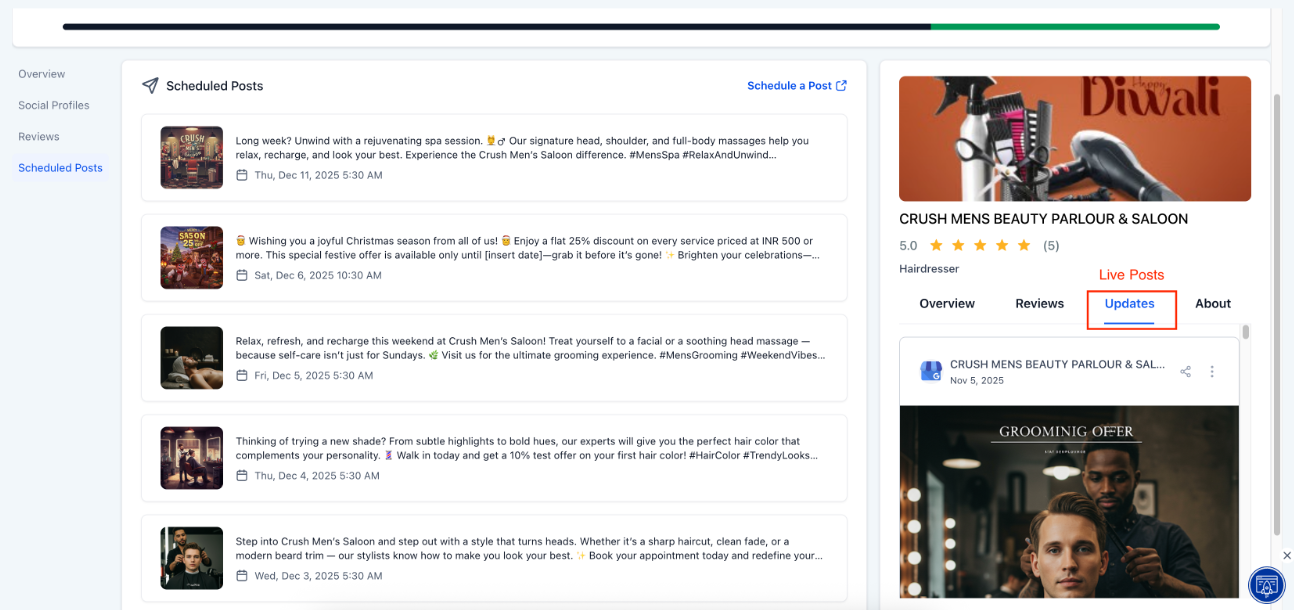
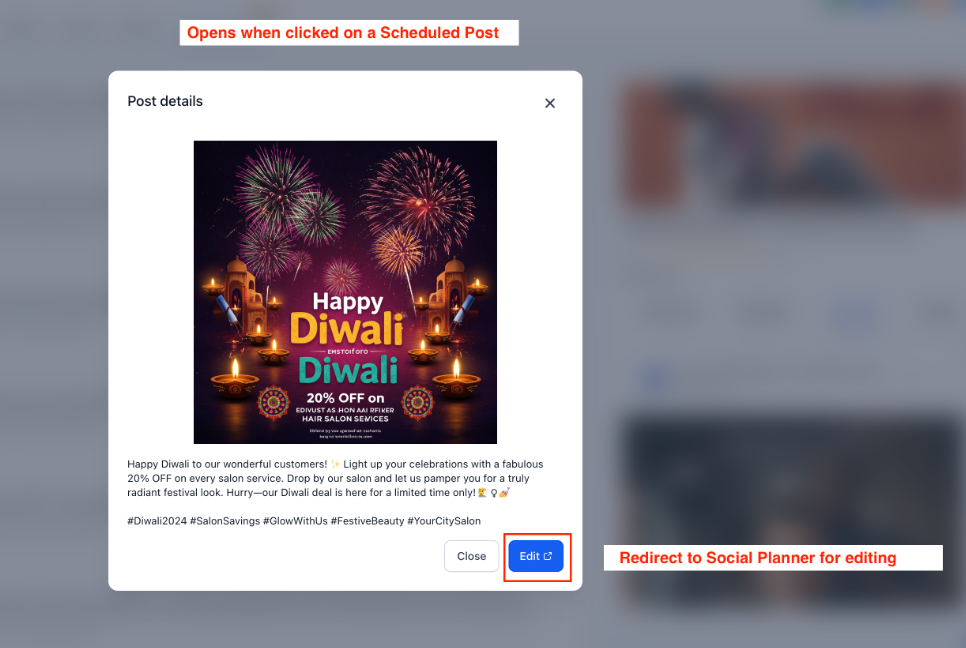
This adds a scheduler for planning and publishing posts to multiple business listings at once, reducing manual effort and improving workflow efficiency. To use, select listings in LeadMagicX
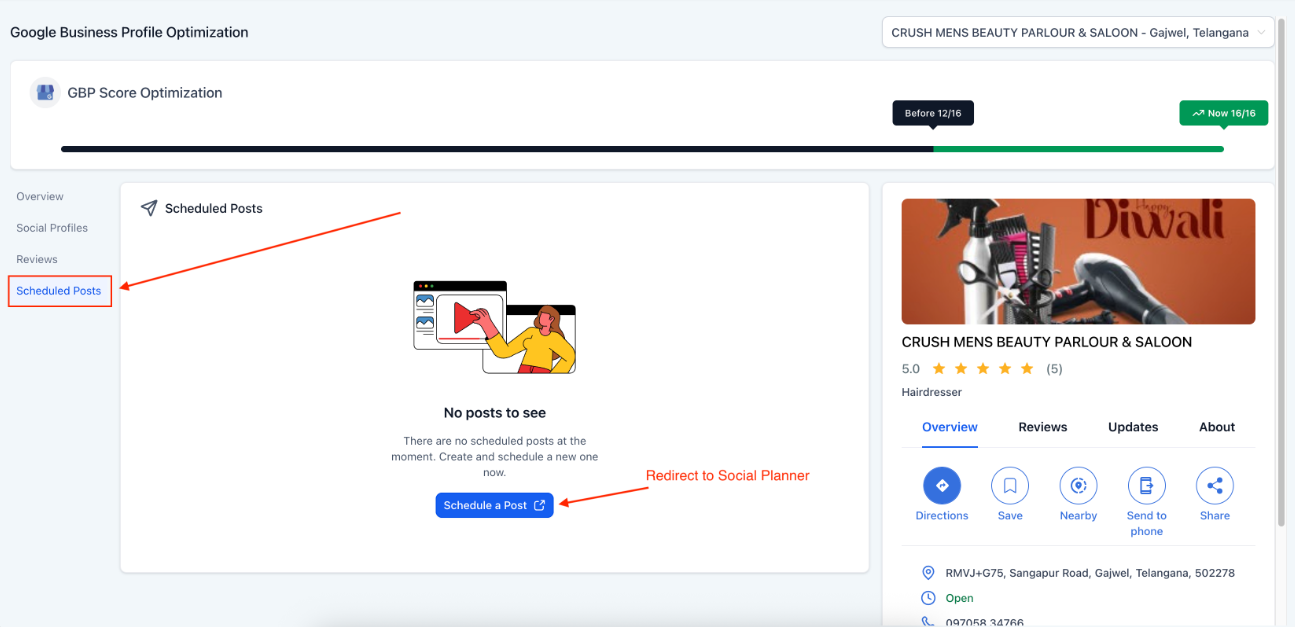
Enter post details, refresh headers if needed, and choose “Schedule” or “Post Now.”
Listings without full permissions may not support automation or syncing.
¶ Pro Tips
- Keep Your Listing Fresh: Regularly update your profile with new images, services, and any changes in business operations (e.g., hours or location). A well-maintained profile helps to build trust and encourages customer engagement.
- Utilize All Available Fields: Don’t leave any sections incomplete. Fill out all the relevant fields to improve your profile’s completeness score. A fully optimized profile is more likely to appear in local search results.
- Use High-Quality Visuals: High-resolution images are more appealing to potential customers. Ensure your images are clear, well-lit, and relevant to your business offerings.
- Respond to Reviews Promptly: Regularly engage with customer feedback by responding to reviews. A prompt, professional response to both positive and negative reviews can boost your reputation and show customers that you care about their opinions.
¶ FAQs
Question: How often should I update my Google Business Profile?**
**Answer: It’s a good practice to review and update your GBP at least once a month. Any changes to business operations, seasonal offerings, or special events should be reflected promptly to keep your profile relevant.
Question: Can I edit my GBP information on the go?**
**Answer: Yes! The tool allows you to make changes quickly, and the live preview feature ensures that your updates are accurate and look good before going live.
Question: Why is my profile score not improving?**
**Answer: If your profile score isn’t increasing, check if all fields are completed. Incomplete sections will affect your score. Follow the alerts and tooltips provided by the tool to guide you through the necessary updates.
Question: How can I track my business’s reputation through GBP?**
**Answer: Use the review monitoring feature in the tool to keep track of customer feedback. This helps you stay on top of your business reputation and allows you to respond to reviews in a timely manner.
Question: Will this tool improve my search rankings?**
**Answer: Yes, optimizing your GBP profile enhances your visibility in local search results. A complete and active profile increases the likelihood of your business appearing in local searches and attracting more customers.
Question: Are alerts and tooltips provided for incomplete sections?**
**Answer: Yes. The tool flags incomplete sections with alert icons and offers step-by-step guidance to help you complete your profile and improve your optimization score.
Question: How does adding social media links to my GBP improve my profile?**
**Answer: Adding social media links to your GBP boosts credibility and gives potential customers more ways to engage with your brand. It helps create a stronger online presence and connects your business to a broader audience, building trust and encouraging interaction.
Question: Is it possible to see what my profile will look like to customers before I save my changes?
Answer: Yes. The tool features a “Live Preview” function that instantly shows you how your profile will appear on Google Maps and Search. This allows you to verify that your updates are visually accurate before you make them live.
Question: Can I schedule posts to appear on my Google Business Profile?
Answer: Yes. The GBP Post Scheduler allows you to plan and publish posts in advance. You can even publish to multiple business listings at once to improve your efficiency.
Question: What should I do if the automation or syncing features aren’t working for some of my business listings?
Answer: Check your account access; listings that do not have full permissions may not support automation or syncing features within the tool.