¶ Understanding Attribution Traffic Sources
Understanding Attribution Traffic Sources
Knowing where your leads and contacts originate from is invaluable. This helps see the effectiveness of various advertising channels and guides strategic decisions on where to allocate budgets for maximum return. In the article below, we will walk through attribution in your account and even where to go to set up your ad reporting.
¶ Step 1: Grasping the Basics of Attribution
Attribution is the process of identifying the channels or sources that have led to a contact or lead creation. It’s essential for evaluating the performance of your advertising efforts across different platforms, such as Facebook and Google.
Within LeadMagicX platform, attribution is categorized into two types:
- First attribution: tracks the initial interaction of a contact with your system.
- Latest attribution: records the most recent interaction.
¶ Step 2: Locating Attribution Data in LeadMagicX
To find attribution data:
- Go to your account
- Then to Contacts
- Select a contact record
- Locate the attribution data at the bottom right column under the activity tab.
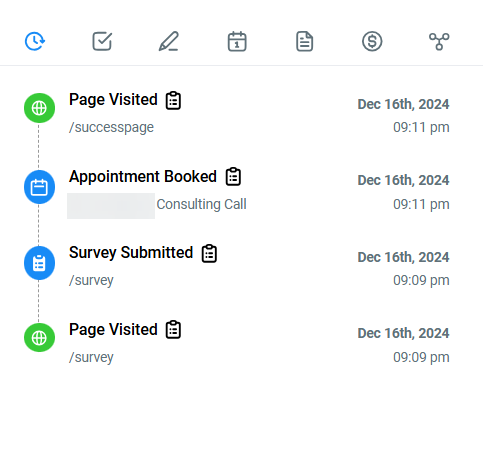
Understanding where this data is located will allow you to analyze the effectiveness of your marketing channels.
¶ Step 3: Deciphering Session Sources
LeadMagicX system categorizes session sources into several types, including:
- Paid Search : This indicates traffic from paid search engine ads, primarily Google Ads. This will help in analyzing the Google Ad Reporting.
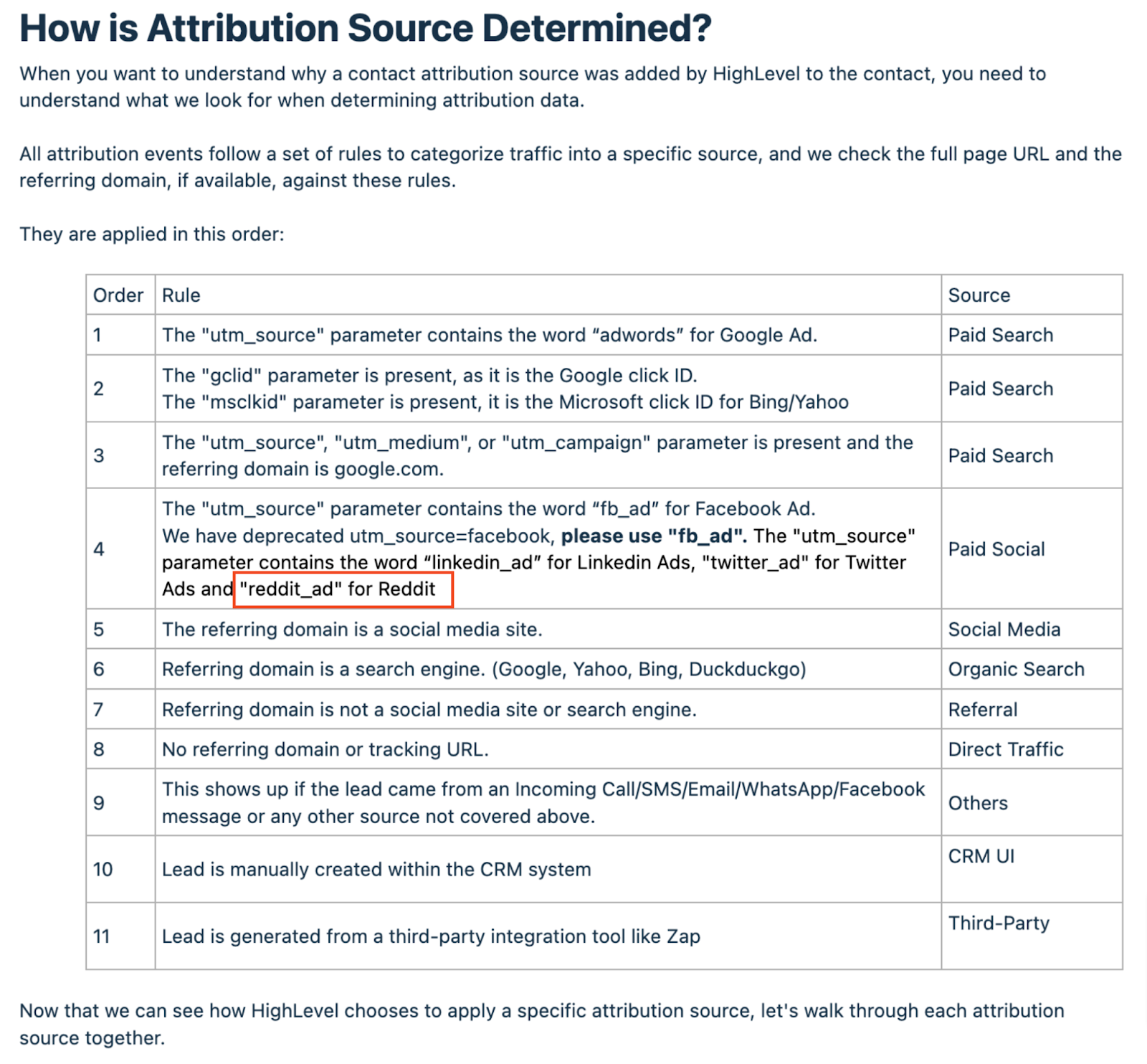
- Reddit Ads Attribution: Reddit Ads are also included in the paid social category for attribution. If the “utm_source” parameter includes “reddit_ad,” it will be categorized as paid social.
It needs to have the UTM parameters matching (It is case-sensitive)
{YourLandingPageUrl.com}?utm_source=adwords&utm_medium={adname}&utm_campaign={campaignname}&utm_content={adgroupname}&utm_keyword={keyword}&utm_matchtype={matchtype}&campaign_id={campaignid}&ad_group_id={adgroupid}&ad_id=
Google Ads UTM Parameters
| Name | Key | Value |
|---|---|---|
| UTM Source | utm_source | adwords |
| UTM Medium | utm_medium | |
| Campaign | utm_campaign | |
| UTM Content | utm_content | |
| Match Type | utm_matchtype | |
| Campaign | campaign_id | |
| Ad Group ID | ad_group_id | |
| Ad ID | ad_id |

- Paid Social (Facebook & Instagram Ads)
Traffic categorized under Paid social comes from a paid social campaign. This will help in analyzing the Facebook Ad Reporting.
It needs to have the UTM parameters matching (It is case-sensitive)
{YourLandingPageUrl.com}?utm_source=fb_ad&utm_medium={{adset.name}}&utm_campaign={{campaign.name}}&utm_content={{ad.name}}&campaign_id={{campaign.id}}
Facebook and Instagram Ads UTM Parameters
| Name | Key | Value |
|---|---|---|
| UTM Source | utm_source | fb_ad |
| UTM Medium | utm_medium | {{adset.name}} |
| Campaign | utm_campaign | {{campaign.name}} |
| UTM Content | utm_content | {{ad.name}} |
| Campaign | campaign_id | {{campaign.id}} |

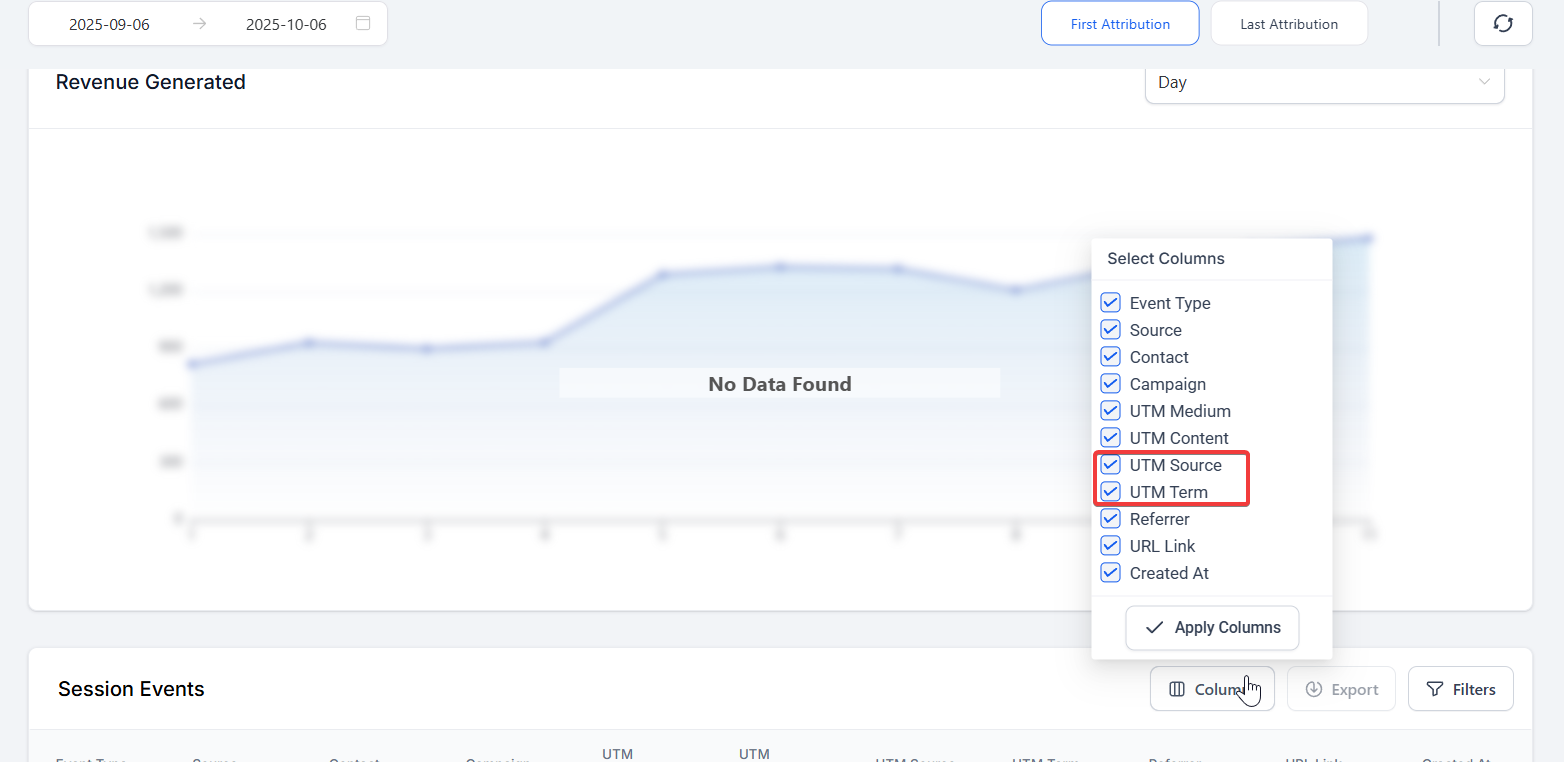
NOTE: The Attribution Report table has been updated to include “utm_source” and “utm_term” columns, providing enhanced tracking and analysis capabilities.
- Direct Traffic : Refers to visitors who directly entered your site’s URL.To view the source URLs for these visitors, click the Direct traffic source.
- Organic Search : Traffic from search engines that is not through paid ads, such as Google, Bing, Yahoo, and Duckduckgo. To view the keywords used in the search engine, click the Organic search source in the Sources table. When there are Unknown keywords (SSL), it is likely due to the search engine encrypting user data. For example, Google encrypts all the search terms entered by their users.
- Social: Visitors from social media platforms not tied to paid advertisements. An example is when a visitor shares your content or website on their social media account, and their followers visit your content or the links inside your messages on social media.
- Referrals: Traffic from other websites that have linked back to your site.It should not be a search engine or social media site. A referring domain may have multiple pages that link to your site.
- Others: This Includes traffic from various sources not covered above, like incoming calls, SMS, emails, WhatsApp messages, or Facebook messages, it is important to display all the information in one place. This helps keep track of all the leads and ensures that none fall through the cracks. By having a centralized system to manage all the leads, businesses can ensure they are not missing out on potential customers.
- CRM UI**
**When a lead is created manually through LeadMagicX, its source is defined as this. This categorization helps in identifying leads that were created manually within LeadMagicX only. - Third-Party
When a lead is created by a third-party tool like Zap, its source is defined as this. This categorization helps identify leads created through third-party integration.
Each category provides critical insights, allowing for tailored marketing strategies.
What Events Record Attribution? Attribution is recorded when a contact performs one or more of the following actions within the same session:
- Form/Survey Submission
- Calendar Booking Submission
- Chat Widget Submission
- Order Form Submission
¶ Step 4: Implementing Ad Reporting
To set up ad reporting accurately:
- Use LeadMagicX’s tracking templates for your ads to ensure proper UTM parameter capture. This step is crucial for clean data collection.
- For Google Ads, follow the specific instructions for setting up the tracking template.
- For Facebook Ads, ensure you use the designated setup to accurately track conversions and engagements.
Adhering to the setup guidelines is critical for gathering actionable data within LeadMagicX.
Additional Resources for Ad Reporting Setup : For Facebook and Instagram Ads:
- How to set up a Funnel Event Pixel for Facebook Conversion API
- How to set up and install a Meta Pixel
- Facebook Conversion Leads Walkthrough
- Facebook Conversions API Trigger in Workflows
For Google Ads:
- Google Analytics 4 Tracking
- Understanding Google Ad Reporting Terminology
- Troubleshoot Guide For Google Ad Reporting
¶ Step 5: Recognizing the Importance of Form Submissions
Attribution data is captured based on certain actions, such as form or survey submissions, calendar bookings, chat widget interactions, or order form completions. These actions must occur on forms integrated within LeadMagicX to accurately capture attribution data. If a user navigates away from the landing page before submitting a form, the UTM parameters—and consequently the attribution data—may be lost.

Determining Attribution Source:**
**When you want to understand why a contact attribution source was added to the contact, you need to understand what we look for when determining attribution data.
All attribution events follow a set of rules to categorize traffic into a specific source, and we check the full page URL and the referring domain, if available, against these rules.
They are applied in this order:
¶ Step 6: Troubleshooting and Optimizing Ad Reporting
If ad reporting is not reflecting accurately, consider the following steps:
- Verify Tracking URLs: Double-check your tracking URLs and UTM parameters for accuracy and case sensitivity.
- Final URL Confirmation: Ensure that the form submission happens on the final URL with UTM parameters intact.
- Avoid Custom UTM Parameters: Stick to LeadMagicX’s tracking templates and avoid adding custom UTM parameters to your ads.
- Check for Spaces or Misspellings in the Final URL: Ensure no extra spaces or misspellings in UTM parameters.
- Confirm Submissions Happen on the Final URL: Ensure users do not move from the landing page before submitting a form.
- Do Not Add Custom UTM Parameters: Use the provided UTM templates without modification.
Addressing these areas can help rectify issues with ad reporting, ensuring accurate attribution tracking.
FAQs
FAQs
Question: What is Attribution?**
**Answer: Attribution refers to identifying the channels or sources that contribute to a contact or lead creation, helping to assess the performance of advertising efforts across different platforms.
Question: What are the two types of Attribution in LeadMagicX?**
****Answer: **
- First Attribution : Tracks the initial interaction of a contact with your system.
- Latest Attribution : Records the most recent interaction.
Question: Where can I find Attribution data in LeadMagicX?**
**Answer: To view attribution data, go to the Contacts section, select a contact record, and find the attribution details under the activity tab in the bottom-right column.
Question: What types of session sources are included in Attribution?**
****Answer: **
- Paid Search : Traffic from paid search engine ads (e.g., Google Ads).
- Paid Social (Facebook & Instagram): Traffic from paid social media campaigns.
- Direct Traffic : Visitors who directly entered your site’s URL.
- Organic Search : Traffic from non-paid search engine results.
- Social : Traffic from social media platforms not tied to paid ads.
- Referrals : Traffic from external websites linking back to your site.
- Others : Traffic from various sources like calls, SMS, emails, and messages.
Question: How does UTM tracking work for Google Ads and Facebook Ads?**
**Answer: Both platforms use specific UTM parameters to track campaign performance. These parameters help categorize traffic, such as utm_source, utm_medium, utm_campaign, and more. It’s essential to follow the exact structure and case sensitivity for accurate tracking.
Question: What are the key events that trigger Attribution?**
**Answer: Attribution is recorded when a contact performs actions such as:
- Form/Survey Submission
- Calendar Booking Submission
- Chat Widget Submission
- Order Form Submission
Question: How do I implement accurate ad reporting?**
**Answer: Use LeadMagicX’s tracking templates to ensure proper UTM parameter capture. Follow setup guidelines for both Google and Facebook Ads to track conversions and engagements effectively.
Question: What should I do if my ad reporting isn’t accurate?**
**Answer: Check the accuracy of your tracking URLs and UTM parameters for case sensitivity. Ensure the form submission happens on the final URL with UTM parameters intact. Avoid custom UTM parameters, and make sure users submit the form on the landing page.
Question: Why is the attribution source important?**
**Answer: Understanding the attribution source helps businesses allocate marketing budgets more effectively, optimize campaigns, and track the performance of various advertising channels.
Question: How can I troubleshoot issues with ad reporting?**
**Answer: Verify tracking URLs and UTM parameters for any errors, check for spaces or misspellings in the final URL, and ensure the form submission happens on the page with the correct UTM parameters intact. Avoid adding custom UTM parameters to ads.
Question: What happens if users leave the landing page before submitting a form?**
**Answer: If a user navigates away from the landing page before submitting a form, UTM parameters and consequently attribution data may be lost. Ensure the user submits the form without leaving the page.
Question: What additional resources are available for setting up ad reporting?**
**Answer: For Facebook and Instagram Ads, you can refer to resources like Funnel Event Pixel Setup, Meta Pixel Installation, and Conversion API Walkthroughs. For Google Ads, resources like Google Analytics 4 Tracking and Google Ad Reporting Troubleshoot Guide are available
Question: What happens if a user leaves the landing page before submitting a form?**
**Answer: UTM parameters and attribution data may be lost if the form is not submitted on the landing page. Always ensure the user completes the form without navigating away.
Question: Can attribution be lost?**
**Answer: Yes, if a user leaves the landing page before submitting a form, the UTM parameters and thus attribution may be lost.
Question: Do I need to add UTMs to every single page of my funnel?**
**Answer: No. You only need the UTM parameters on the Landing Page (the first page the user hits from the ad). As long as the user submits a form or books an appointment during that same session, the system will “remember” the UTMs from the URL they arrived at.
Question: Does the system track attribution for returning visitors who haven’t cleared their cookies?
Answer: Yes. The system uses browser cookies to maintain session data. However, if a user switches from their phone (where they saw the ad) to their laptop (where they filled the form), the “link” is broken unless they clicked the ad on the laptop as well. This is why using the tracking templates provided is so vital.