¶ Invoice Payments via Bank-Only Transfers (SEPA & ACH)
Invoice Payments via Bank-Only Transfers (SEPA & ACH)
Offering bank-only transfers as a payment option can be an effective solution for businesses seeking a streamlined and cost-efficient way to collect payments. This feature allows businesses to restrict payment options on invoices to bank transfers only, providing clients with a direct and secure method to settle their accounts. It can be especially beneficial for regions where credit card usage is low or for businesses aiming to reduce payment processing fees.
Key Features and Benefits of Bank-Only Transfers
- Cost Efficiency : By eliminating credit card payment options, businesses can significantly reduce transaction fees typically associated with card processing.
- Regional Adaptation : In certain regions, bank transfers are the preferred or only available payment method. This feature is beneficial for businesses in these areas, ensuring smoother transactions.
- Enhanced Customization : Tailor your payment options to better meet the needs of your client base. With bank-only transfers, you offer a more personalized, secure, and trusted payment method.
How to Set Up Bank-Only Transfers in Invoices
Setting up bank-only transfers for invoices is a simple process. Follow these easy steps to configure this payment option and start accepting payments exclusively via bank transfer.
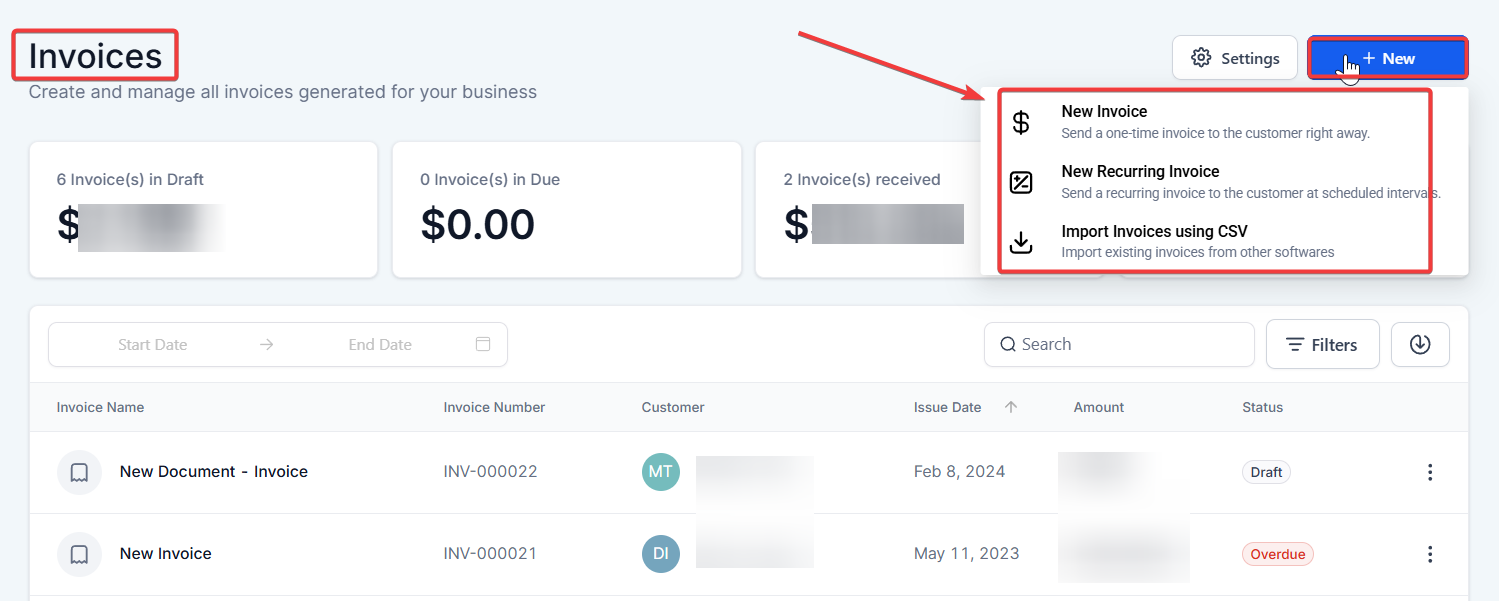
- Access the Invoices Section
- Log in to your CompanyName account.
- From the main dashboard, navigate to the “Invoices” section.
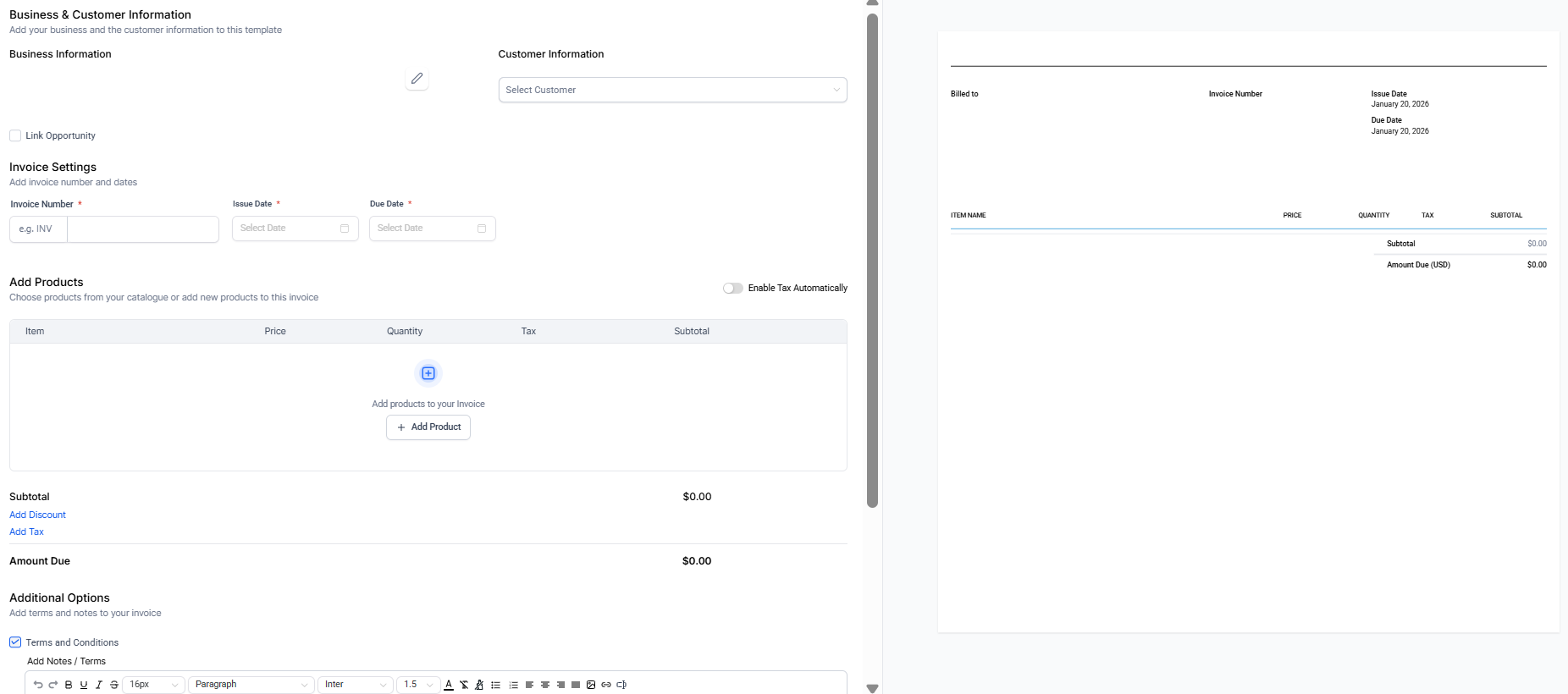
- Create or Edit an Invoice
- To create a new invoice, click on “+ Create Invoice.”
- If you want to edit an existing invoice, locate it from the list and click Edit.
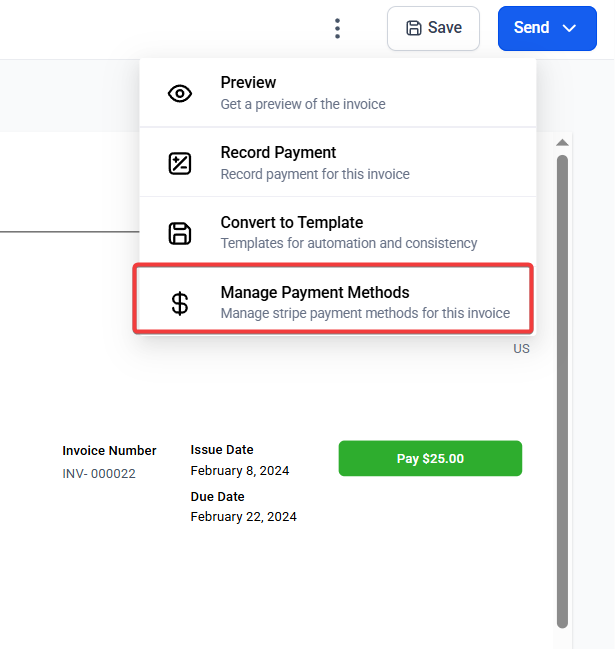
- Select Bank Transfer Payment Option
- Scroll to the “Payment Options” section.
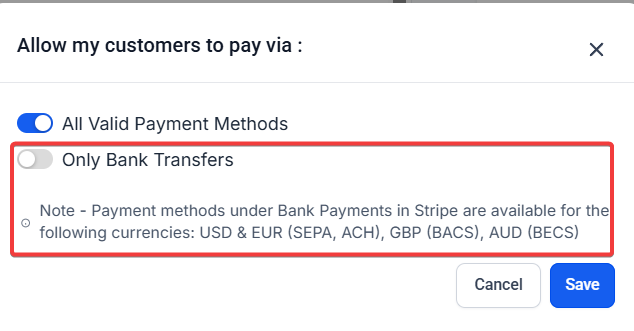
- Choose “Bank Transfer” as the exclusive payment method for that invoice.
4.Save and Send the Invoice
- Once the bank transfer option is selected, click “Save.”
- Use the “Send Invoice” button to email the invoice to your client, ensuring they can make the payment through the bank transfer option.
Global vs. Individual Invoice Settings
You have the flexibility to enable bank-only transfers either globally or for individual invoices:
- Global Settings : To apply the bank transfer-only option to all invoices, go to the global settings. This will restrict all invoices from offering card payment options.
- Individual Invoice Settings : If you only want a particular invoice to accept bank transfers, you can enable the option on an individual basis. For example, if you’re working with a client in a region where credit cards are not common (e.g., Germany), or if you’re processing high-ticket sales, enabling bank transfer-only for that invoice makes sense.
Common Use Cases for Bank-Only Transfers
-
Regional Preferences : Businesses in areas with low credit card usage (e.g., some European countries or rural areas) benefit from bank-only transfers as it ensures customers can pay using local methods.
-
Minimizing Transaction Fees : Companies that want to avoid high credit card processing fees will find this feature helpful. By enabling only bank transfers, businesses can reduce overall payment-related costs.
-
Security and Trust : Some clients may feel more comfortable making payments through a direct bank transfer rather than using a credit card. Bank transfers offer a more secure and familiar method of payment for such customers.
Pro Tips
- Bank Transfer Setup : Ensure that your bank details are correctly set up in the payment processing section. Double-check the account information to avoid delays in payments.
- Invoice Customization : Customize the invoice template to include clear payment instructions. This is particularly important for clients unfamiliar with making payments through bank transfers.
- Global Considerations : If you are dealing with clients from different countries, make sure that international bank transfers are supported. Depending on the region, the customer may need additional instructions or formats for the transfer.
¶ FAQ’s
Question: Can I enable both bank transfers and card payments on the same invoice?****
Answer: No. The bank-only transfer option is specifically designed to make bank transfers the exclusive payment method for an invoice. To offer multiple payment methods, you would need to enable “All Valid Payment Methods.”
Question: Does enabling bank transfers require integration with a payment processor?****
Answer: Yes. You will need to configure your payment processor to handle bank transfers. This could involve setting up ACH, SEPA, or another bank transfer method depending on the service you use.
Question: Is this feature available for all account types?****
Answer: Yes, this feature is generally available for accounts that include invoicing capabilities. Check with your service provider to confirm if this option is available within your plan.
Question: Can I track payments made via bank transfer?****
Answer: Yes. Bank transfer payments will appear in the invoices section just like any other payment method, allowing you to track them in the same way.
Question: Are there any currency limitations for bank transfers?****
Answer: Some payment processors may restrict bank transfers to specific currencies. Be sure to check the supported currencies within your platform’s settings to ensure compatibility with your business needs.
Question: Any tips for using bank-only transfers effectively?****
**Answer: **
- Ensure your bank details are accurate in the payment settings.
- Customize invoices with clear instructions for clients unfamiliar with bank transfers.
- For international clients, provide the necessary information for cross-border transfers.
Question: Can international clients pay through bank transfer?****
Answer: Yes, as long as international transfers are supported by your bank and payment setup. You may need to provide additional details such as SWIFT codes or IBAN numbers for cross-border payments.
Question: Can I customize the bank transfer payment option for individual invoices?**
Answer:** Yes, you can enable the bank transfer-only option on an individual invoice basis. This allows you to restrict a particular invoice to bank transfers, making it ideal for regions where credit cards are not commonly used or for high-ticket sales.