¶ How to Import Products From Stripe
How to Import Products From Stripe
If you have one or more products already set up in your Stripe account and want to import them into LeadMagicX, you can do so w
ith a few easy steps.
This will allow you to save time building products to price if you already have them set up within your Stripe account.
Follow along below to learn how to import them:
¶ Step 1: Ensure your Stripe account is integrated.
- Navigate to Payments > Integrations and ensure that your Stripe account is connected. (If not, check out our article “How to Integrate a Stripe Account” to learn how.)

¶ Step 2: Import the Product from Stripe
-
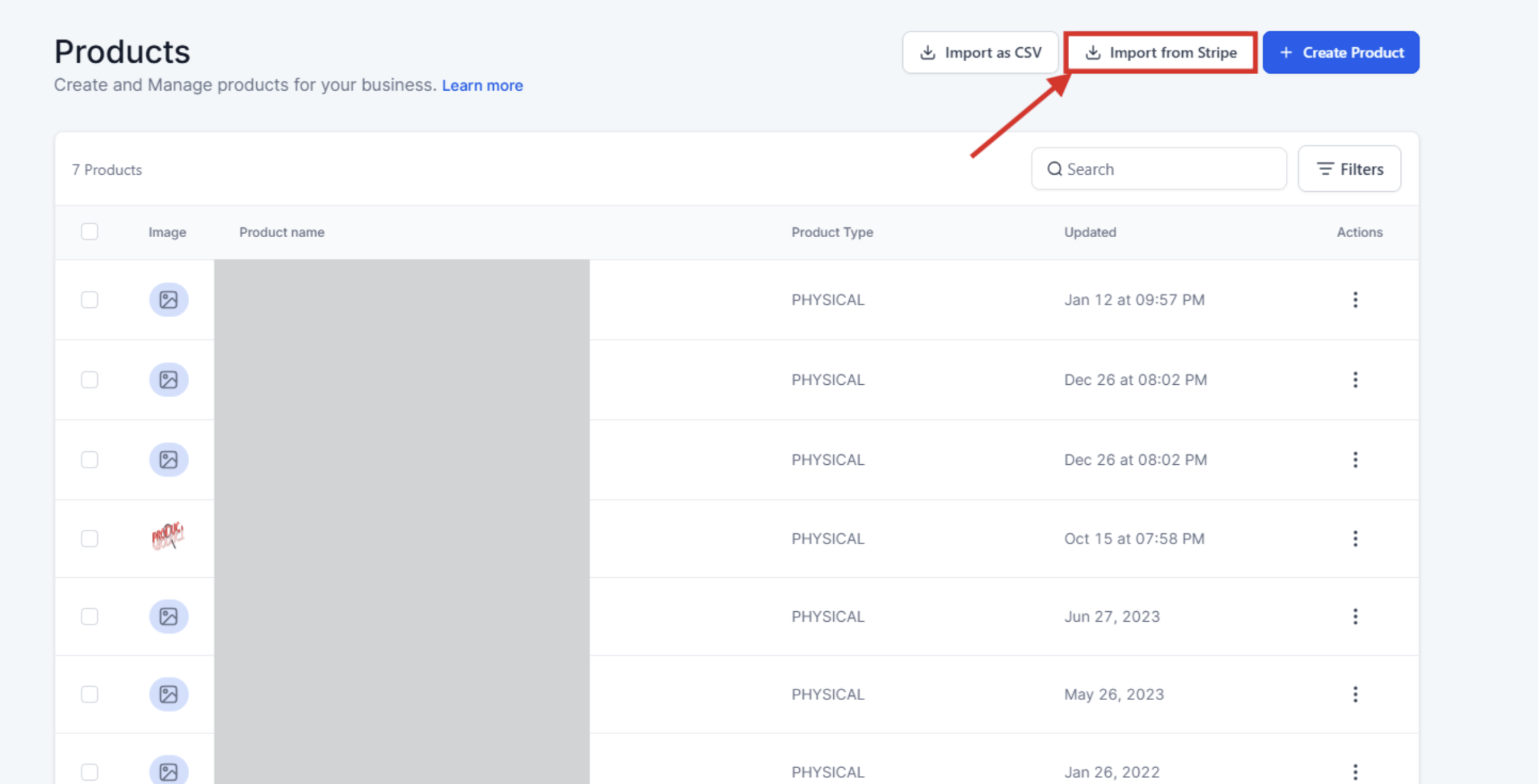
Under Payments > Products you’ll see the “Import from Stripe” button.
-
Click to open a new window.
-
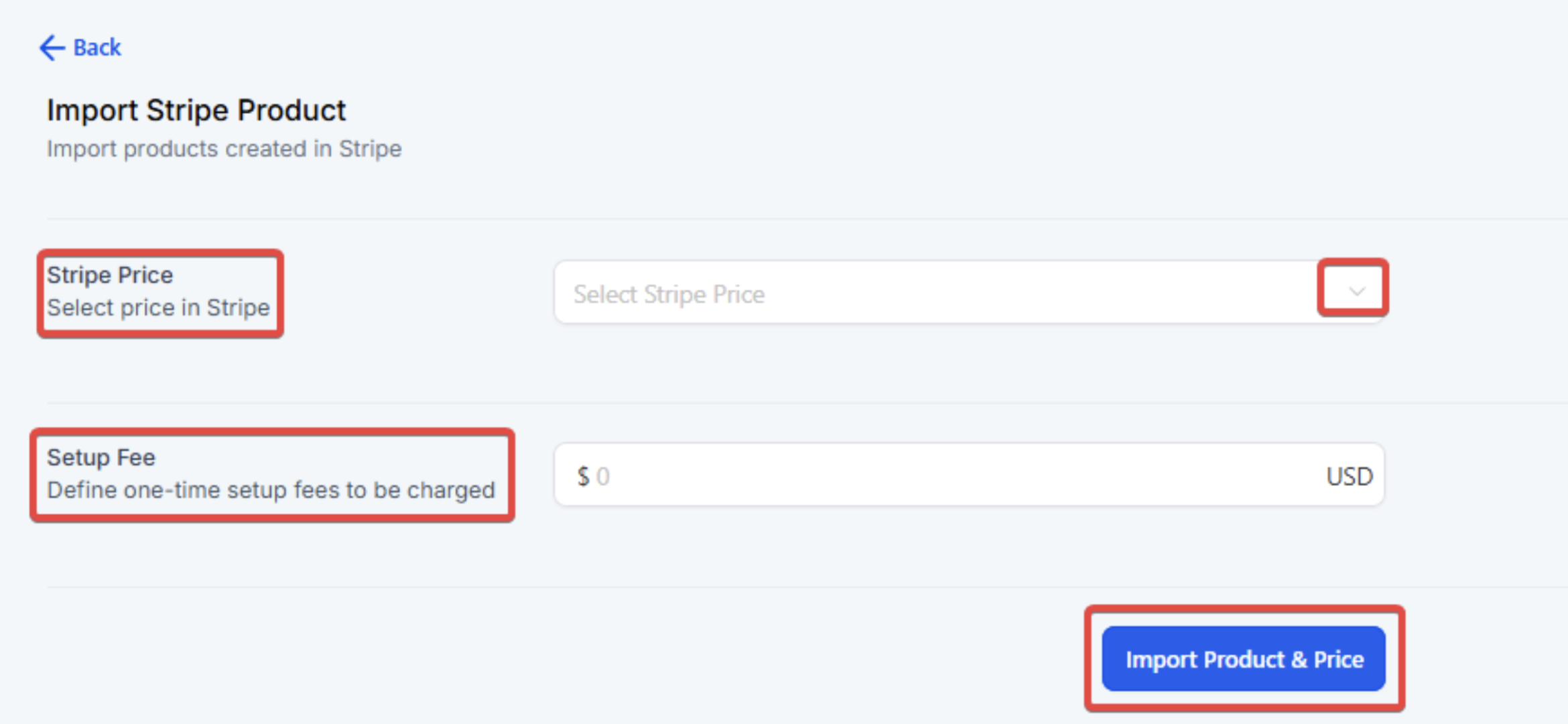
From the dropdown, select the product you wish to import and click “Import Product & Price”.
- NOTE: Only LIVE mode prices can be imported. Also, if LeadMagicX already has the Stripe price, it won’t appear in the import dropdown.
- NOTE: One-time prices , metered prices and recurring or subscription plans can be imported.
-
You’ll be redirected to a view of the newly imported product. You can view the details, add another price, edit the product, or delete the product.
- NOTE: If you click the trashcan icon to delete the product, a popup window will appear and you’ll need to type in DELETE to confirm you wish to proceed, as the action cannot be undone.

¶ FAQs
Question: How do I import products from Stripe into LeadMagicX?**
**Answer: To import products from Stripe, ensure your Stripe account is integrated with LeadMagicX. Navigate to Payments > Products and click on the “Import from Stripe” button. Select the desired product from the dropdown and click “Import Product & Price.”
Question: What should I do if my Stripe account is not integrated with LeadMagicX?**
**Answer: If your Stripe account is not integrated, go to Payments > Integrations to connect your Stripe account. For detailed instructions, refer to the article “How to Integrate a Stripe Account.”
Question: Can I import products with test mode prices from Stripe?**
**Answer: No, only LIVE mode prices can be imported. Products with test mode prices will not be available for import.
Question: Why is my product not appearing in the import dropdown?**
**Answer: If LeadMagicX already has the Stripe price for the product, it will not appear in the import dropdown.
Question: What can I do after importing a product from Stripe?**
**Answer: After importing a product, you can view its details, add another price, edit the product, or delete it.
Question: How do I delete an imported product in LeadMagicX?**
**Answer: To delete an imported product, click the trashcan icon next to the product. A popup window will appear where you’ll need to type in “DELETE” to confirm the action, as it cannot be undone.
Question: Is the deletion of an imported product reversible?**
**Answer: No, deleting a product is a permanent action and cannot be undone. You will be required to confirm the deletion by typing “DELETE” in a popup window.
Question: What happens if I edit a price directly in Stripe after importing it into LeadMagicX?**
**Answer: If you edit a price in Stripe, those changes will not sync automatically with LeadMagicX. You will need to re-import the product as a new item to reflect the updated price in LeadMagicX.
Question: Can I import one-time or metered prices from Stripe?**
**Answer: Yes, and recurring or subscription plans can also be imported.
Question: Where can I view the imported products from Stripe in LeadMagicX?**
**Answer: Imported products can be viewed under Payments > Products in LeadMagicX. Once imported, you’ll be redirected to the product’s details view.
Question: Are taxes or discounts from Stripe imported along with the product?**
**Answer: No, taxes, discounts, and coupon rules set in Stripe are not imported. These need to be configured separately in LeadMagicX.
Question: Can I import products with multiple prices from Stripe?**
**Answer: Yes, you can import products that have multiple prices set in Stripe. After importing, you can view the details and add another price if needed.
Question: Can I import products if I am using Stripe’s “Test Mode”?
Answer: As noted in the guide, only Live Mode prices are eligible for import. If you are currently building out your store in test mode, you will need to switch your Stripe toggle to “Live” before those products become visible in the import dropdown menu.