¶ In Depth Look at Coupons
In-Depth look at Coupons
In this article, we will take an in-depth look at Coupons, breaking down each section, and giving a few examples of usage.
¶ What is a coupon?
A coupon is an offer made by a business or organization (usually in exchange for payment) where you receive a discount on something you purchase.
¶ What type of Coupons are supported?
There are two ways to use a coupon:
- Percentage Coupon: Offer a percentage-based discount on an order value
- Fixed Coupon: Offer fixed discount irrespective of order value
¶ Part 1: Getting Started
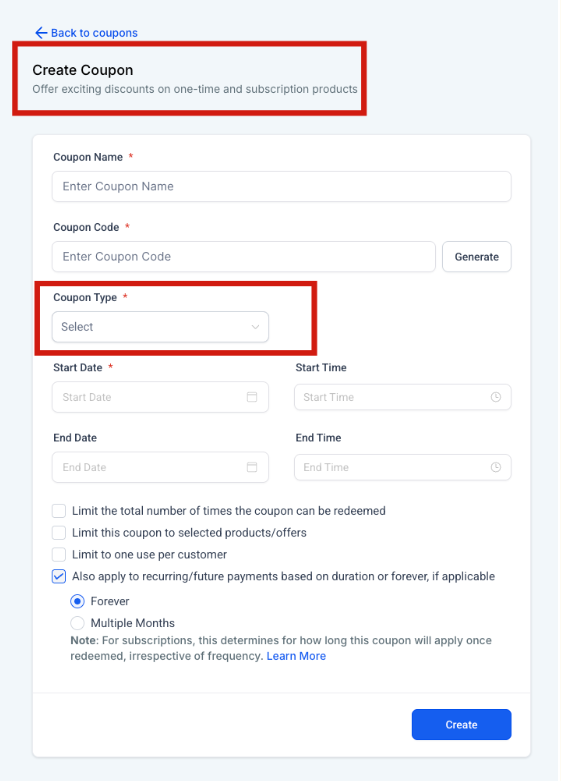
Step 1: Locating Coupons
-
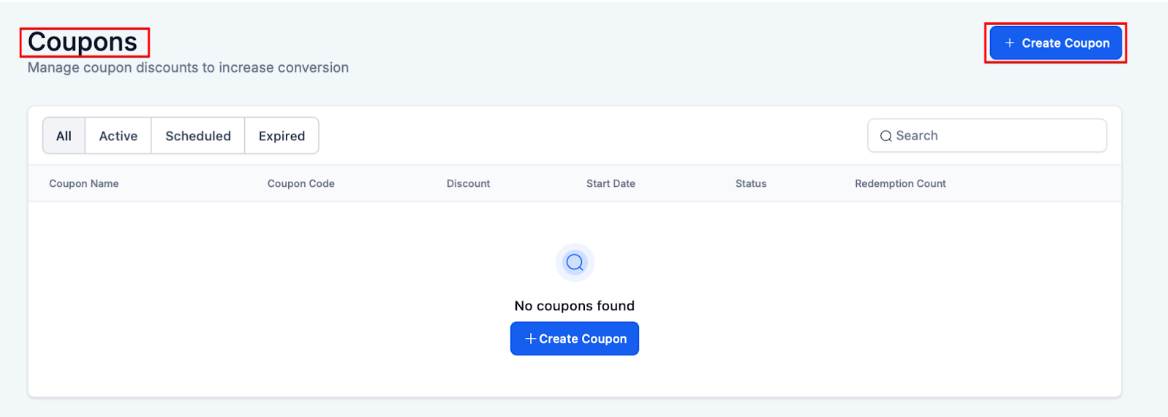
Navigate to Payments on the sidebar
-
Click on “Coupons” at the top
-
Select “Create Coupon” to create a new coupon.
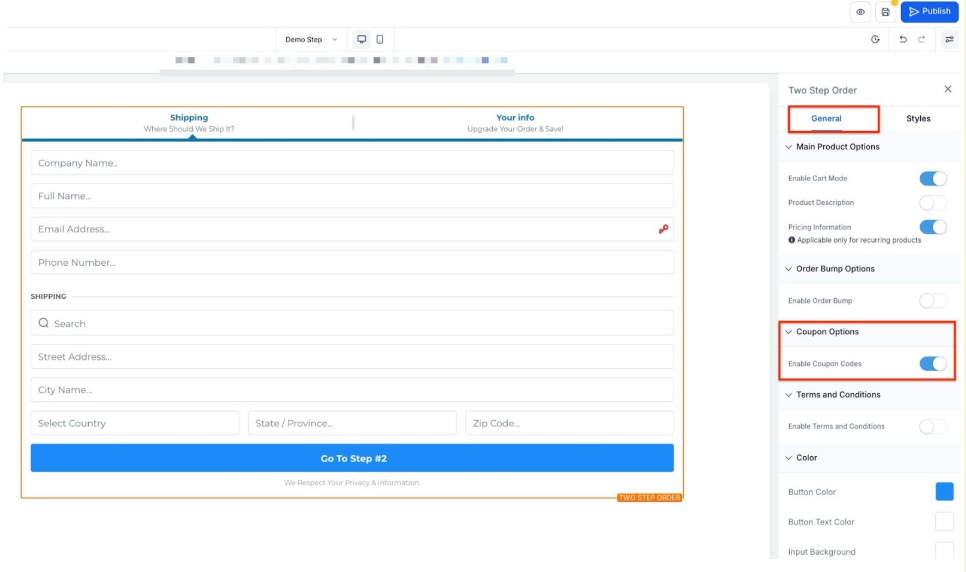
NOTE: Coupons will only work if you have enabled coupon codes on your order form element within your funnel/website in Sites.
Please Note:
- Coupon codes are not case-sensitive, and we will convert all coupon codes into uppercase
- Spaces and special characters are not supported formats when creating Coupon codes
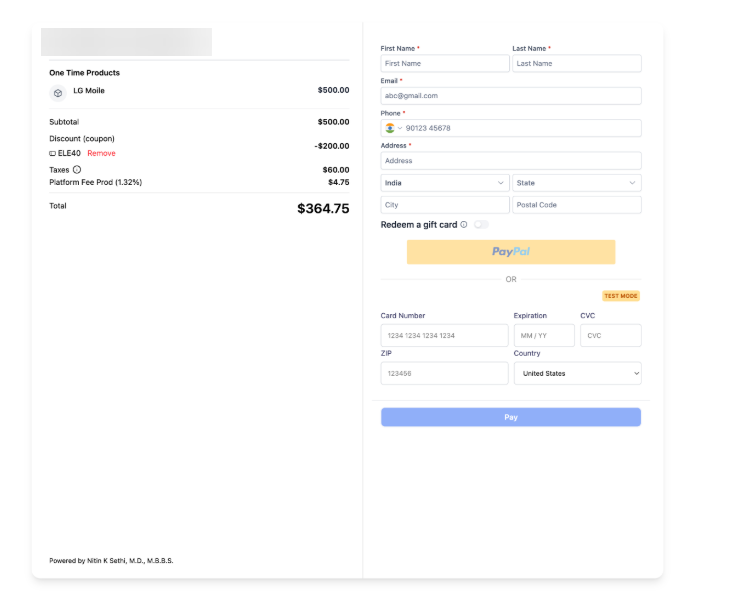
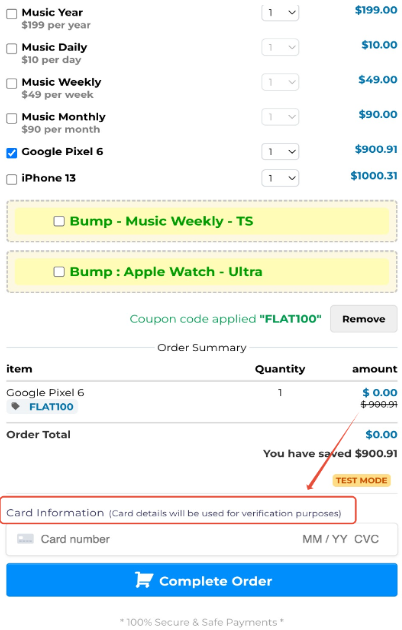
- End customers can redeem a coupon code to get 100% off on the cart value. They would still be required to enter their card details to save credit card info in case it is required for upsells in the next steps.
- Only Stripe can be used to give 100% off on order amounts; this will not work with Paypal. In case both Stripe and Paypal exist, the Paypal option will be hidden.
- Small text "Card details will be used for verification purposes " will appear beside the card element during a $0 checkout
¶ Product Price & Variant Level Coupons
LeadMagicX supports granular coupon application at the specific price or product variant level. This allows for highly targeted promotions, such as discounting a specific membership tier or a particular product size, without affecting other pricing options.
How to Use: Navigate to Payments > Coupons, create or edit a coupon, and use the nested selection view to choose specific prices or variants.
¶ Part 2: Setting up your coupon
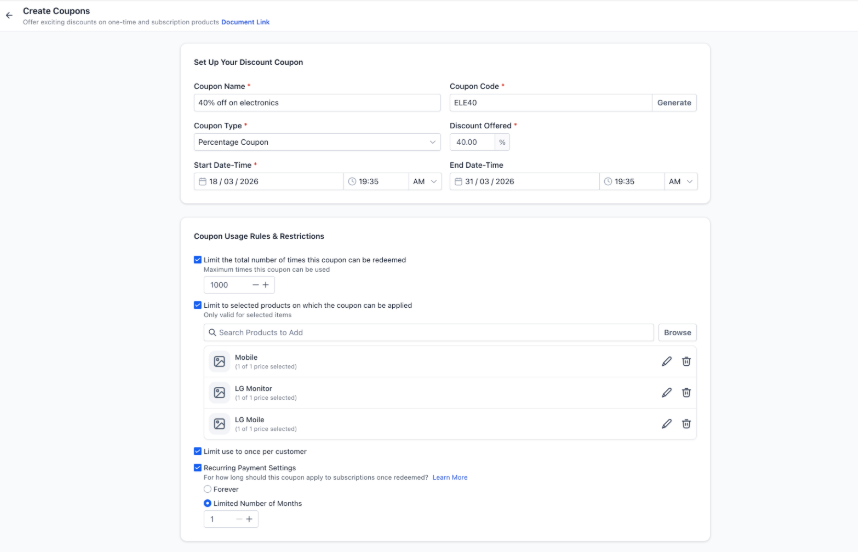
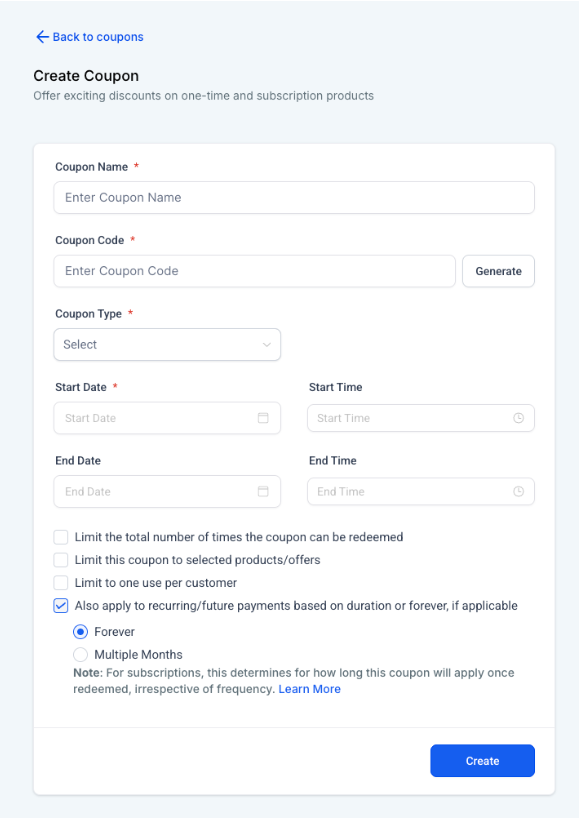
After you’ve selected to create a coupon, you’ll be presented with the following options:
¶ Breaking down each setting
- Coupon Name is for internal use only, this is so you can better navigate through your coupon list.
- The Coupon Code is the code used to activate the coupon discount. You can use the “Generate” button to create a random coupon code, or manually enter your own such as BOGO50
- NOTE : Coupon codes can only contain alphanumeric values and are not case-sensitive. Using the Generate ability, you can generate a 7-character alpha-numeric coupon code
- Coupon Type can be either percentage-based or fixed amount-based. Example: 50% off versus 50 dollars off
- Start Date and Start Time changes when the coupon will go into effect. Start Date is at the minimum required so LeadMagicX knows when the coupon can start being used.
- End Date and End Time changes when the coupon will expire, and no longer be able to be used. You can use this to create a limited-time coupon that will expire at a certain date/time.
- Limiting the number of times the coupon can be redeemed can be used to limit the number of people who can redeem the coupon, such as limiting the first 100 product purchases.
- Limit to selected products on which the coupon can be applied limits which products this is applied to. When this setting is disabled, if coupons are enabled on the order form, these coupons will be available to use on any one-time products that are present.
- Apply to future/recurring payments, if applicable allows users to choose to apply a coupon discount to all future recurring payments. Ifleft unchecked , it will apply only to the first payment while the customer is submitting the order form.
¶ Subscription coupons
Coupons can also be used to give a discount code for subscription-based services. It encourages customers to subscribe by offering discounts on recurring payments. These coupons can provide percentage or fixed amount discounts or even free access for a limited period. They’re used to attract new customers, upsell existing ones, and boost sales.
Limit the Number of Months a Coupon Is Applied to a Subscription
Specify how long a coupon should apply to a subscription. Instead of the coupon being applied indefinitely, businesses can set the coupon to apply for a defined number of months. This setting applies to all payments made within the subscription period, regardless of the payment frequency.
Please Note:
- The feature ensures that subscription frequency (daily, weekly, monthly, quarterly, annually) does not affect how many payments receive the discount—only the defined duration applies.
- For a scheduled subscription, the coupon applies from the start date of the subscription (active or trial), i.e., the scheduled date used as input when creating the subscription.
- Existing coupons maintain their original behavior:
- If the checkbox was previously checked, the default duration is Forever.
- If unchecked, the default duration is once.
Discount Coupons on Subscriptions:
- Attract customers with free trials or promotions.
- Boost revenue by upselling additional products.
- Flexible for various promotional strategies.
- Streamlined checkout enhances conversion rates.
How to Use:
- Generate a unique coupon code.
- Promote the offer across marketing channels.
- Instruct customers to apply the code at checkout.
¶ Use Case
Use Case 1: Limited Time Promotion for New Product Launch
A business is launching a new product and wants to create buzz and drive initial sales. They decided to offer a 20% off coupon for the first 100 customers who purchase the product within the first month of launch. By using a percentage-based coupon with a set redemption limit and expiration date, they can create urgency and encourage early adoption, helping to quickly build momentum and generate initial customer feedback.
Use Case 2: Rewarding Loyalty with Subscription Discounts
To boost customer retention and reward loyal subscribers, a company offers a fixed $10 off coupon for all recurring payments of their subscription service. This coupon is only available to existing customers who have been subscribed for at least six months. By applying the discount to future recurring payments, the business increases customer satisfaction and reduces churn rates, fostering long-term customer loyalty.
PRO TIP:
- Limiting your coupon to certain products is recommended as a best practice unless you intend on them being able to use the discount on every one-time product listed in the order form collectively.
¶ FAQs
Question: Do coupons apply to all products?
Answer: Yes, coupons apply to both one-time and recurring product
**Question: What are the different types of coupons I can create?
Answer: Two types: **
- Percentage discount: Offer a percentage-based discount on an order value
- Fixed discount: Offer a fixed discount irrespective of order value
**Question: Are coupon codes unique?
Answer: **Yes, coupon codes are unique, and no two coupons can be created with the same coupon code
Question: What are the rules for creating a coupon code?
Answer: Coupon codes can only contain alphanumeric values and are not case-sensitive. Using the Generate ability, the user can generate a 7-character alphanumeric coupon code
**Question: What is the coupon name? Is it unique?
Answer: **Coupon names can be used to refer to and relate to coupons for internal purposes. They must not be unique for every coupon, but we highly recommend using unique coupon names for proper identification
Question: What is meant by limiting the total number of times a coupon code can be redeemed?
Answer: Using this, you can limit the total number of successful redemptions you want to offer for the coupon code. This only includes successful redemption and is not dependent on the number of users redeeming the coupon code
**Question: What is meant by limiting to selected products?
Answer: **Using this, you can restrict the coupon usage to selected products only. This means that if you restrict coupon usage to product A, then the coupon can only be applied to product A
**Question: What is the redemption count shown in the list view?
Answer: **This displays the total number of successful redemptions of the coupon code done to date
Question: Will the coupons text box start appearing automatically in order forms?
Answer: If you have created a valid coupon code that can be applied to an order form, then the coupon text box will start appearing on the order form. In case of an order form where no applicable active coupon exists, the order form will not show the coupon application text box
Question: How to see the orders in which the coupon code has been applied?**
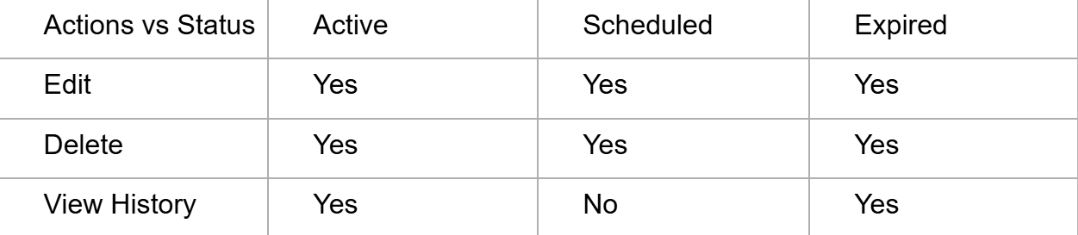
**Answer: Click on Actions ➝ View History and this will redirect to the orders page where only specific orders in which the coupon code was successfully applied
Status vs Actions for coupons:
**Question: Where are the coupon application details available?
Answer: **Order details would contain the coupon code and the discount offered per item against every product line item, in case a coupon code was successfully applied to the order.
**Question: I want to set up a free product(s). Is this supported?
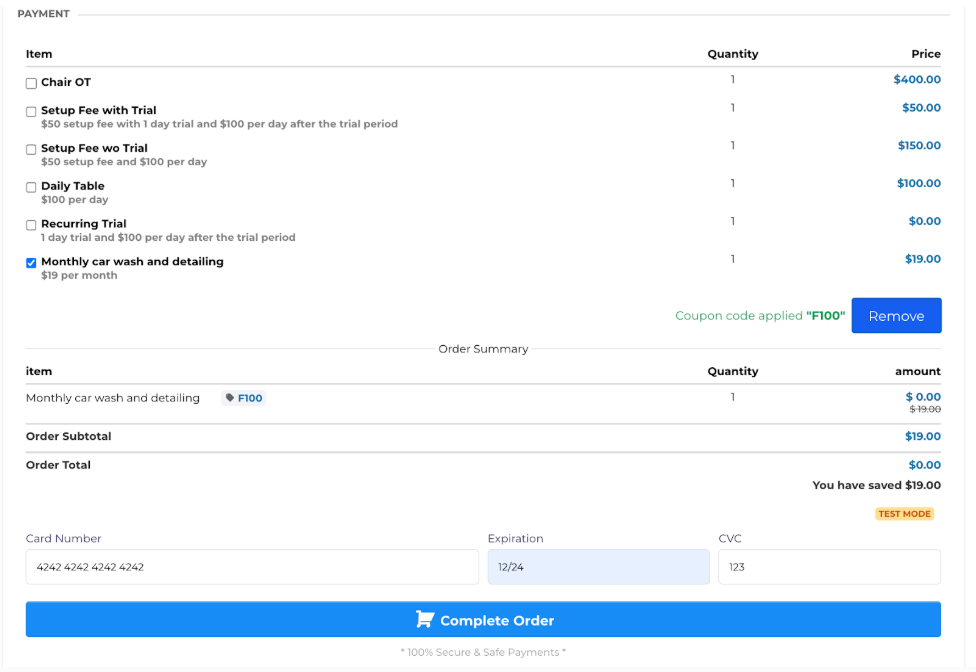
Answer: **Yes, this is possible! Purchasers can redeem a 100% OFF coupon code. They would still be required to enter their card details to save credit card info in case it’s required for upsells/ down sells in the next steps.
Currently, only Stripe can be used to give 100% off on order amounts; this will not work with PayPal. In case both Stripe and PayPal exist, the PayPal option will be hidden.
During checkout with a cart that is $0, the text "Card details will be used for verification purposes " will appear beside the card element.
Question: Will edits to a coupon update past orders?**
**Answer: No, coupon edits only affect future usage. Past orders keep the original discount applied at the time of checkout.
Question: If a customer has two different coupons, can they use both on a single order?**
**Answer: No. Currently, the order form only supports one coupon code per transaction. If a customer tries to enter a second code, it will replace the first one.
Question: Does the coupon discount apply to all future payments for a subscription?
Answer: It depends on your settings. You can choose to “Apply to future/recurring payments” to cover all future charges. Alternatively, you can specify a defined number of months for the discount to last, or leave the setting unchecked to apply the discount only to the first payment.
Question: Is it possible to give a discount that only lasts for the first 3 months of a subscription?
Answer: Yes. Within the subscription settings for the coupon, you can “Limit the Number of Months a Coupon Is Applied” by specifying a defined duration, such as 3 months, after which the price returns to normal.