¶ Coupon Triggers in Workflows: A Step-by-Step Guide
Coupon Triggers in Workflows
In this guide, we’ll show you how to set up coupon triggers within your workflows, helping you automate actions based on coupon activity like redemption, expiration, and usage limits. This feature makes it easier to target customers with personalized offers and manage your marketing campaigns efficiently.
¶ Why This Matters:
Automating actions based on coupon activity ensures timely and personalized interactions with customers. You can target customers the moment a coupon is applied, track redemptions, and manage expired or overused coupons. All these things can be taken care of through streamlined workflows. This improves efficiency and helps you stay on top of your promotions.
¶ Key Features of Coupon Triggers:
- Coupon Code Applied : Triggers when a customer applies a coupon at checkout, regardless of whether they complete the purchase.
- Coupon Code Redeemed : Activates when a coupon is successfully used in a completed transaction.
- Coupon Redemption Limit Reached : Notifies when a coupon has been used to its maximum allowed limit.
- Coupon Code Expired : Triggers when a coupon reaches its expiration date.
¶ How to Set Up Coupon Triggers in Workflows:
¶ Step 1: Access the Workflow Section
- Navigate to Automation > Workflows.
- Click Create New Workflow to begin setting up your triggers.
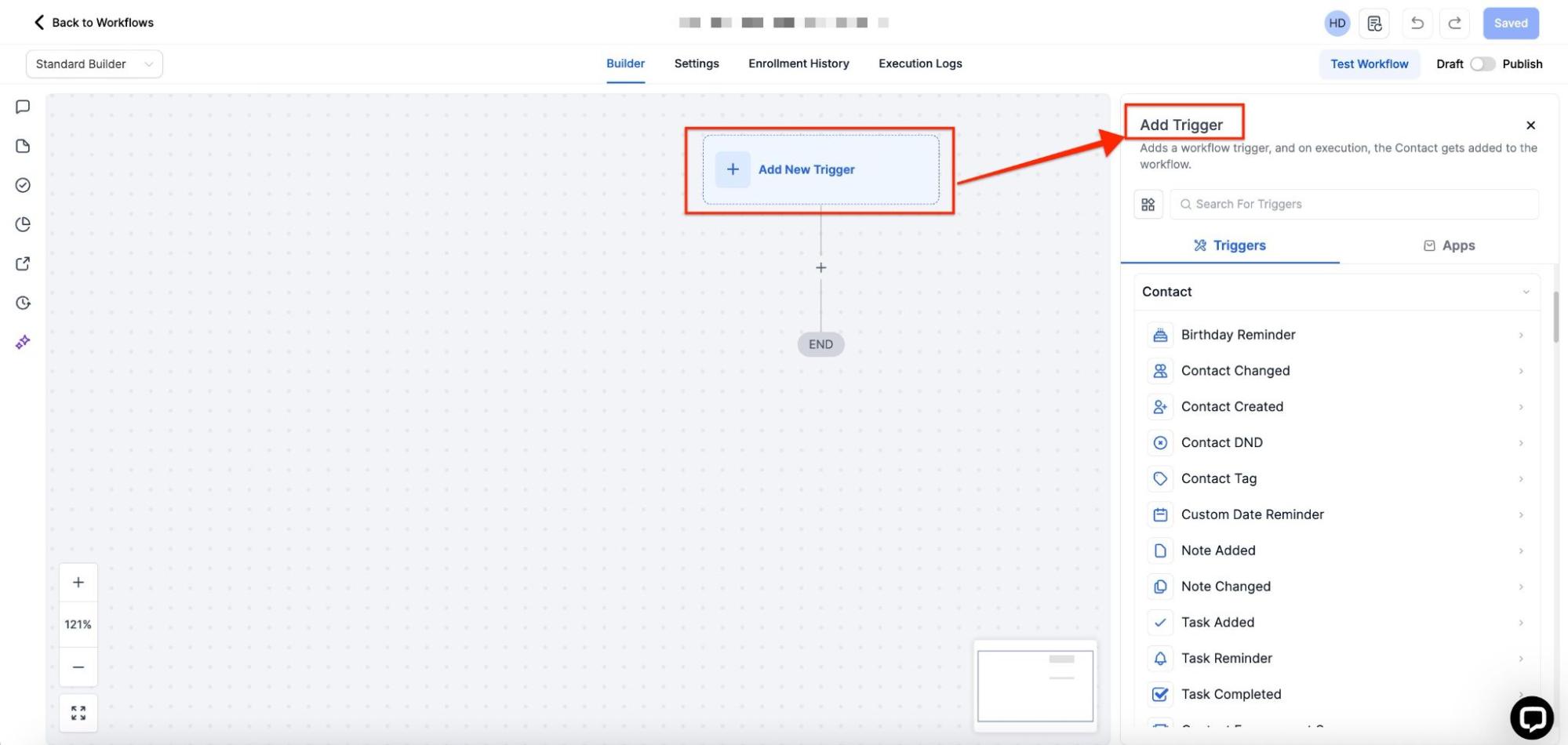
¶ Step 2: Add a New Trigger
- Select Add New Trigger to open the options.
- Choose one of the coupon-related triggers:
- Coupon Code Applied
- Coupon Code Redeemed
- Coupon Redemption Limit Reached
- Coupon Code Expired
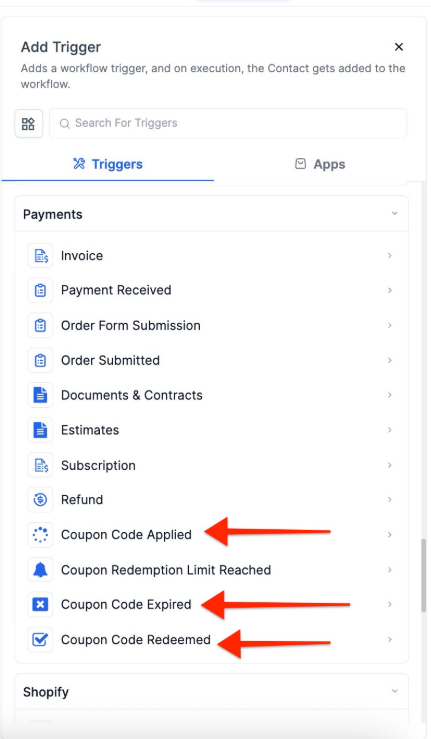
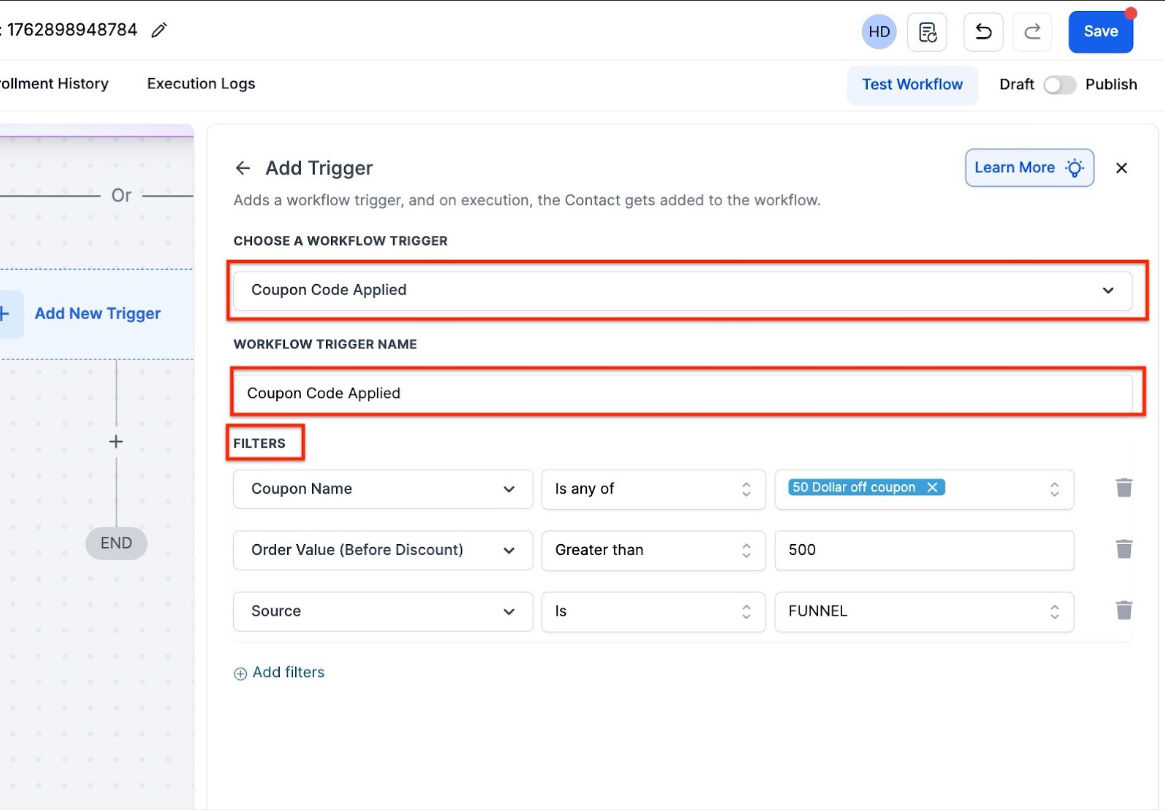
¶ Step 3: Customize the Trigger Conditions
- Once you’ve selected a trigger, customize the conditions.
- For example, you can specify the coupon code, product type, or order value to fine-tune when the trigger is activated.
Note: Coupon Code Applied and Coupon Code Redeemed, you can apply filters based on Product , including dependent options like Price and Variant.
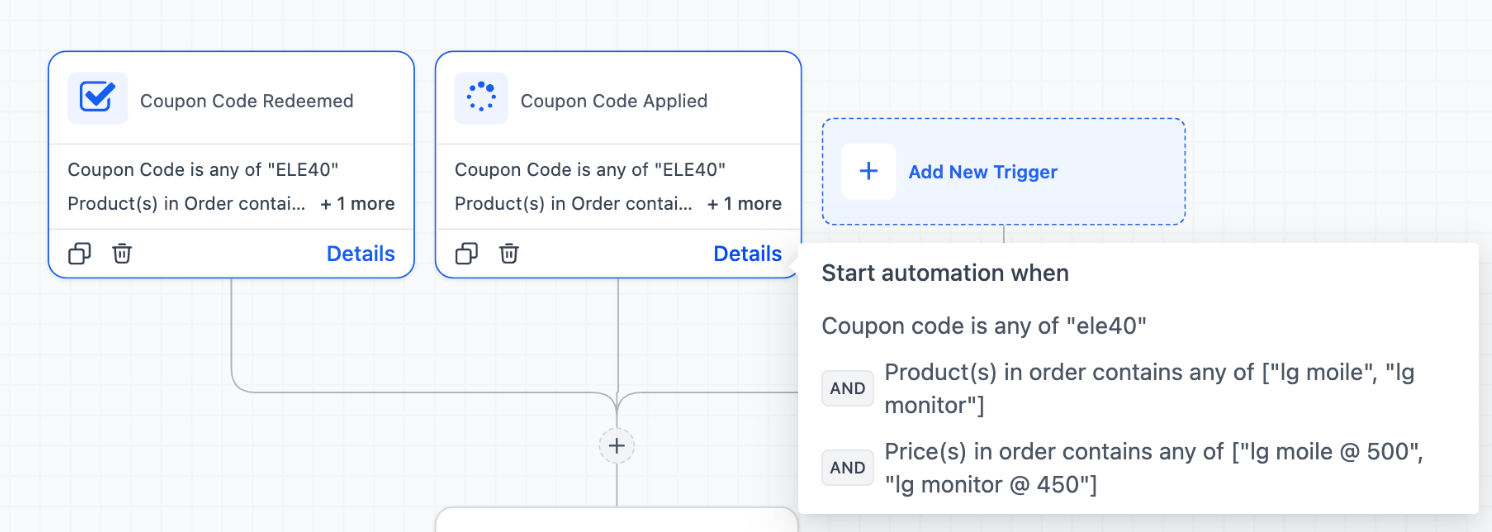
¶ Step 4: Set Up the Action
- After defining your trigger, select the actions that should occur when it’s triggered. Some examples include:
- Sending an email to the customer.
- Notifying the sales team when a coupon is redeemed.
- Deactivating a coupon once its usage limit is reached.
¶ Step 5: Activate the Workflow
- Review your workflow, and once satisfied with the configuration, click Save and Publish.
¶ Real-World Examples:
- Coupon Code Applied : A customer applies a coupon at checkout but doesn’t complete the purchase. You can trigger an automated follow-up email offering a limited-time bonus to encourage them to complete the purchase.
- Coupon Redemption Limit Reached : If a coupon reaches its maximum usage, you can automatically deactivate it and notify your marketing team to avoid overselling.
- Coupon Code Expired : Send a reminder to customers 24 hours before their coupon expires, encouraging them to use it before it becomes inactive.
¶ FAQs
Question: How do I access the coupon trigger settings?**
**Answer: Navigate to Automation > Workflows, then create a new workflow and select Add New Trigger to see the coupon-related options.
Question: Can I set up multiple triggers in one workflow?**
**Answer: Yes, you can add several coupon triggers within a single workflow. For example, you can trigger a follow-up email when a coupon is applied and another when it expires.
Question: Are there any specific conditions I can set for coupon triggers?**
**Answer: Yes, you can filter triggers based on the coupon code, product type, order value, coupon value, and more.
Question: Can I apply different actions for each coupon trigger?**
**Answer: Absolutely! Each trigger can have its own set of actions, such as sending emails, applying tags, or notifying your sales team.
Question: What happens if a customer doesn’t redeem the coupon?**
**Answer: If the coupon is applied but not redeemed, you can trigger follow-up actions like sending reminders or offering incentives to complete the purchase.
Question: If I delete a coupon, will the “Expired” workflow still run?
Answer: No. If a coupon is deleted, it effectively ceases to exist in the system’s logic. If you want a workflow to fire, you should let the coupon reach its natural Expiration Date rather than deleting it manually.
Question: What is the difference between “Coupon Code Applied” and “Coupon Code Redeemed”?
Answer: Coupon Code Applied triggers the moment a customer enters the code at checkout, even if they don’t finish the transaction. Coupon Code Redeemed only activates once the payment is successfully completed and the transaction is finalized.