¶ Adding Optional Items to Documents & Contracts
**Adding Optional Items to Documents & Contracts | Help Library
**
LeadMagicX supports sending quotes with optional items in an exciting development for the documents and contracts product. This significantly upgrades the functionality, giving users more flexibility and control over their document management processes. Think of it as a robust alternative to traditional solutions like DocuSign and PandaDoc, but with added features tailored to your needs.
¶ Key Features
¶ Send Quotes with Optional Items
One of the standout features is the ability to include optional items in quotes. This is particularly useful for scenarios where a primary service or product is offered, but additional add-ons or optional items are also available. Here’s how it works:
1. Toggle Optional Items : Users can designate certain items in a quote as optional. This means that while the main service or product remains fixed, clients can choose additional items based on their preferences.
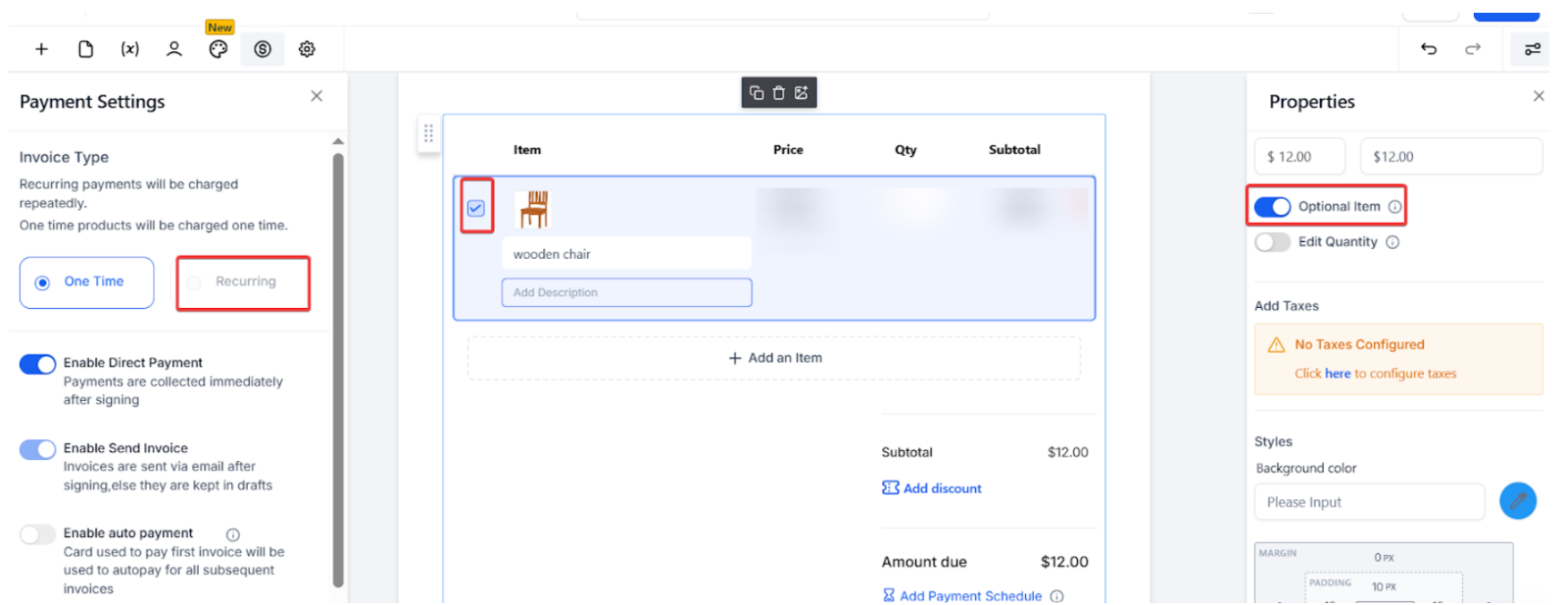
2. Editable Quantities : For each optional item, users can allow the quantity to be editable by the signer. This flexibility ensures that clients can specify exactly how much of an optional item they require.
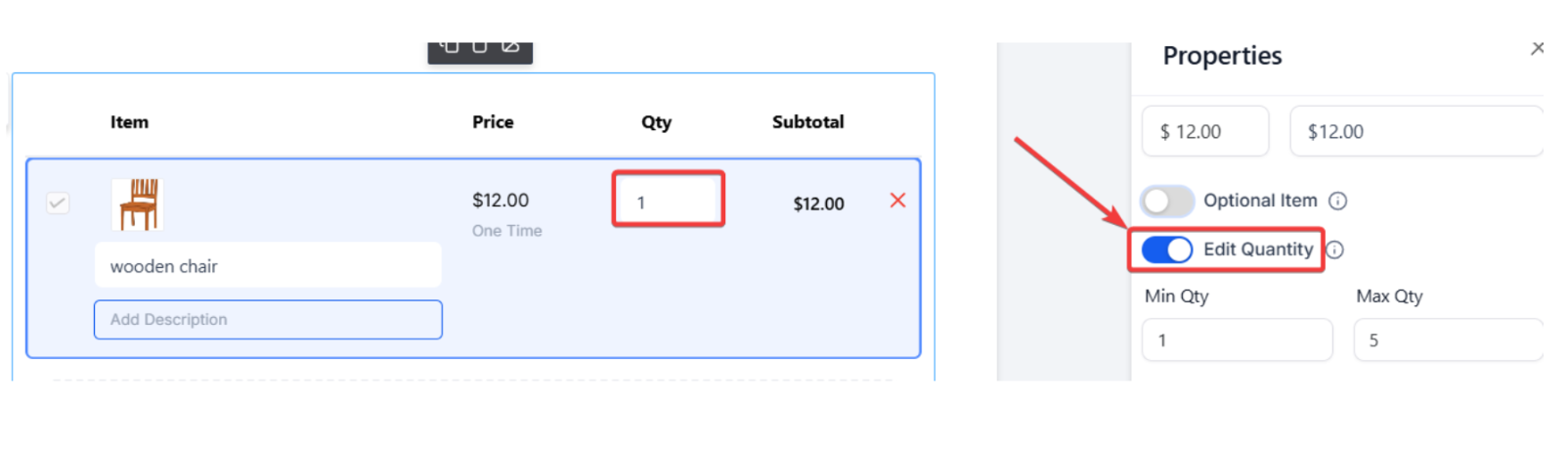
3. Set Quantity Limits : To maintain control over the quantities, users can set minimum and maximum limits on how many units of an optional item can be selected. This prevents over-ordering and ensures that the orders remain within manageable limits.
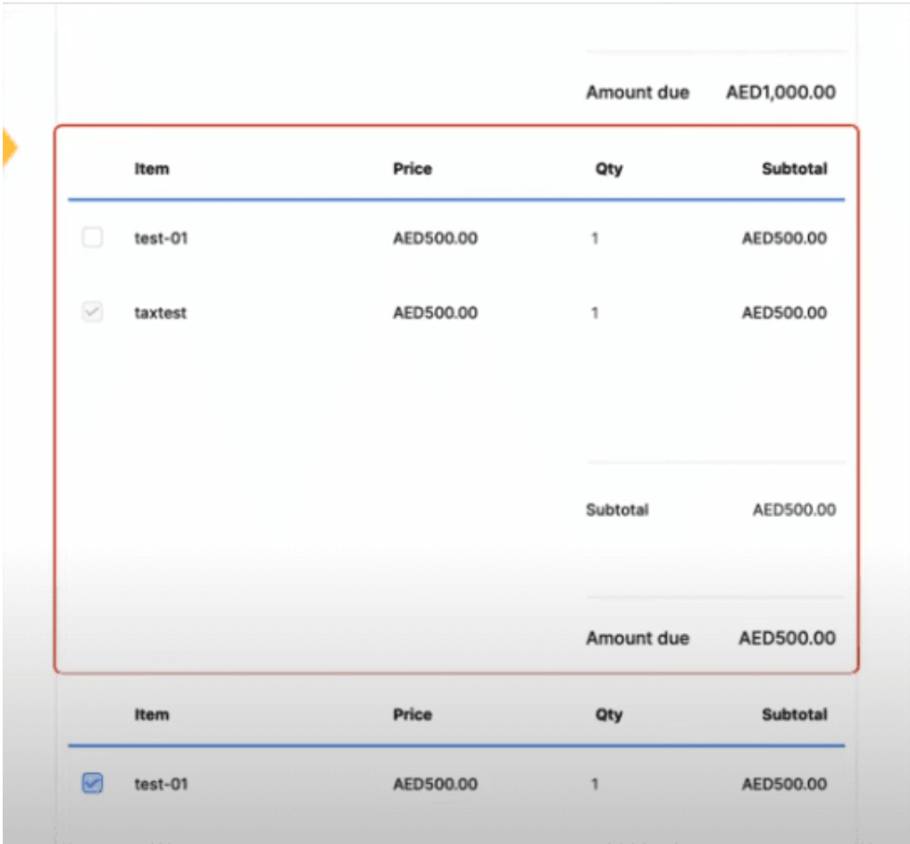
The product list within a quote is automatically assigned to the primary recipient, and the total amount updates dynamically based on the items selected by the signer. This seamless integration ensures that the final quote is always accurate and reflective of the client’s choices.
- Enhanced Interface : The interface includes an editable quantity field, allowing users to make quantities adjustable while also setting limits. This is particularly beneficial for businesses that offer scalable services or products.
- Tax Calculation : The interface also accommodates tax calculations, providing a clear breakdown of costs for both the primary and optional items.
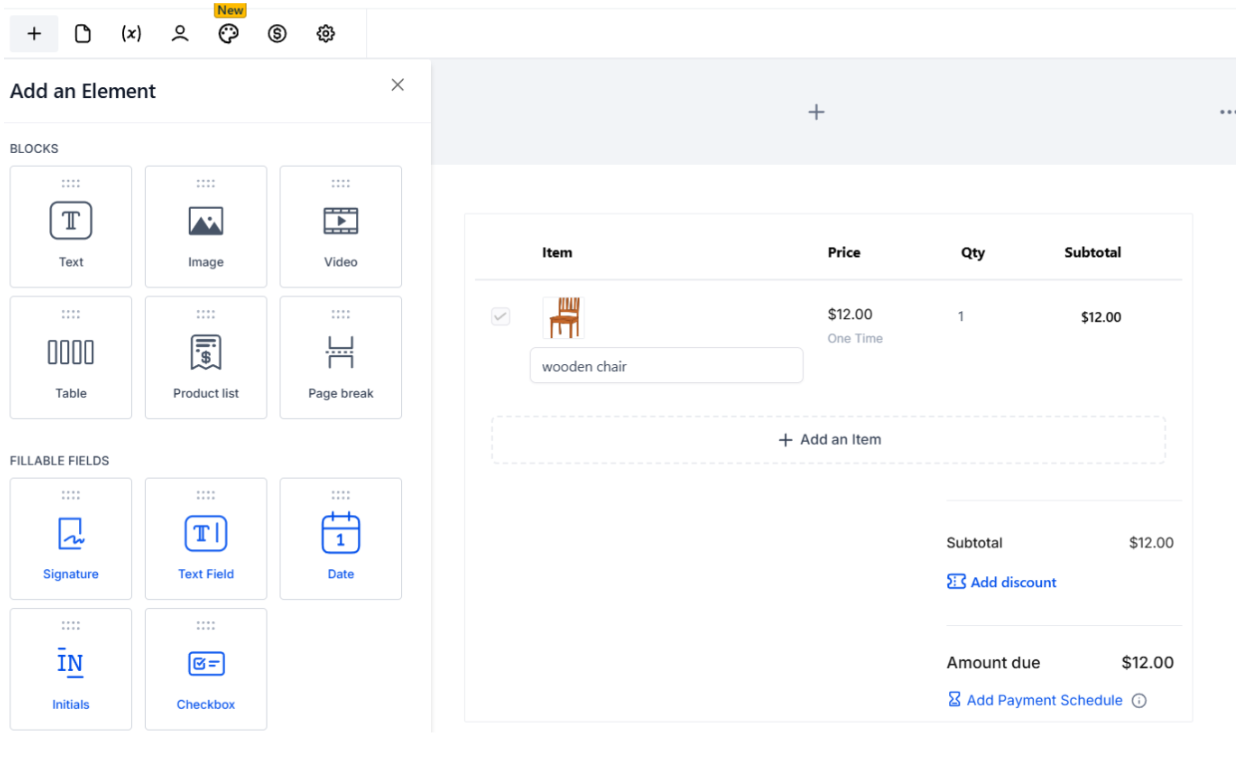
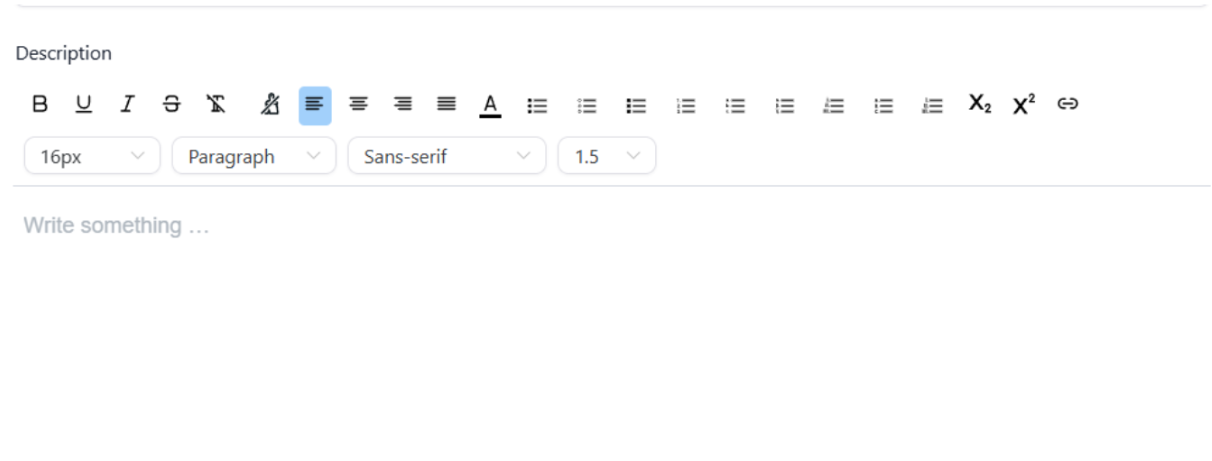
- Description: The user can add product descriptions within the same product list.
- Add a product and the description gets auto-populated
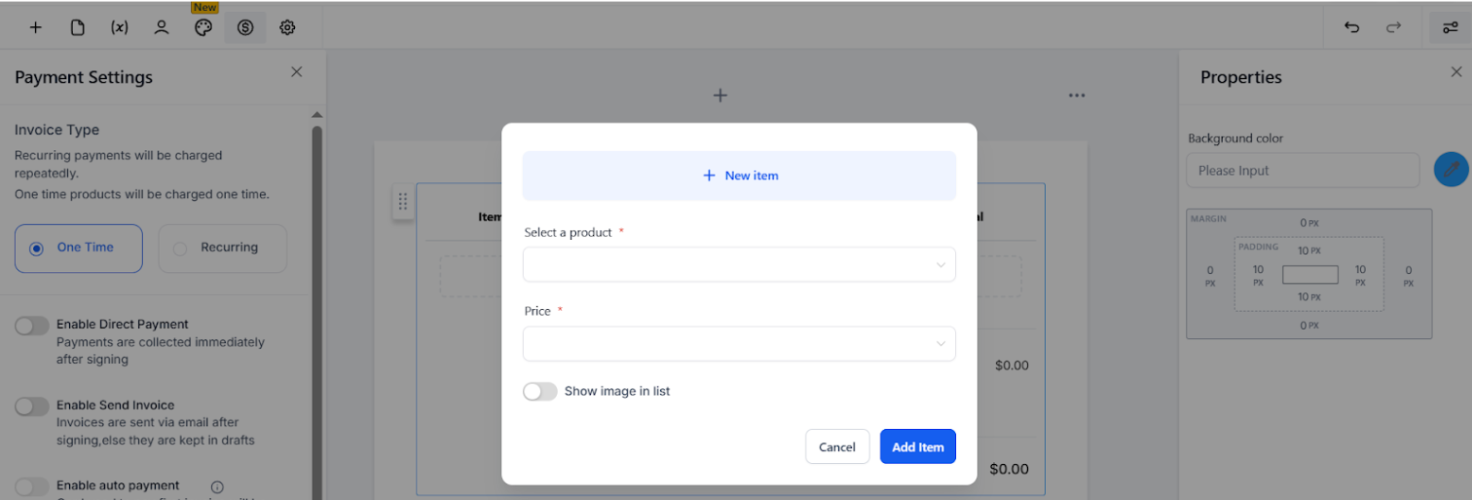
- Click on the description and edit it if needed
¶ Practical Applications
This is designed to cater to various business needs. For instance:
- Service Providers : A cleaning service can offer a base package with optional add-ons like deep cleaning or window washing, allowing customers to customize their orders.
- Product Sellers : An electronics retailer can provide a main product, such as a laptop, with optional accessories like a mouse, keyboard, or extended warranty, giving customers the ability to select exactly what they need.
¶ FAQs
Question: What is the feature introduced in LeadMagicX for sending quotes?**
**Answer: LeadMagicX supports sending quotes with optional items, allowing users to offer a primary service or product along with additional optional items that clients can select based on their preferences.
Question: How do optional items work in the quotes feature?**
**Answer: Users can toggle items in a quote as optional, meaning they are not required for the main service or product but can be chosen by the client if desired. This adds flexibility to the quotes and allows clients to customize their orders according to their needs.
Question: Can clients adjust the quantity of optional items in the quotes?**
**Answer: Yes, clients can adjust the quantity of optional items in the quotes. LeadMagicX allows users to make the quantity of each optional item editable, with the option to set minimum and maximum limits to maintain control over the quantities ordered.
Question: How does the platform handle tax calculations for optional items?**
**Answer: The interface includes tax calculations, providing a clear breakdown of costs for both the primary and optional items. This ensures that the total amount is always accurate and reflective of the client’s choices.
Question: Where can I find the quotes feature on the LeadMagicX platform?**
**Answer: You can access the quotes feature by navigating to the ‘Documents and Contracts’ section within the LeadMagicX platform.
Question: What happens to the total amount of a quote when optional items are selected?**
**Answer: The total amount of the quote updates dynamically based on the items selected by the signer. This ensures that the final quote reflects the client’s choices accurately, including any optional items they may have added.
Question: Is there a way to add descriptions to items in a quote?**
**Answer: Yes, the enhanced interface allows users to add product descriptions directly within the product list, providing additional information to the clients about each item.
Question: How does this feature compare to traditional solutions like DocuSign and PandaDoc?**
**Answer: This feature provides a more robust and flexible alternative to traditional solutions like DocuSign and PandaDoc by allowing for the inclusion of optional items, editable quantities, and tax calculations directly within the quotes, tailored specifically to the needs of the platform’s users.
Question: How can I customize my service or product order?**
**Answer: You can personalize your order by selecting from a base package and adding optional extras, such as additional services or accessories, to tailor it to your specific needs. Whether you’re booking a cleaning service or purchasing electronics, customization options are available to suit your preferences.
Question: How does the system assign products within a quote?**
**Answer: All products in a quote are automatically assigned to the primary recipient, and the total amount updates dynamically based on selections made by the signer.
Question: Can I edit product descriptions within a quote?**
**Answer: Yes, users can add or edit product descriptions within the product list of a quote. When you add a product, the description is auto-populated, but you can click on it to make any necessary changes to the description before sending the quote.
Question: Can I control the minimum and maximum number of units a client can select for an optional item?
Answer: Yes. To maintain control over orders, users can set specific quantity limits, including both minimum and maximum thresholds, for any optional item where the quantity is set to be editable by the signer.
Question: Is it possible to offer scalable services, like a “per hour” or “per unit” add-on?
Answer: Yes. By using the Editable Quantity Field , you can offer scalable options. This is ideal for service providers who want to let clients decide exactly “how much” of an extra service they want to purchase.
Question: What happens if a client selects an optional item but I’ve run out of stock?
Answer: The Documents and Contracts feature currently does not sync with real-time inventory levels. We recommend setting the Maximum Quantity Limit on optional items to match your available stock to prevent over-ordering.
Question: Can I let my clients choose how many of an optional add-on they want to buy?
Answer: Yes. You can enable the “Editable Quantities” feature for any optional item. This gives the signer the ability to type in their desired amount directly on the document.