¶ How To Restore Deleted Opportunities
If you’ve accidentally deleted an opportunity, you can now restore it within the Opportunities tab. Follow these steps to recover your deleted opportunities:
How-to steps:
1. Navigate to the Opportunities Tab
- Navigate to the opportunities tab in your account.
2. Access the Restore Option
- Click on the three dots located in the top right corner and select ‘Restore’ from the dropdown menu.

3. View Deleted Opportunities
- This action will take you to the audit logs
- Here you can view all deleted opportunities.
4. Select Opportunity to Restore
- Locate the opportunity you want to restore, click on the three dots next to it and select the ‘Restore’ option.

5. Verify Restoration
- The restored opportunity will reappear in the pipeline under the Opportunities tab.
By following these steps, you can easily restore any deleted opportunities and ensure they are back in your workflow.
Tracking Opportunities in Audit Logs:
You can track down the opportunities in the audit logs and see the complete history of it with the opportunity ID.
How to do:
**1.**Navigate to the Opportunity Tab
- Open the Opportunity tab in your application
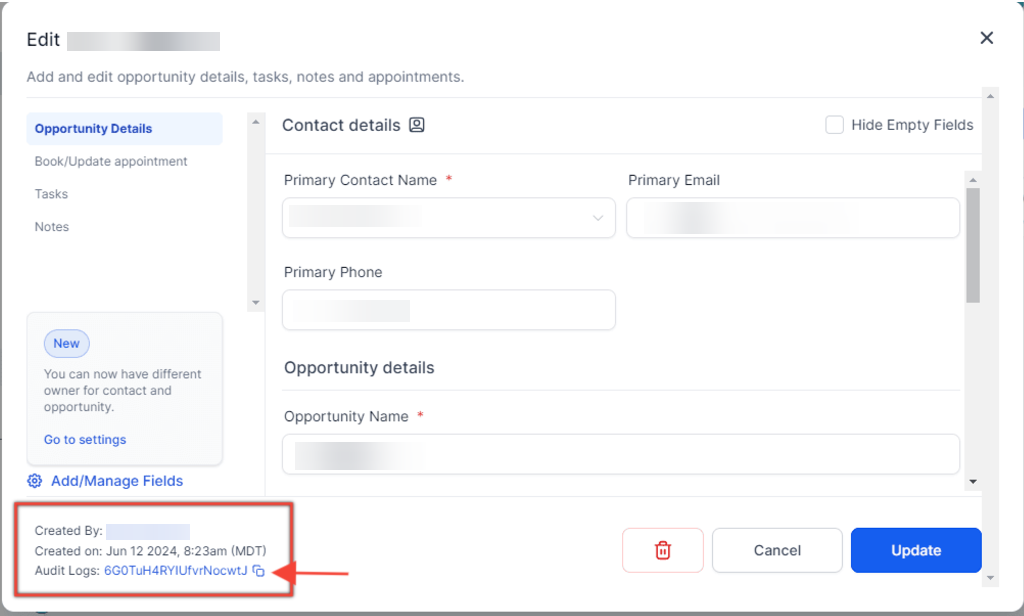
2. Copy the Opportunity ID
- Click on the opportunity card.
- Click on the copy icon located at the bottom left to copy the opportunity ID.
3. Go to the Settings Tab
- Navigate to the Settings tab.
- Select Audit Logs from the options.
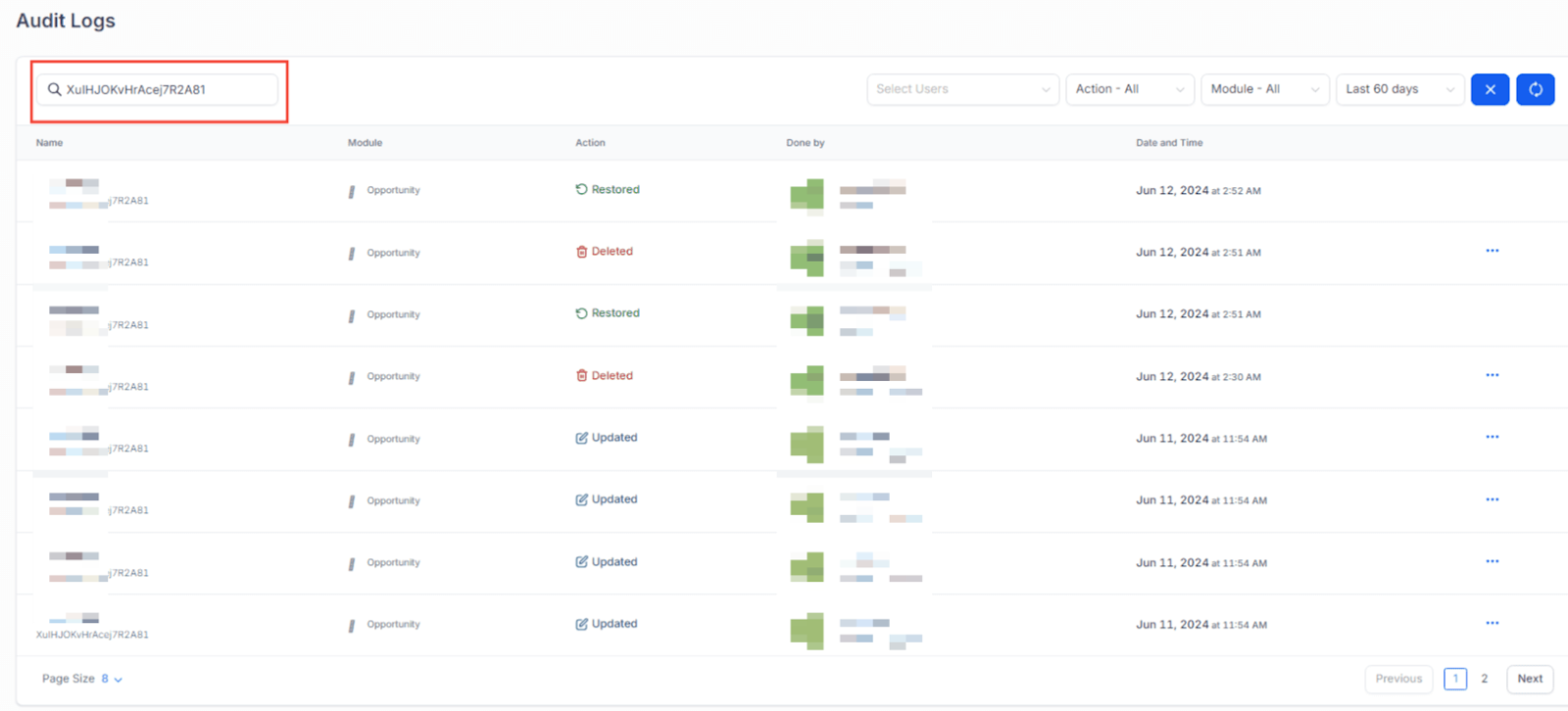
4. Search for the Opportunity ID
- ** ** Paste the copied opportunity ID into the Search Document ID field.
5. View the Specific Opportunity in Audit Logs
- The specific opportunity will be displayed in the audit logs, allowing you to track its details from there.
¶ FAQs
Question: Can I restore an opportunity that was deleted a long time ago?
**Answer: **The system retains an opportunity’s data for up to 60 days and can be restored if needed. Simply follow the steps to access and restore it from the Opportunities tab.
Question: How can I find the Opportunity ID for a deleted opportunity?
**Answer: **To find the Opportunity ID, go to the Opportunities tab, click on the opportunity card, and use the copy icon to copy the ID from the bottom left of the card.
Question: Is there a way to see the history of an opportunity after it’s been restored?
**Answer: **Yes, you can track the entire history of the restored opportunity in the audit logs by searching with the Opportunity ID.
Question: What happens if I cannot find the deleted opportunity in the audit logs?
**Answer: **If the deleted opportunity is not available in the audit logs, it may no longer be recoverable. Please ensure you regularly monitor and manage your opportunities to avoid permanent loss.
Question: Can I restore multiple opportunities at once?
**Answer: **Currently, opportunities must be restored individually by selecting each one from the deleted opportunities list.
Question: Is there a time limit for restoring opportunities?
Answer: Yes, opportunities can only be restored within 60 days of deletion. After that period, the data is permanently removed.
Question: If I deleted a contact and their opportunity, will restoring the opportunity also restore the contact?**
**Answer: No. Restoring an opportunity only recovers the sales deal. If the Contact record itself was also deleted, you must restore the Contact from the “Contacts” audit logs separately to ensure the two are linked again.
Question: Will a restored opportunity return to its original stage in the pipeline?
Answer: Yes. When you restore an opportunity, it returns to the exact pipeline, stage, and status (Open, Won, Lost, Abandoned) it was in at the precise moment it was deleted.