¶ How to Add SEO Descriptions and Keywords to Your Ecommerce Store
Adding SEO descriptions and keywords to your products is a powerful way to improve your e-commerce store’s visibility on search engines like Google. By optimizing your product listings, you can increase the chances of your products being discovered, ultimately boosting your revenue. This article will guide you through the process of adding SEO descriptions and keywords to your products, highlighting the key features and benefits of this practice.
¶ Key Features and Benefits
- Increased Visibility: Optimized product listings are more likely to appear in search engine results, making it easier for potential customers to find your products.
- Higher Click-Through Rates: Well-crafted SEO titles and descriptions can attract more clicks from search engine results pages (SERPs).
- Improved Sales: Increased visibility and click-through rates can lead to higher sales and revenue for your e-commerce store.
- Brand Consistency: Customizing SEO elements ensures that your product listings align with your brand voice and message.
¶ How to Add SEO Descriptions and Keywords
¶ Step 1: Navigate to Product Settings
- Click on Payments on the left side menu.
- Hover over Products at the top and select Products.
You can either create a new product by clicking on the Create Product button or select an existing product to edit.
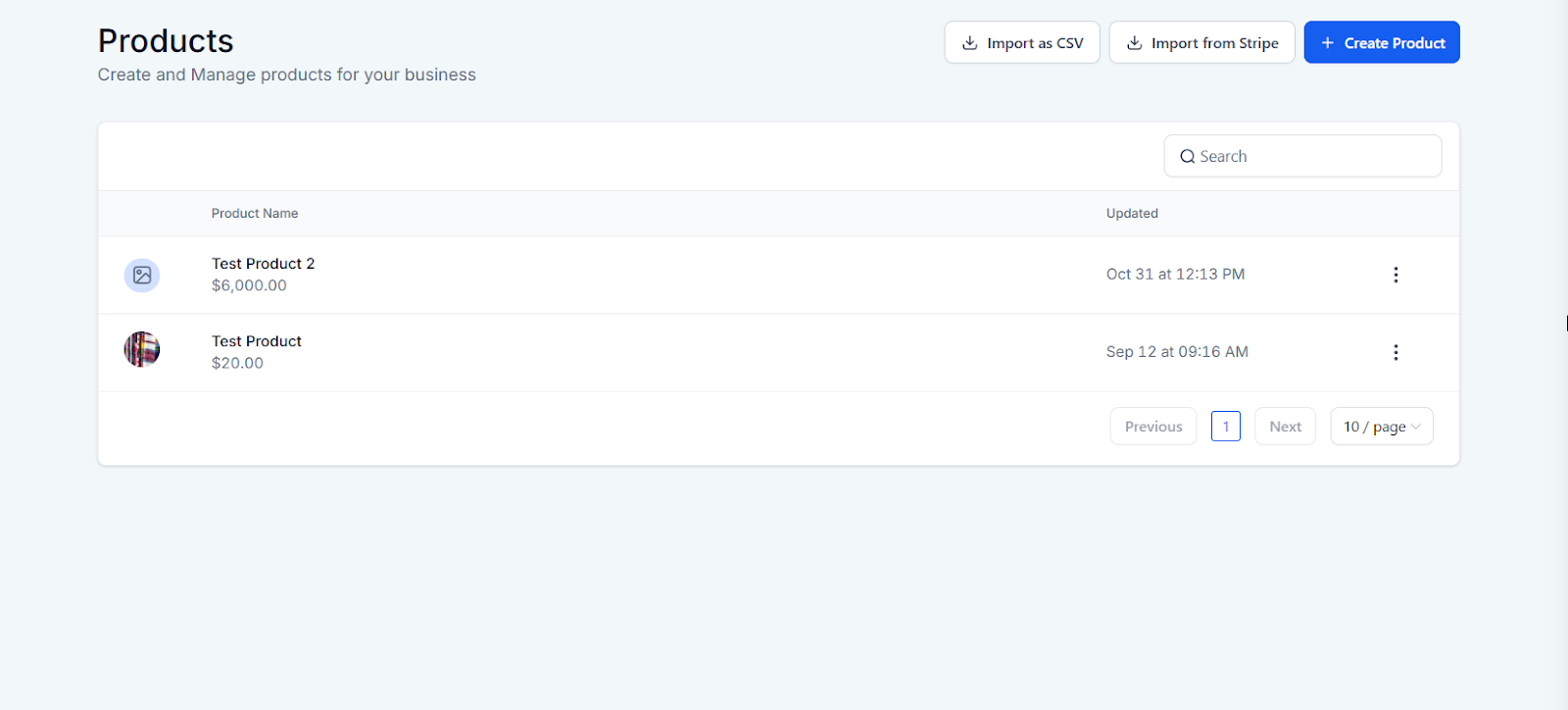
¶ Step 2: Enable Search Engine Listing
- Ensure that the ‘Include in Online Store’ option is toggled on. If it is off, the SEO settings will not be available.
- Scroll down to the bottom to find the SEO settings.
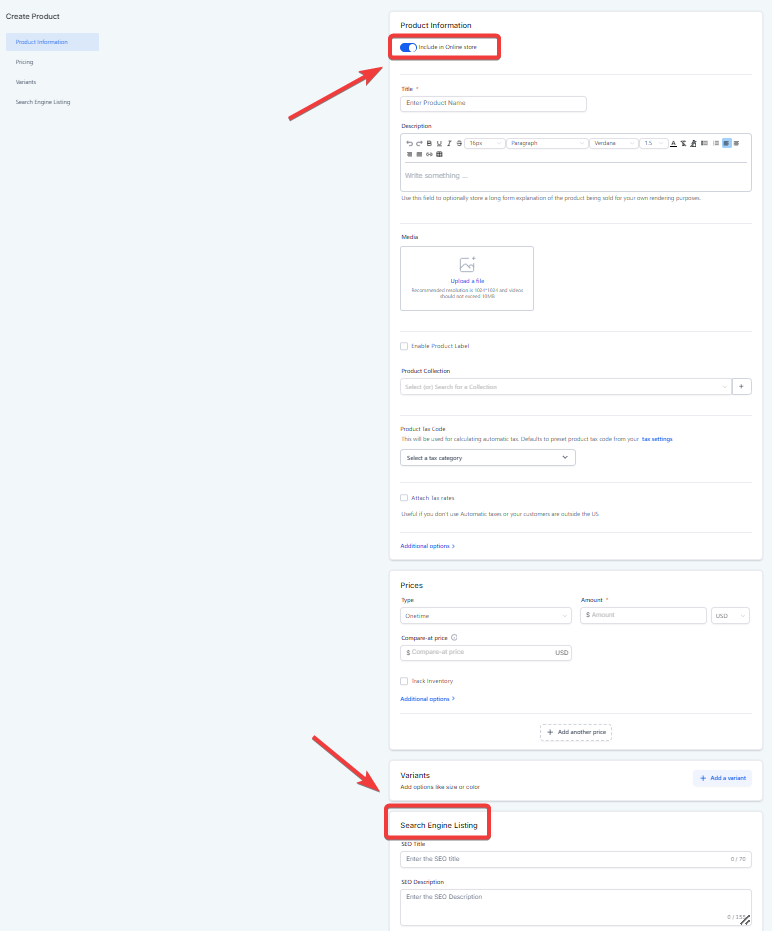
¶ Step 3: Add SEO Descriptions and Keywords
- SEO Title: Enter a catchy and relevant title for your product. Include keywords that you want to rank for. For example, “Cute Portable Cups for Dogs.”
- SEO Description: Write a brief and enticing description that includes your keywords. This description should make potential customers want to click on your link. Remember, there is a maximum of 155 characters for the SEO description.
- Handle (URL): Ensure the keyword is included in the URL to help with ranking on search engines. Each product must have a unique URL.
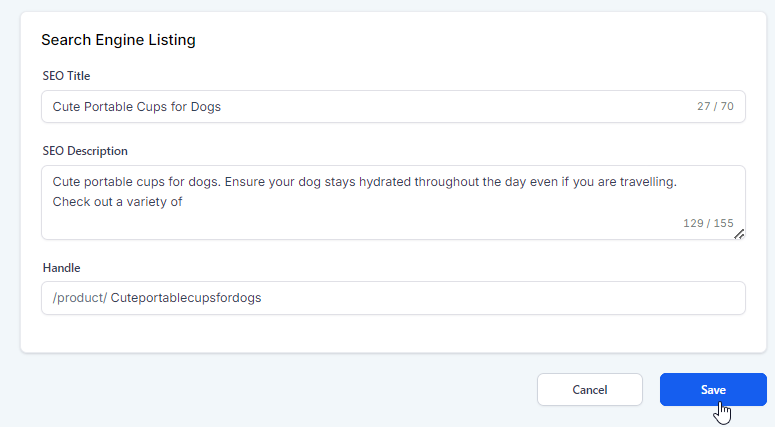
¶ Step 4: Save Your Changes
- After adding your SEO title, description, and handle, click Save to apply the changes.
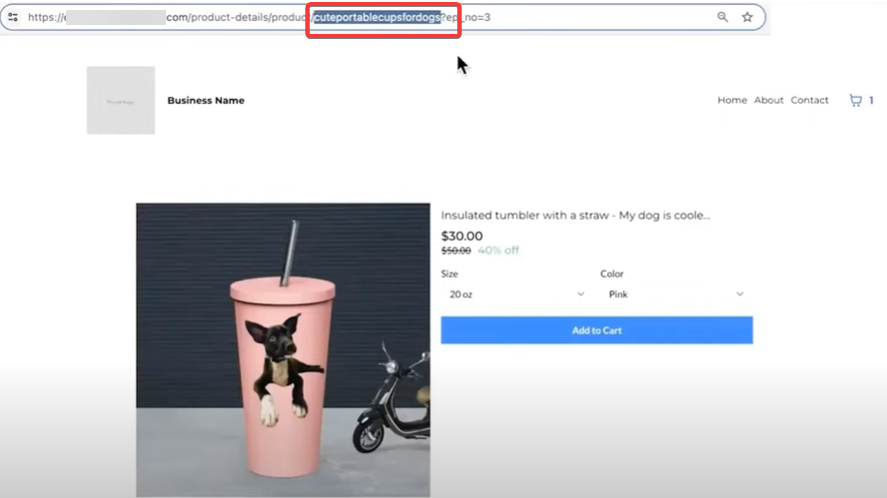
- Verify that your product URL includes the keyword and that the changes are reflected in your store.
¶ Pro Tips
- Keyword Research: Use tools like Google Keyword Planner to find the best keywords for your products.
- Enticing Descriptions: Make your meta descriptions as enticing as possible to increase the likelihood of clicks.
- Consistency: Ensure that all your product listings are optimized similarly to maintain brand consistency.
¶ FAQ
Question: Can I use the same URL for multiple products?
Answer: No, each product must have a unique URL to ensure proper indexing and ranking on search engines.
Question: What is the character limit for the SEO description?
Answer: The SEO description should not exceed 155 characters to ensure it is displayed correctly in search engine results.
Question: Why is it important to include keywords in the URL?**
**Answer: Including keywords in the URL helps search engines understand the content of the page, improving the chances of ranking higher in search results.
Question: Can I edit SEO settings for existing products?
Answer: Yes, you can update the SEO title, description, and URL for any existing product by navigating to the product’s settings and editing the SEO section
Question: Any tips for writing effective SEO descriptions?
Answer: Make descriptions brief, engaging, and keyword-rich. Focus on enticing potential customers to click while maintaining clarity and alignment with your brand voice.
Question: Why am I unable to see the SEO settings at the bottom of my product page?
Answer: The SEO settings only appear if the “Include in Online Store” option is toggled ON. If this is disabled, the SEO configuration section will remain hidden.
Question: How long does it take for my new SEO title and description to show up on Google?
Answer: It depends on how often Google “crawls” your site. Generally, it can take anywhere from a few days to a few weeks. To speed things up, you can manually request an indexing update through your Google Search Console.