¶ Security Headers For Funnels And Websites
Security Headers For Funnels And Websites
The ability to add custom security headers to funnels and websites equips users with the power to fortify their online assets against potential attacks, providing an additional layer of protection and peace of mind. These headers act as safeguards against various vulnerabilities and attacks, mitigating risks associated with malicious activities. By empowering users to configure custom response headers, this feature offers a proactive approach to enhancing security and safeguarding online assets.
¶ Overview of the Feature:
The addition of custom security headers allows users to define specific instructions that are sent to the browser when their funnels or websites are loaded. These instructions dictate how the browser should behave, helping to prevent certain types of attacks and vulnerabilities. With this feature, users can tailor their security measures to suit their specific needs and requirements, thereby bolstering the overall security posture of their online assets.
¶ How to Utilize the Feature:
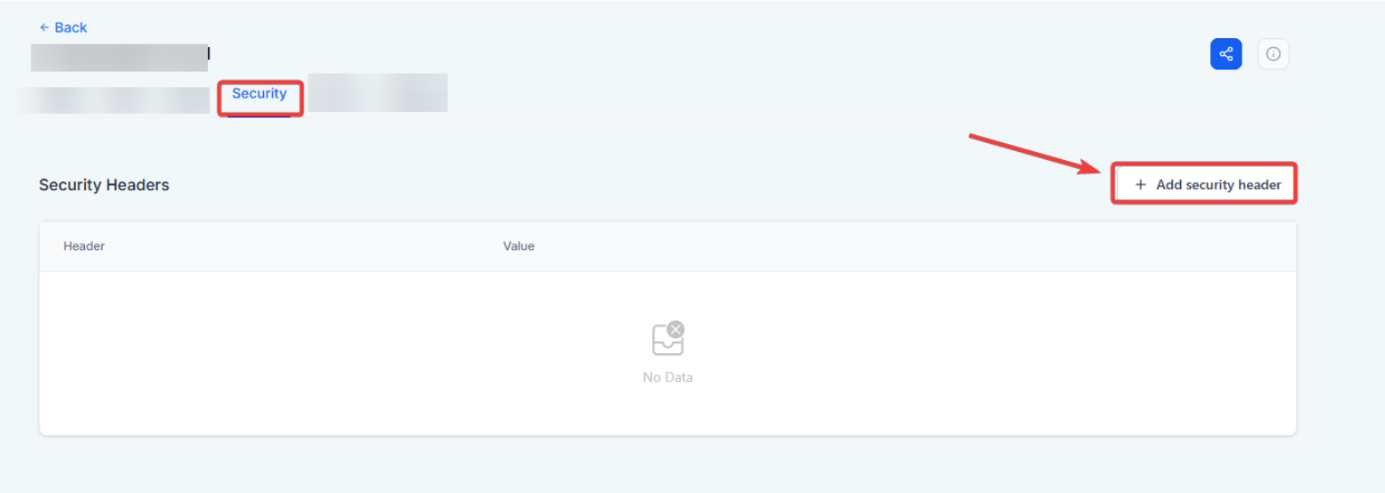
- Access Security Settings: Navigate to Sites on the left > Funnels at the top > Select the particular funnel and click on the security tab within settings.
- Add Security Headers: Click on the option to add a new security header. This will open a modal where you can enter the header name and value.
- Configure Header Values: Define the header name and specify its corresponding value based on your security requirements. You can refer to standard security practices or consult with security experts for guidance on appropriate configurations.
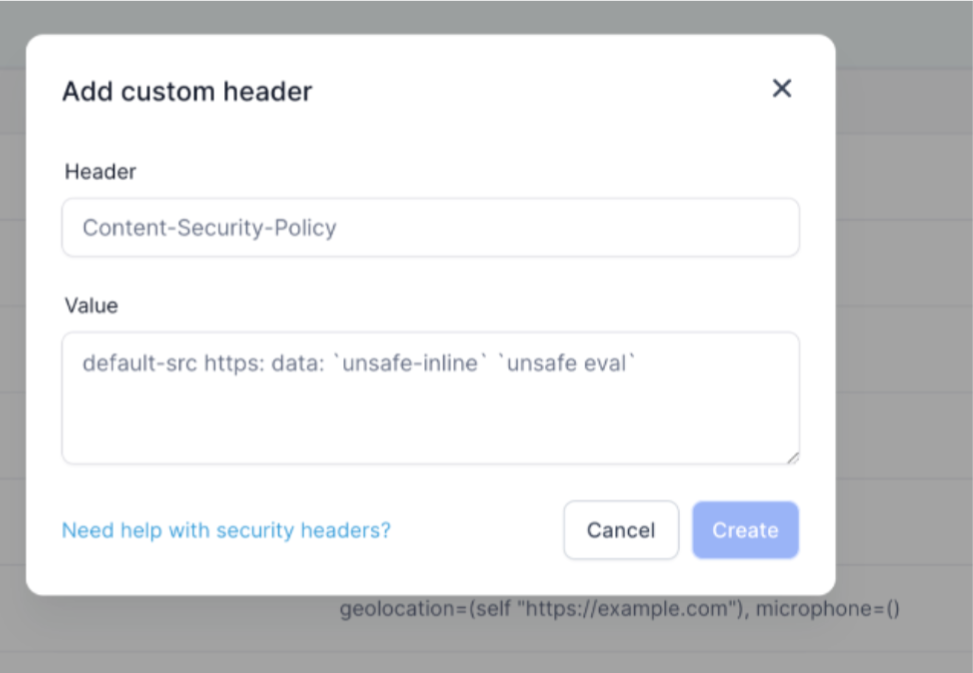
- Save Changes: Once you have configured the security header, save your changes to apply them to your funnel or website. The custom header will now be sent to the browser whenever the page is loaded, bolstering its security defenses.

¶ Benefits of Custom Security Headers:
- Enhanced Protection: Custom security headers provide an additional layer of protection against various vulnerabilities and attacks, safeguarding online assets from potential threats.
- Flexibility and Control: Users have the flexibility to define and configure security headers according to their specific security needs, allowing for tailored security measures.
- Proactive Security Measures: By proactively implementing custom security headers, users can mitigate risks and strengthen the overall security posture of their funnels and websites.
¶ ** Pro Tips**
- UseContent-Security-Policyto Limit External Scripts: This is one of the most powerful headers to prevent XSS attacks. Start with default-src ‘self’; and expand as needed.
- Block Iframe Embedding: Use X-Frame-Options: DENY to stop your site from being embedded in other sites, preventing clickjacking.
- Prevent MIME-Type Sniffing: Use X-Content-Type-Options: nosniff to tell browsers not to guess file types, reducing the risk of malicious content rendering.
- Enable HTTPS Everywhere: Combine Strict-Transport-Security with SSL certificates to enforce HTTPS and block any non-secure connections.
- Test Your Configuration: Use browser developer tools or online scanners like [SecurityHeaders.com] (remove branding in actual article) to validate your settings.
¶ FAQs
Question: What are custom security headers?**
**Answer: Custom security headers are HTTP headers that you can configure to enhance the security of your funnels and websites. They instruct the browser on how to handle certain security aspects, helping to protect against vulnerabilities and attacks.
Question: Why should I use custom security headers?**
**Answer: Custom security headers add an extra layer of protection to your online assets by specifying how browsers should behave with respect to security. They help to mitigate risks associated with various types of attacks, such as cross-site scripting (XSS), clickjacking, and more.
Question: How do I access the security settings to add custom headers?**
**Answer:
- Navigate to Security Settings: Go to the security tab within the settings or configuration options of your funnel or website in Sites.
- Add Security Headers: Click on the option to add a new security header.
Question: What information do I need to provide when adding a custom security header?**
**Answer:
- Header Name: Specify the name of the security header you want to add.
- Header Value: Enter the corresponding value for the header based on your security requirements.
Question: How do I determine which security headers to use and their values?**
**Answer: You can refer to standard security practices or consult with security experts to determine the appropriate headers and values for your specific needs. Common headers include Content-Security-Policy (CSP), X-Content-Type-Options, and X-Frame-Options.
Question: How do I configure and apply the security headers?**
**Answer:
- Configure Header Values: Define the header name and specify its value according to your security needs.
- Save Changes: Once configured, save your changes to apply the custom header to your funnel or website.
Question: Will adding custom security headers affect website functionality?
Answer: When configured correctly, headers enhance security without affecting normal website behavior. However, overly restrictive settings (e.g., blocking all external scripts) may interfere with some functionalities, so testing after configuration is recommended.
Question: How do I enforce HTTPS for all visitors?
Answer: You should combine an SSL certificate with the Strict-Transport-Security (HSTS) header. This configuration forces the browser to use secure connections and blocks any non-secure (HTTP) attempts.
Question: What does the “X-Frame-Options: DENY” header specifically protect against?
Answer: This header prevents your website or funnel from being embedded into other sites via iframes, which effectively stops “clickjacking” attacks.