¶ How to Create and Use a Coupon Code for One/Two-Step Order Forms
How to Create and Use a Coupon/Promo Code - One Step Form
Coupons and promo codes are excellent tools to incentivize purchases, drive sales, and reward customer loyalty. In the platform, you can easily create and manage coupons for use with One-Step and Two-Step Order Forms. This guide will walk you through creating a coupon, applying it to your order forms, and optimizing the customer experience.
¶ Creating a Coupon
Follow these steps to create a coupon:
¶ Step 1: Navigate to Payments
- Log in to your account.
- In the dashboard, go to Payments in the left-hand menu.
- Click on Coupons under the Payments section.

¶ Step 2: Create a New Coupon
1. Click on the Create Coupon button.
2. Fill out the coupon details:
- Coupon Name : Enter a unique name for the coupon (e.g., SUMMER10).
- Type : Choose either a Fixed Discount (e.g., $10 off) or a Percentage Discount (e.g., 10% off).
- Discount Value : Enter the discount amount or percentage.
- Usage Limit : Set a limit on how many times the coupon can be used, or leave it unlimited.
- Start and End Dates : Specify the validity period of the coupon.

3. Assign the coupon to specific products or services by selecting them from the list.
4. Click Save to finalize the coupon.
Limit the Number of Months a Coupon Is Applied on a Subscription:
Set a specific duration for a coupon to apply to a subscription, limiting it to a defined number of months rather than applying “forever,” regardless of the payment frequency.

¶ Applying the Coupon to an Order Form
¶ Step 1: Create or Edit an Order Form
1. Navigate to Funnels under the Sites tab.
2. Select an existing funnel or create a new one.

3. Add a One-Step Order Form or Two-Step Order Form element to your funnel page.

¶ Step 2: Configure the Order Form
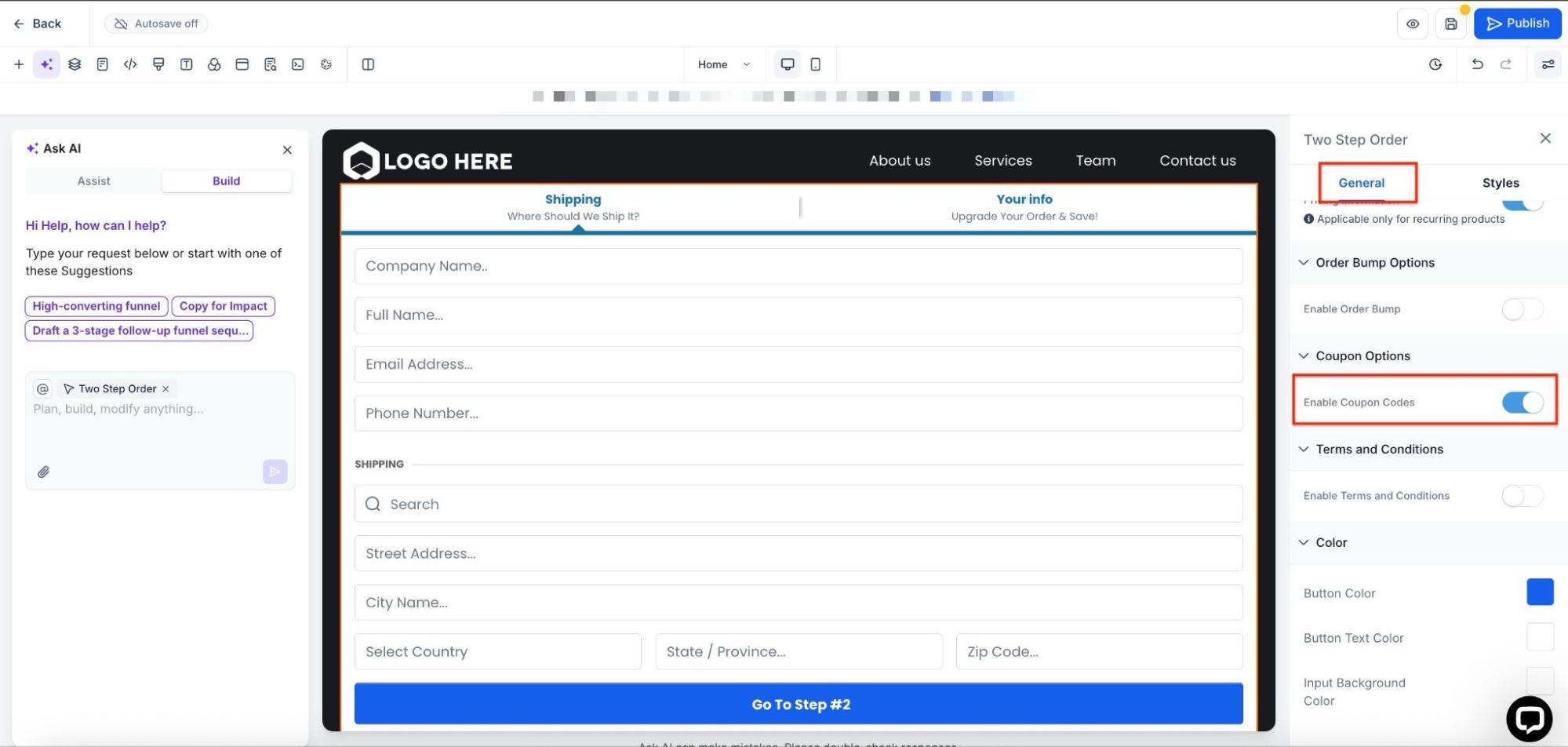
- Click on the order form element to open its settings panel.
- In the settings, locate the Payment Settings section.
- Ensure that the correct product or service is selected.
- Enable the Coupon Code option:
- Toggle the Allow Coupon Code switch to “On.”
- This will add a field to the order form where customers can input the coupon code.
¶ Step 3: Save and Publish
- Save the changes to your funnel.
- Publish the funnel to make the updated order form live.

¶ Testing the Coupon
Before making the coupon live, it is crucial to test its functionality:
- Open the published funnel in a browser.
- Fill out the order form and apply the coupon code in the designated field.
- Verify that the discount is applied correctly to the total amount.
- Ensure that the form behaves as expected for both valid and invalid coupon entries.
¶ Best Practices for Using Coupons
- Clear Expiration Dates : Always communicate the validity period of the coupon to customers to create urgency.
- Limited Use : Use the “Usage Limit” feature to create exclusivity and control discount availability.
- Specific Targeting : Assign coupons to particular products or services to promote them effectively.
- Combine with Marketing : Use email campaigns, social media, and SMS to promote your coupons and drive traffic to your order forms.
- Monitor Performance : Track coupon usage in the Coupons tab under Payments to analyze the effectiveness of your promotions.
¶ Troubleshooting Common Issues
- Coupon Not Applying : Ensure the coupon is active and associated with the correct product.
- Invalid Code Error : Check for typos or expiration issues.
- Coupon Field Missing : Verify that the Allow Coupon Code toggle is enabled in the order form settings.
FAQs
Question: Do coupons apply to all product types?**
**Answer: No, Coupons are applicable only on one-time products
Question: What are the different types of coupons I can create?**
****Answer: Two types: **
Percentage discount: Offer a percentage-based discount on an order value
Fixed discount: Offer fixed discount irrespective of order value.
Question: Are coupon codes unique?**
**Answer: Yes, coupon codes are unique and no two coupons can be created with the same coupon code
Question: What are the rules for creating a coupon code?**
**Answer: Coupon codes can only contain alphanumeric values and are not case-sensitive. Using the Generate ability, the user can generate a 7-character alpha-numeric coupon code
Question: What is the coupon name? Is it unique?**
**Answer: Coupon names can be used to refer to and relate to coupons for internal purposes. They must not be unique for every coupon, but we highly recommend using unique coupon names for proper identification
Question: What is meant by limiting the total number of times a coupon code can be redeemed?**
**Answer: Using this, you can limit the total number of successful redemptions you want to offer for the coupon code. This only includes successful redemption and is not dependent on the number of users redeeming the coupon code
Question: What is meant by limiting to selected products?**
**Answer: Using this, you can restrict the coupon usage to selected products only. This means that if you restrict coupon usage to product A, then the coupon can only be applied to product A
Question: What is the redemption count shown in the list view?**
**Answer: This displays the total number of successful redemptions of the coupon code done to date
Question: Will the coupons text box start appearing automatically in order forms?**
**Answer: If you have created a valid coupon code that can be applied to an order form, then the coupon text box will start appearing on the order form. In case of an order form where no applicable active coupon exists, the order form will not show the coupon application text box
Question: Are upsells included in the “Require Credit Card” feature?**
**Answer: Yes, free checkout settings also apply to upsell purchases within the checkout process.
Question: Does the “Require Credit Card” feature support both one-step and two-step order forms?**
**Answer: Yes, it is compatible with both types of order forms and online store checkouts.
Question: Will the coupon text box automatically appear on order forms?**
**Answer: Yes, the coupon box appears only if a valid, active coupon applies to that order form. If no applicable coupon exists, the field will not show.
Question: Can I create a “Hidden” coupon that doesn’t show a field on my order form?
Answer: No. If you enable the “Allow Coupon Code” toggle, the text field will appear for everyone. However, a common strategy for “Automatic Discounts” is to create a duplicate funnel page with the product price already lowered, rather than using a coupon code at checkout.
Question: What are the two primary “Types” of discounts I can create?
Answer: You can choose between a Fixed Discount (e.g., $10.00 off the total) or a Percentage Discount (e.g., 20% off the total).