Incorporating opportunity custom fields into forms and surveys is a game-changer for data collection. This feature enables users to gather opportunity-specific information seamlessly, optimizing the efficiency of tracking and managing opportunities.
How-to Steps:
1. Access the Form or Survey Builder:
2. Navigate to the Custom Fields Section:
.jpg)
3. Add Desired Opportunity Custom Fields:
4. Configure Opportunity Settings:
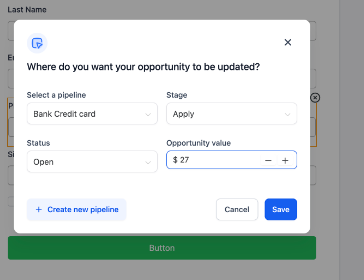
5. Save and Submit:
Benefits:
Pro Tips:
FAQs
Question: How do I ensure all necessary data is captured?**
**Answer: Include all relevant custom fields and configure the settings appropriately to capture comprehensive opportunity data.
Question: Can I create multiple opportunity pipelines?**
**Answer: Yes, you can create and configure multiple opportunity pipelines to suit different sales processes or product lines.
Question: Can I automate data mapping to opportunity fields?**
**Answer: Yes, when a contact submits the form or survey, the data entered is automatically mapped to the associated opportunity fields, streamlining your workflow and reducing manual entry errors.
Question: Is it possible to set up a brand-new pipeline directly within the form or survey builder?**
**Answer: Yes. Within the opportunity settings modal, you can utilize the ‘Create Pipeline’ option if you need to establish a new opportunity pipeline without leaving the builder.
Question: How can I keep my custom fields organized if I have a large number of them?
Answer: You can utilize the collapsible format within the builder to keep your custom fields neatly organized under their respective parent folders.