¶ Enabling Pop-up Forms Feature in Websites & Funnels
This article provides a comprehensive guide to the Pop-up Forms feature, offering a range of valuable elements for triggering, activating, and deactivating pop-up forms. Discover the various types of embeds and enhance your website’s engagement. Follow along to learn more about maximizing the effectiveness of your pop-up forms.
¶ Option 1: In-built Pop up
The revamped Form Builder introduces the built-in pop-up feature to suit diverse user requirements:
- The pop-up shows the form as an overlay inside a lightbox. It cannot be minimized but closed.
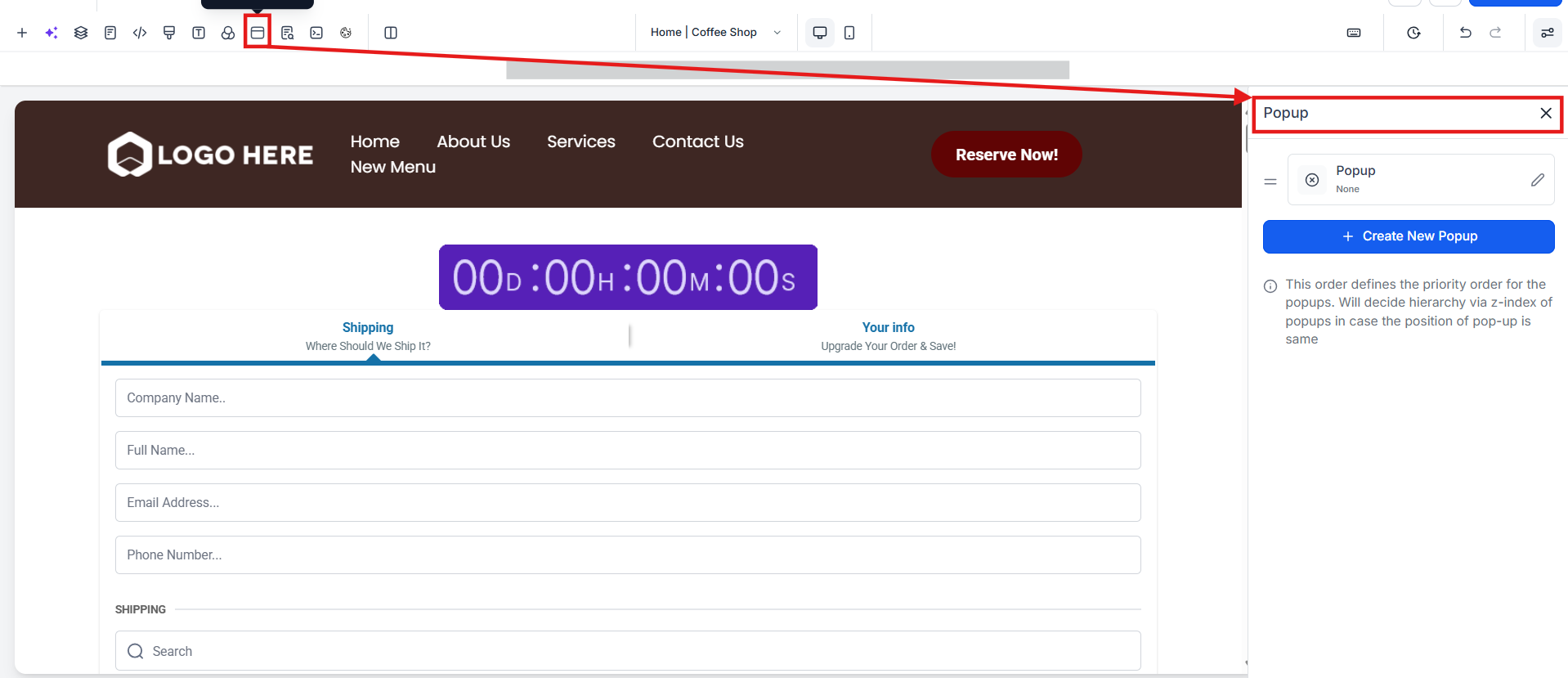
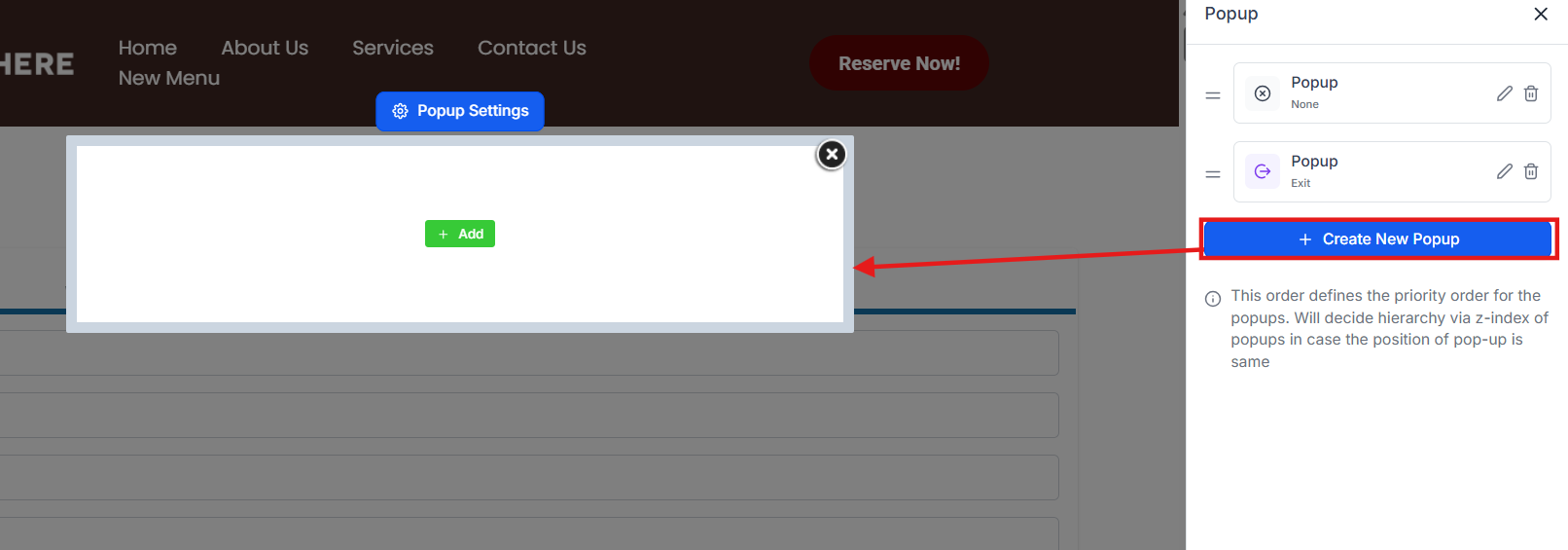
¶ Option 2: Embedding the Form Code to the Site Builder
¶ Step 1: Locate the Form
- Navigate to Sites > Forms > Builder and create a form as desired

- View the new features by clicking on Integrate

¶ Step 2: Integrate Form
Upon accessing the Form Builder, click “Integrate” to explore the various features designed to enhance the effectiveness of your pop-up forms. Here, you can choose from four types of forms and customize their triggers, activation, and deactivation options according to your preferences.
- Select Form Type : Choose from four distinct forms tailored to different user interactions.
- Trigger Selection: Determine the trigger type based on user behavior, such as scrolling percentage, timeframe, or constant display.
- Activation and Deactivation: Customize activation and deactivation preferences. Choose how the form reappears after closing, either after a specific number of visits or continuously. Control the frequency of form display based on user interactions.
- Embedding: Copy the form link for the inline version or retrieve the embed code to make use of other layouts and click done. You can choose from a variety of layouts, each designed for specific user experiences.
- Select the Copy Embed Code

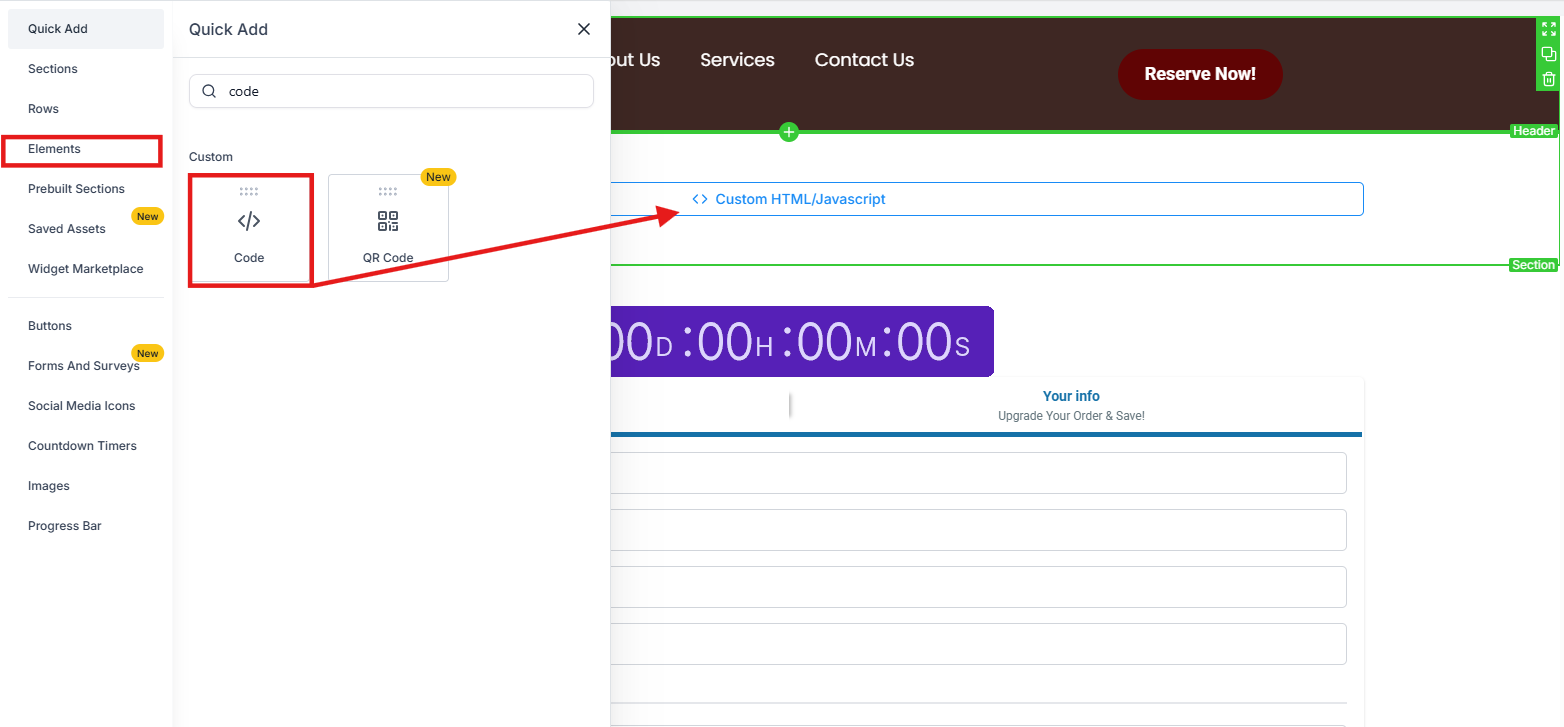
- Go to the funnel or website page editor where you want this pop-up to be, and add a Code element (also known as Custom HTML/Javascript element)
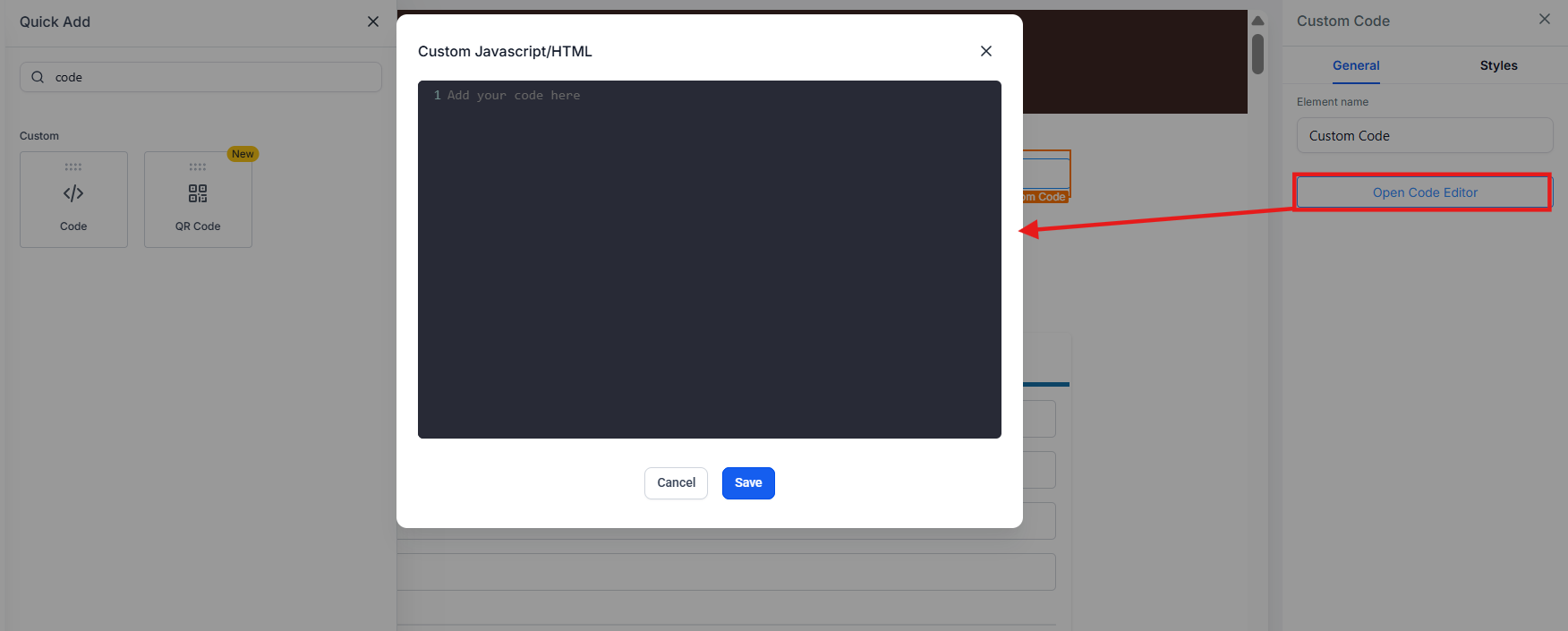
- Open the code editor, paste the code, and save.
¶ Trigger Types and Activation/Deactivation Options
Tailor the behavior of your pop-up forms with customizable triggers and activation/deactivation settings:
- Trigger Types : Determine what causes the form to appear you can choose for it to show when you scroll through a certain percentage of the page, display the form after a timeframe, and you can have it show all the time
- Activation: Determine how you bring the form back after closing by choosing a certain amount of visits to the page or all the time
- Deactivation: Control how often the form is displayed. You can choose if it deactivates when a lead fills out the form, or you could make it so that it never goes away
¶ Advanced Customization and Integration:
- Easily customize form elements and fields from the left panel, ensuring your form matches your brand’s aesthetics.
- Integrate additional options on the right, making forms not just functional but also visually appealing.
Note : Show on scrolling will only show once when scrolling on the page, and must be refreshed to show again.
¶ FAQs
Question: What is the Pop-up Forms feature, and why is it useful?
Answer: The Pop-up Forms feature allows users to create and embed forms on their websites to increase engagement and collect information from visitors. It offers various triggers, activation, and deactivation options, making it a versatile tool for enhancing user interaction.
Question: How do I create and locate a form for use with Pop-up Forms?
Answer: To create a form, navigate to Sites > Forms > Builder. Design your form as desired and then click on Integrate Form to explore additional features for setting up your pop-up forms.
Question: What types of forms can I choose from when integrating a pop-up form?
Answer: There are four types of forms available:
- Sticky Sidebar: Appears on the side of the screen and can be minimized to a tab.
- Polite Slide-in: Appears at the bottom of the screen, disappears once closed, and can also be minimized.
- Popup: Shows as an overlay inside a lightbox; it cannot be minimized but can be closed.
- Inline: Displays within the page’s content as a native element without overlay, and it cannot be closed or minimized.
Question: What trigger types can I set for my pop-up forms?
Answer: You can customize the triggers for your pop-up forms to control when they appear. Available trigger types include:
- Scrolling Percentage: The form appears when the user scrolls through a certain percentage of the page.
- Timeframe: The form displays after a set period.
- Constant Display: The form is shown all the time.
Question: How do I activate and deactivate pop-up forms?
Answer: You can customize activation and deactivation settings to control how your pop-up forms behave:
- Activation: Set how the form reappears after being closed, such as after a specific number of visits or constantly.
- Deactivation: Choose how often the form is displayed. For instance, you can set it to deactivate when a lead fills out the form or to always remain active.
Question: How can I embed my pop-up form on a website or funnel page?
Answer: To embed your form, select the Copy Embed Code option in the Form Builder. Then, go to the funnel or website page editor where you want the pop-up form to appear, add a Code element (Custom HTML/Javascript), paste the embed code, and save your changes.
Question: What are the different embed layouts available for forms?
Answer: The Form Builder provides various embed layouts to suit different user needs:
- Sticky Sidebar: A sidebar that sticks to the side of the screen.
- Polite Slide-in: A slide-in form that appears at the bottom and can be minimized.
- Popup: A lightbox overlay pop-up.
- Inline: An embedded form that appears within the content of the page.
Question: Can I customize the appearance of my pop-up forms?
Answer: Yes, you can easily customize form elements and fields from the left panel in the Form Builder to match your brand’s aesthetics. Additional integration options on the right panel enhance the form’s functionality and visual appeal.
Question: What should I know about the scrolling trigger for pop-up forms?
Answer: If you set your pop-up form to trigger on scrolling, it will only show once per page load. To trigger it again, the page must be refreshed.
Question: Can I control how often my pop-up form appears after it has been closed?
Answer: Yes, you can control the reappearance of your pop-up form by setting the activation preferences in the Form Builder. You can configure it to reappear after a certain number of visits or to always be active.
Question: Can I choose different behavior for pop-up forms based on user interactions?
Answer: Yes, the Form Builder allows you to customize pop-up form behavior based on user interactions. You can choose triggers such as scrolling percentage, a set timeframe, or a constant display. Additionally, you can set activation preferences (e.g., after a specific number of visits or continuously) and deactivation options (e.g., after form submission or never deactivating).
Question: Does the “Show on scrolling” trigger repeat if the user scrolls up and down multiple times?**
**
Answer: No. The “Show on scrolling” trigger is designed to fire only once per page session. If the user scrolls past the trigger point, closes the form, and continues scrolling, it will not reappear unless they refresh the page.