¶ Gmail 2-Way Email Sync
Gmail 2-Way Email Sync
Users can connect their personal Gmail accounts and sync outgoing and incoming emails between the LeadMagicX system and their personal Gmail accounts. They can use their email accounts to send, receive, and track emails.
Additionally:
Create contacts directly from Gmail and add conversations easily.
Enjoy real-time bidirectional email synchronization for improved efficiency.
¶ Steps to connect
- Go to Settings > My Profile in the General tab and locate the section Email (2-way sync)
- Select Gmail Two Sync and hit Connect.

- It will then prompt you to choose one of the available Gmail Accounts in that browser or ask you to connect a Gmail account; select the one you need; connecting a new account will require you to enter that account’s credentials in the popup that shows up.

- Connecting it will then ask you about which permissions you are allowing LeadConnector to have on your Gmail account; make sure to allow all and then hit enable continue**
 *
*

- Click Continue
Note: You will see your desired Gmail account connected in the Email Two Way sync tab:

¶ How does the 2-way sync work between LeadMagicX and your email account?
There are two ways the sync can be established:
- You can email a contact directly from LeadMagicX, which will start the sync between both platforms.
- Gmail sync works if a contact already saved in LeadMagicX emails the user (who has Gmail two-way sync enabled) on their Gmail address. The email will sync into the conversations tab.
Note : Emails from contacts who are also sub-account users are not synced, as they may contain confidential information. Emails from non-user contacts will sync as described above.
¶ Screenshot Walkthrough of Functionality:
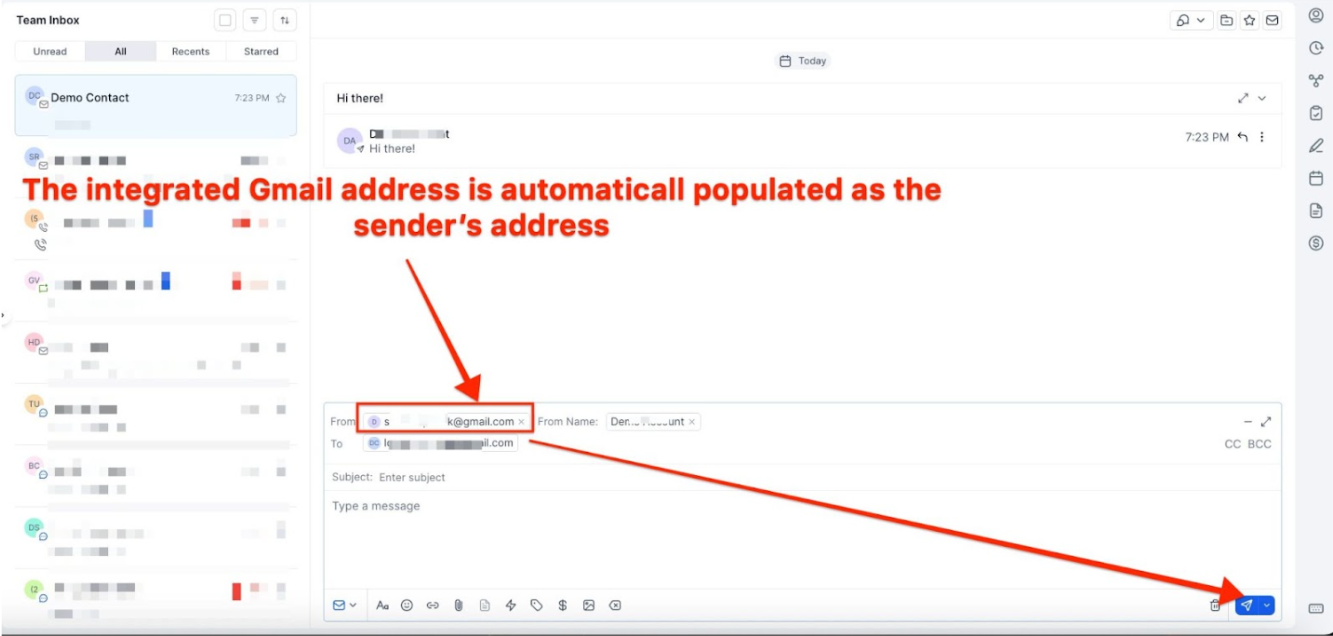
- The sent email will show up in the sent inbox of the integrated Gmail account

All subsequent messages in the email thread (initiated from the LeadMagicX) will be in sync. Outbound emails from your email will reflect in the LeadMagicX and vice versa.

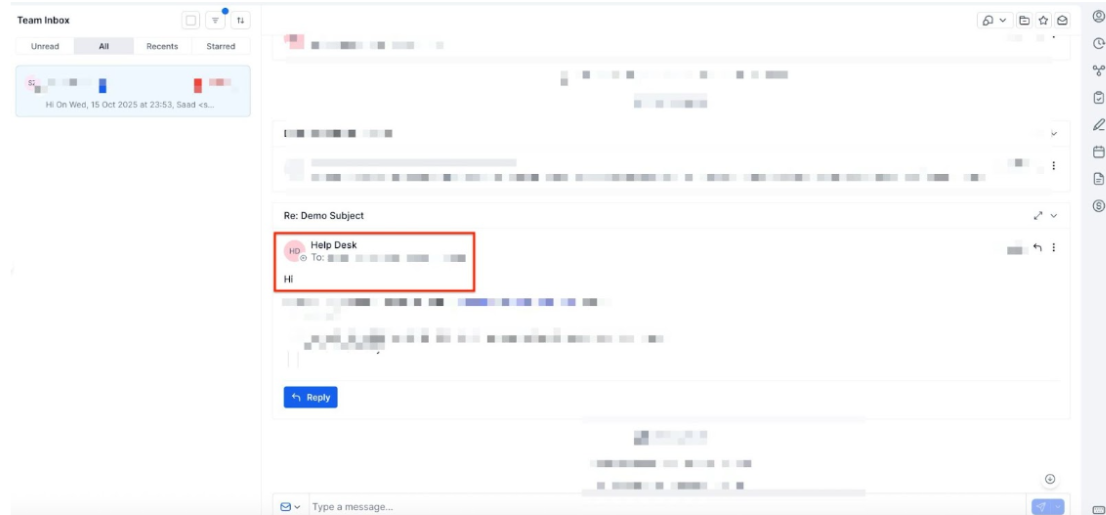
Please Note:
The supported attachment size limit for Gmail Two-way sync is25 MB.
¶ Auto BCC Sync:
- Navigate to Settings > My Profile
- Copy the value in the field and add this to your CC or BCC field when sending an email from Gmail/Outlook to automatically add this conversation and contact to LeadMagicX. Any future emails from this contact in Gmail or Outlook will automatically sync with your LeadMagicX account.

Note: The ‘Auto bcc address’ will be populated in the message details card under the ‘bcc field’ to provide users with clear visibility.
Note:
You may receive a “Delivery incomplete” error from Gmail when using BCC addresses. This occurs because we use BCC for logging purposes, and Gmail doesn’t get a delivery receipt for BCC addresses.
Despite the error, your message might still be successfully posted to LeadMagicX.
¶ **Update Email: **
This helps users change their connected email ID to another without disconnecting the previous connection.

New outbound emails from LeadMagicX will start syncing with the newly added email address. Upcoming messages in the previously connected email ID will stop syncing between LeadMagicX & personal email.
¶ **Disconnect Email: **
This helps users to disconnect their connection and stop the sync with__CompanyName. Post disconnect, emails or messages will not sync between both platforms.

¶ Does Two-way sync only work with individual emails or bulk emails and workflows?
How the sender domain mapping works for different types of emails:
- Individual Email : When you connect a personal email account (like Gmail), the Gmail address will be the sender domain for emails sent individually. These emails are sent directly from Gmail when 2-way sync is enabled.
Note that Google has a daily limit of 500 emails, which applies to individual emails.
- Bulk Email : Bulk emails will continue to be sent through the account’s email provider. The 2-way sync does not affect this.
- Workflow & Automation: Automated emails are not sent through 2-way sync but are dispatched from the account’s defined email provider, ensuring smooth integration with LeadMagicX workflows and email dispatch system.
Please Note :
This setup allows users to take advantage of 2-way sync for personal emails while also being able to send bulk emails. The Gmail daily limit of 500 emails only applies to individual emails, so users can send bulk emails through the SMTP without worrying about hitting the limit, enabling seamless mass email campaigns.
¶ FAQs
Question: What happens to emails received from existing contacts?**
**Answer: All incoming emails from existing contacts will be synced to both your LeadMagicX account and Gmail/Outlook inbox. This ensures you have a complete record of all communications across both platforms.
Question: Will removing a synced account delete existing emails?**
**Answer: No, removing a synced account does not delete existing emails. Emails previously synced will remain intact, and the sync will only affect new emails sent or received after the account is removed.
Question: Do new emails get synced after an account is removed?**
**Answer: New emails sent or received after removing the account will not sync between LeadMagicX and Gmail/Outlook. The sync will continue for existing emails, but new ones won’t be included.
Question: Will all my existing contacts in Gmail be synced with LeadMagicX?**
**Answer: Yes, the Two-Way Sync will identify and sync existing contacts from Gmail to LeadMagicX. Incoming emails from these contacts will be automatically linked to their respective LeadMagicX records, but emails received prior to the integration cannot be synced.
Question: What happens when a new email is received from a contact?**
**Answer: New incoming emails from existing contacts will appear in both LeadMagicX and Gmail. If the email is part of an existing conversation thread, it will be added to that thread on both platforms.
Question: What happens when you send emails from LeadMagicX or Gmail?**
**Answer: Outgoing emails sent from LeadMagicX will be logged in the Sent folder of the synced email account. Similarly, emails from the synced email account will appear in the corresponding LeadMagicX contact’s conversation history.
Question: How are CC/BCC recipients handled in the sync?**
**Answer: If someone is CC’d or BCC’d in an email, the information will be synced to LeadMagicX under the respective contact, but no new contact is created for those CC or BCC addresses.
Question: What if a contact emails someone else but includes the LeadMagicX user?**
**Answer: The email will be reflected in LeadMagicX under the appropriate contact, maintaining the full conversation history.
Question: How is the conversation thread managed when multiple recipients are involved?**
**Answer: For emails sent to multiple recipients, the first contact listed becomes the conversation tab in LeadMagicX, with subsequent emails appearing within that thread.
Question: What is a BCC Address, and how does it work?**
**Answer: When sending an email from Gmail/Outlook, you can include a BCC address in the Cc or Bcc field. This automatically adds the conversation and contact to LeadMagicX, and future emails from the contact will be synced to LeadMagicX.
Question: How is the secure connection handled if Gmail login credentials change?**
**Answer: If your Gmail login credentials change, LeadMagicX will require re-authentication and resyncing to maintain the secure connection.
Question: What happens when an email is forwarded from Gmail?**
**Answer: Forwarded emails to an existing contact will be treated as a sent email and synced under that contact’s record in LeadMagicX.
Question: What if there are duplicate emails with multiple contacts?**
**Answer: Duplicate emails sent to multiple contacts will be associated with the first created contact in LeadMagicX.
Question: How are forwarded emails handled?
Answer: Forwarded emails to existing contacts are treated as sent emails and synced under the contact’s record in LeadMagicX
Question: I received a “Delivery Incomplete” error after using my Auto BCC address. Is it broken?
Answer: Not necessarily. This is a common quirk with Gmail. Because Gmail doesn’t receive a “delivery receipt” from the system’s internal logging tool, it occasionally flags it. Usually, the email has still successfully logged into the contact’s timeline despite the notification.
Question: Does the Gmail 2-way sync apply to emails sent through my automated workflows or bulk campaigns?
Answer: No. 2-way sync is specifically for individual emails. Bulk emails and automated workflow emails are dispatched through your account’s primary SMTP/Email provider. This ensures that your personal Gmail account stays within Google’s daily limits (typically 500 emails) while allowing your automated marketing to run separately.