¶ Bot Status for Individual Contacts
The Bot Status for Individual Contacts allows users to control and customize the bot’s activity based on the specific needs of each contact. Whether you’re aiming for uninterrupted interaction or requiring a more selective approach, this feature offers you the flexibility to manage your bot’s presence according to your preferences.
¶ Key Features and Benefits
The Bot Status for Individual Contacts feature provides users with enhanced control over when and how the bot engages with individual contacts. Below are the key features and benefits of this functionality:
- Personalized Control: You can manage the bot’s activity for each contact individually, making it more adaptable to different scenarios.
- Flexible Status Options: Choose from three distinct bot statuses—Active, Sleep/Snooze, or Inactive—to customize engagement based on contact preferences or specific communication needs.
- Automated Reactivation: Set the bot to automatically reactivate after a specific duration when it’s in Sleep/Snooze mode, ensuring that contact engagement remains consistent without requiring manual intervention.
- Efficient Interaction: By deactivating the bot for certain contacts, you can ensure that interactions remain personal and are handled by a human representative when needed.
- Automatic Deactivation: The bot will automatically deactivate in scenarios like exceeding the maximum message limit or when manually triggered messages are sent.
¶ How to Use the Bot Status for Individual Contacts
Managing the bot status for individual contacts is easy and intuitive. Follow these steps to adjust the bot’s activity according to your needs:
- Access Bot Status:
- Navigate to the Conversations section of your dashboard.
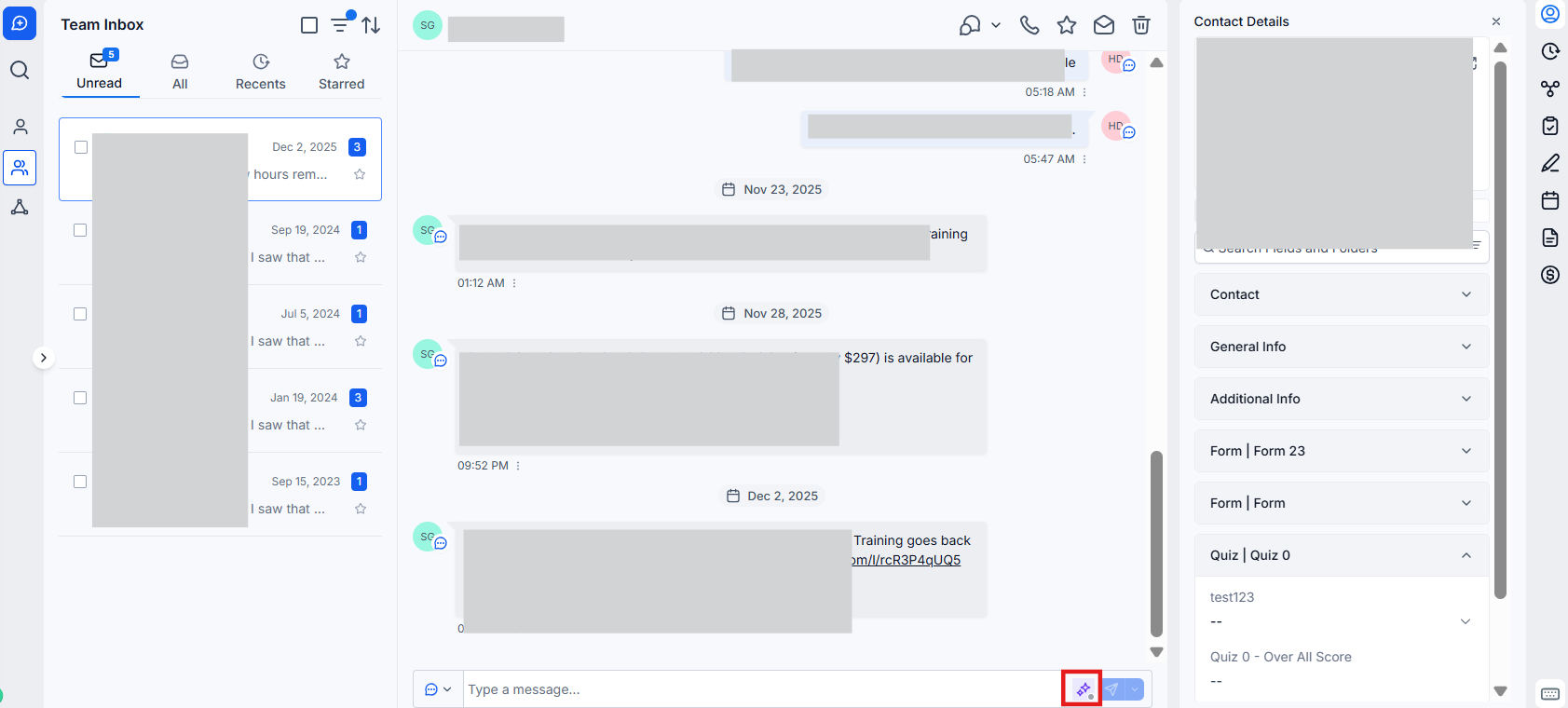
- In the message composer for any contact, you’ll see the bot’s current status displayed by an icon. If the bot is active, a green icon will appear.
- Turn Off the Bot for a Specific Contact:
- Click on the bot status icon next to the contact’s name in the message composer.
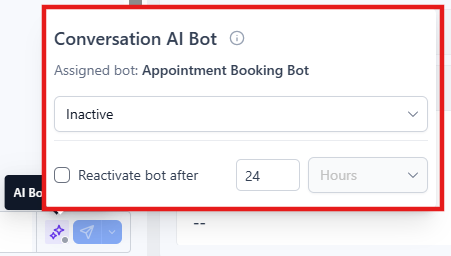
- From the dropdown menu, select Inactive to turn off the bot’s activity for that particular contact.
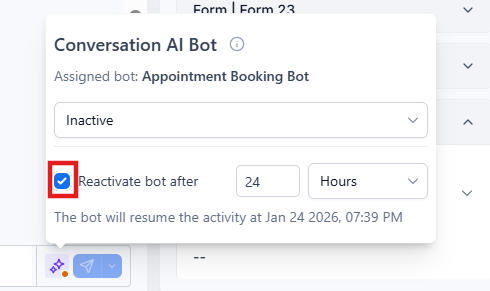
- Optionally, set a duration for which the bot should remain inactive before automatically reactivating, or leave the duration field unchecked for the bot to remain off permanently.
- Activate Sleep/Snooze Mode:
- To temporarily pause the bot’s activity, click on the bot status icon and select Sleep/Snooze.
- You can set a specific time duration for the bot to reactivate automatically, ensuring that it will only remain inactive for the desired period.
- Automatic Off Scenarios:
- The bot will automatically turn off in certain scenarios, such as when the maximum message limit is reached or if a manual message is sent to the contact. This ensures that you avoid overloading the bot or disrupting personalized communication with your contacts.
¶ Pro Tips
- Consistency in Bot Interaction: While managing the bot’s status is a powerful tool, it’s important to be mindful of consistency. Switching the bot on and off too frequently may disrupt the flow of communication, so use these settings judiciously to maintain a smooth interaction process.
- Monitor Activity: Keep an eye on the bot’s status through the message composer to ensure that the bot is either active when needed or paused during the right moments for more meaningful human engagement.
- Combining Automation with Human Interaction: The Sleep/Snooze function allows you to combine automated responses with human assistance seamlessly. If the bot reaches the limit of interactions or encounters an issue, it can automatically pause, letting a human take over the conversation at the right time.
¶ FAQ’s
Question: Can I set the bot to automatically reactivate after a certain period?****
Answer: Yes, you can set the bot to automatically reactivate after a specified duration when in Sleep/Snooze mode. If you don’t specify a duration, the bot will remain inactive until you manually reactivate it.
Question: What happens if I don’t set a duration for the bot to stay inactive?****
Answer: If you don’t specify a duration, the bot will remain inactive indefinitely until you manually change the status to Active again. This provides you with full control over the bot’s activity.
Question: Will the bot automatically turn off during high interaction periods?****
Answer: The bot may automatically turn off in scenarios such as exceeding the message limit or when a manual message is sent. This ensures that the bot doesn’t interfere with critical human-to-human communication.
Question: Can I manage the bot status for multiple contacts at once?****
Answer: Currently, the bot status must be managed on an individual basis. This provides the most precise control, ensuring that the bot engages with each contact appropriately based on their specific needs.
Question: Can the bot interact while it’s in Sleep/Snooze mode?****
Answer: No, the bot cannot interact with contacts when it’s in Sleep/Snooze mode. However, it will automatically resume activity after the specified reactivation period or once manually turned back on.
Question: Is there a way to track when and why the bot turned off?****
Answer: Yes, activity logs in the Conversations section will show when the bot status changed and whether it was turned off manually, automatically, or due to a limit being reached.
Question: What visual indicator shows me that the bot is currently active for a contact?**
Answer:** When the bot is active for a specific contact, a green icon will be displayed next to the bot’s status in the message composer within the Conversations section.
Question: Does the bot turn off automatically if I send a manual message to a contact?
Answer: Yes. To ensure that manual, personalized communication is not disrupted by automated responses, the bot will automatically deactivate the moment a manual message is sent to that contact.