¶ Collect Payments for Recurring Appointments
Recurring appointments are an efficient way to manage regular meetings or appointments that occur daily, weekly, or monthly. Instead of scheduling each appointment individually, you can set up a single recurring appointment that repeats automatically, saving time and effort.
¶ Why Use Recurring Appointments?
Recurring appointments are beneficial for:
- Weekly team meetings
- Monthly check-ins
- Regular client sessions
Setting up a recurring appointment calendar allows you to automate scheduling while ensuring consistency in your routine.
¶ Step-by-Step Guide: Setting Up a Recurring Appointments Calendar
¶ Step 1: Access Calendar Settings
- Navigate to Settings > Calendars.
- Click Create Calendar to set up a new calendar or select an existing calendar to edit.
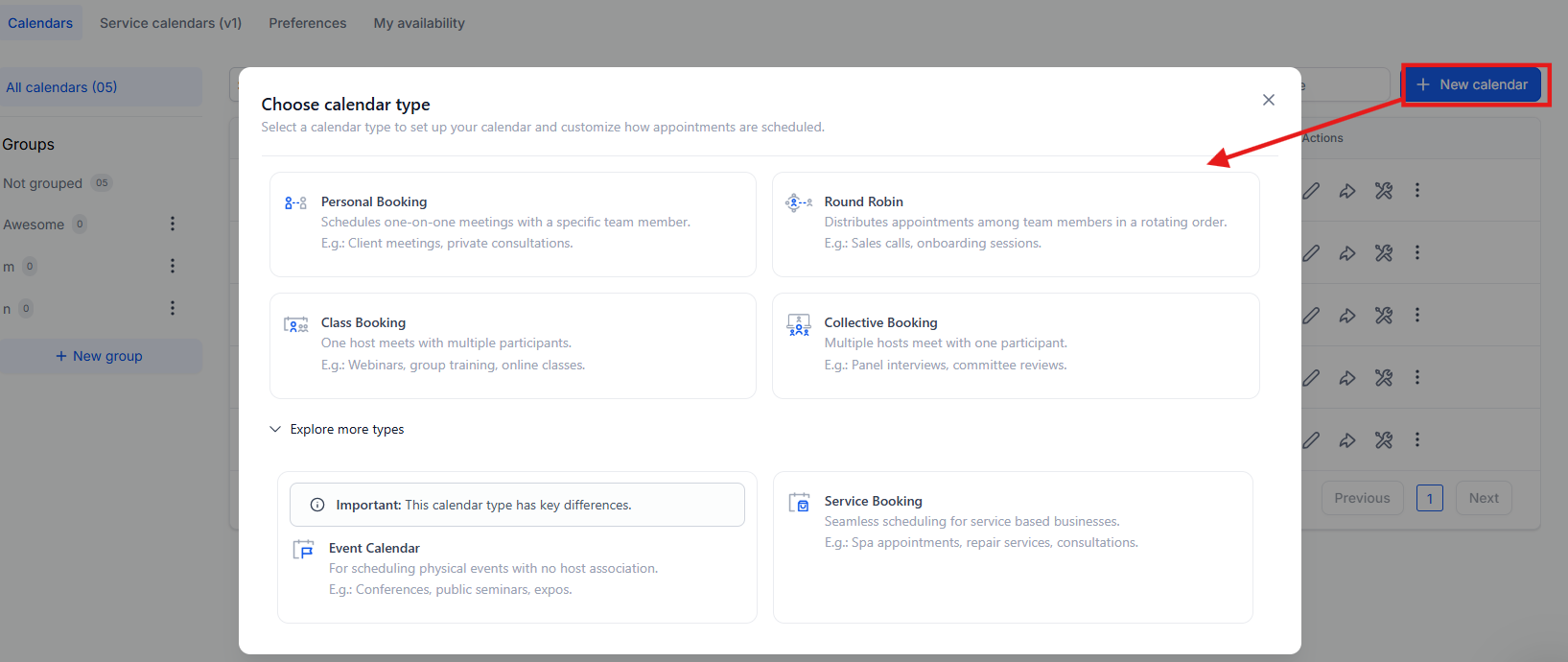

¶ Step 2: Choose the Calendar Type
- Select the Round Robin Booking option under calendar types.
- Note: All calendar types support recurring appointments. However, if you choose Round Robin, only one user or team member can be assigned to that calendar.
¶ Step 3: Enable Recurring Appointments
- Go to the Availability tab.
- Toggle on the Recurring Appointments option.
- Configure the recurring settings based on your specific needs (e.g., daily, weekly, monthly).


Step 4: Set Up Payment Collection
- Under the Forms and Payments tab, choose between collecting payment for First Appointment Only or for All Appointments and click Save to finalize your choice.

¶ Payment Options for Recurring Appointments
Users can choose between two payment collection options:
- Charge for the First Appointment Only: Payment is collected for the initial appointment in the series, while subsequent appointments will require manual collection.
- Charge for All Appointments Upfront: The full amount for all appointments in the series is collected upfront. This total may vary depending on the actual number of booked appointments based on availability.
Note: Partial payments are currently unsupported for recurring appointments.
View in the calendar:

¶ Important Notes:
- The maximum repetition for an event is 24 times.
- If slots are unavailable, you can choose from three options:
- Continue Booking: Allows double-booking in case of conflicts.
- Skip Booking Unavailable Slots: Only books available slots and skip the rest.
- Book Next Available Slot: Books the next available slot, even if it’s far in the future. The system checks only up to three slots ahead for availability.

¶ Customizing Recurring Appointments
- Select Standard Slots: Recurring appointments can only be booked for standard slots, not custom slots.
- Meeting Location: If using virtual platforms like Zoom or Google Meet, each recurring appointment will generate a unique meeting link.
¶ FAQ Section
Question: Will existing workflow trigger steps work for recurring appointments?****
Answer: No, they won’t. You’ll need to add a new event-type filter in your workflow triggers. Options include:
- Event Type: Normal - For non-recurring appointments.
- Event Type: Recurring - For appointments with recurring settings.
- Event Type: Any - For any type of appointment.
Question: Can users bulk update recurring appointments?****
Answer: No, recurring appointments cannot be bulk updated (canceled or rescheduled).
Question: Can the same meeting location be used for all recurring appointments?****
Answer: If the meeting location is set to Zoom or Google Meet, each recurring appointment will have a different meeting link generated dynamically.
Question: How do recurring events sync with integrated calendars?****
Answer: If calendar sync is enabled, each event is synced as an individual appointment with third-party calendars.
Question: Can payments be charged for recurring appointments?****
Answer: Yes, payments can be collected for recurring appointments. You have the choice to collect payment for either the first appointment only or for all appointments upfront. Partial payments are not currently supported.
Question: Can recurring appointments be scheduled for custom time slots?**
Answer:** No, recurring appointments can only be scheduled for standard slots, not custom slots. This limitation ensures consistent timing across all occurrences of the recurring event.
Question: Can recurring appointments be used with one-on-one and group calendars?**
Answer:** Yes. All calendar types support recurring appointments, but Round Robin calendars are limited to a single assigned user.
Question: Can a client reschedule just one of their recurring sessions?**
Answer:** Currently, recurring appointments do not support bulk rescheduling or canceling. If a client needs to change one specific date, they (or an admin) must treat that individual appointment as a separate event for the purpose of moving it to a new time.